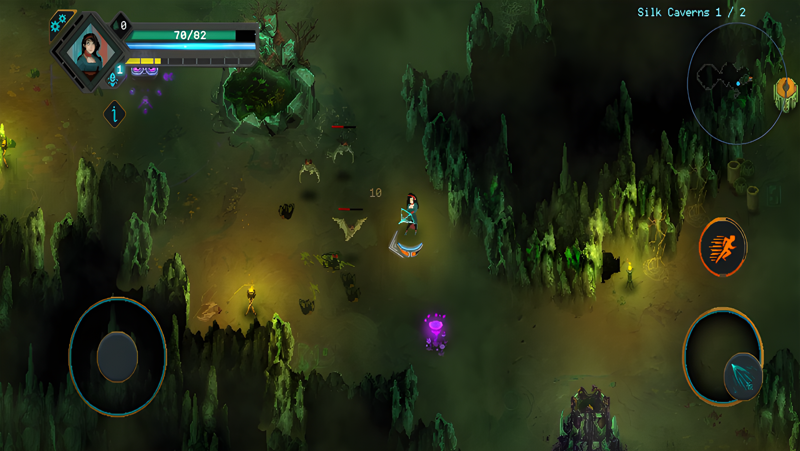
Play Children of Morta on PC and Mac
Download Children of Morta on PC or Mac with MuMuPlayer, get a PC like gameplay along with smart control and high graphics performance.
MuMuPlayer, the top Android emulator for PC and Apple silicon Mac, delivers an optimal gaming experience with minimal RAM usage and high FPS. It also allows you to create multiple instances of the emulator and run several games simultaneously, thanks to its Multi-instance feature. Its advanced emulator features ensure smooth gameplay, even on low-end PCs.
Download and play Children of Morta on PC or Mac with MuMuPlayer and start enjoying your gaming experience now.
About the Game
Children of Morta is a story-driven action RPG with a roguelite approach to character development, in which you don’t play a single character but a whole, extraordinary family of heroes.

Hack’n’slash through hordes of enemies in procedurally generated dungeons, caves and lands and lead the Bergson family, with all their flaws and virtues, against the forthcoming Corruption. The story takes place in a distant land but copes with themes and emotions common to all of us: love and hope, longing and uncertainty, ultimately loss... and sacrifice we are willing to make to save the ones we care the most for.
Ultimately, it's about a family of heroes standing together against the encroaching darkness.

-- Complete Edition --

Both the Ancient Spirits and the Paws and Claws DLC are included in the main game and available as you play.
Online coop will come soon in a post-launch update!

FEATURES
- Welcome to the family! Join the heroic Bergsons in their trials to honor their heritage and save the land of Rea from the creeping Corruption
- One for all, all for one: improve skills and gear for the whole family through each run in the ever-changing world of this roguelite RPG
- Stronger together: switch between 7 playable characters, each with their own abilities, fighting styles and endearing personality
- Immerse yourself in the beautiful, deadly world of Rea through gorgeous 2D pixel art mixing handcrafted animations with modern lighting techniques
- Family that slays together stays together: use the two-player online coop mode and rely on each other in every fight (available in a post-launch update)

CAREFULLY REDESIGNED FOR MOBILE
- Revamped interface – exclusive mobile UI with complete touch control
- Game Center achievements
- Cloud Save – Share your progress between Android devices
- Compatible with controllers
Emulator Features

With a smart button scheme and image recognition function, provide a more concise UI, and support custom button mapping to meet different needs.

Run multiple games independently at the same time, easily manage multiple accounts, play games while hanging.

Break through FPS limit, and enjoy a seamless gaming experience without lag and delay!

Get a 3-second startup with 52% less memory usage and 65% more stability.
How to Download and Play Children of Morta on PC and Mac
Installation Guide
① Download and install MuMuPlayer on your PC or Mac. It will identify automatically your current system and download the latest version.
② Start MuMuPlayer and complete Google sign-in to access the Play Store, or do it later.
③ Search Children of Morta in the Play Store.
④ Complete Google sign-in (if you skipped step 2) to install Children of Morta.
⑤ Once installation completes, click the Children of Morta icon on the home page to start the game.
⑥ Enjoy playing Children of Morta on your PC or Mac with MuMuPlayer.
Installation Guide
Recommended computer configuration
For Windows:4-core CPU, 4GB RAM, i5 OS, GTX950+ graphics card
For macOS: 4-core CPU, 4GB RAM
Recommended Android Device performance settings
Graphics renderer mode
Vulkan and DirectX both supported
Performance Settings
Recommended performance settings: 2 cores, 2GB. >>How to adjust performance settings
Recommended Android Device Display Settings
Resolution Settings
Go to Device Settings > Display > Resolution Settings to adjust your device's resolution as needed.
FPS Settings
MuMuPlayer supports up to 240 FPS. >>How to enable high FPS mode
Recommended to enable VT
Enabling VT will significantly improve emulator performance, reduce screen freezing, and make games run more smoothly. >>How to enable VT