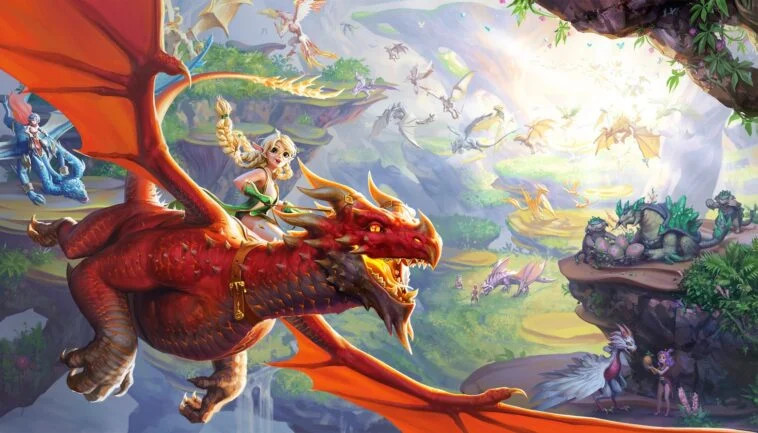
Play Summon Dragons 2 on PC and Mac
Download Summon Dragons 2 on PC or Mac with MuMuPlayer, get a PC like gameplay along with smart control and high graphics performance.
MuMuPlayer, the top Android emulator for PC and Apple silicon Mac, delivers an optimal gaming experience with minimal RAM usage and high FPS. It also allows you to create multiple instances of the emulator and run several games simultaneously, thanks to its Multi-instance feature. Its advanced emulator features ensure smooth gameplay, even on low-end PCs.
Download and play Summon Dragons 2 on PC or Mac with MuMuPlayer and start enjoying your gaming experience now.
About the Game
Embark on an epic adventure in Summon Dragons 2, the ultimate dragon-themed RPG game that takes you on a journey from a secluded ocean plot to becoming a legendary Dragonlord.

Build your island, construct powerful buildings, summon mighty dragons, and recruit skilled dragon trainers as you explore numerous dungeons and instances, each requiring strategic line-ups and tactics.

Key Features:

Build Your Dragon Sanctuary
Start your adventure on a tranquil ocean plot and transform it into a thriving Dragon Sanctuary. Customize your island's layout, construct buildings, and watch your sanctuary flourish.

Unleash the Power of Dragons
Summon and nurture a diverse array of dragons, each with unique abilities and elemental affinities. Train them, form bonds, and lead them into challenging battles against formidable foes.

Explore Mysterious Dungeons
Dive into treacherous dungeons and instances scattered throughout the game world. Assemble your team of dragon trainers and heroes, strategize, and conquer these trials to uncover hidden secrets and earn valuable rewards.

Forge Weapons and Enhance Talents
Equip your dragons with exclusive weapons and enhance their innate talents, unlocking their full potential. Collect rare equipment and halidoms to bolster your dragons' combat prowess.

Rich Rewarding System
Enjoy a rewarding system that makes progression exciting, catering to both casual players and dedicated strategists alike.

Idle Rewards for the Dragonlord on the Go
Even when you're not actively playing, Summon Dragons 2 continues to reward your efforts with idle rewards. Your dragons will gather resources and improve, ensuring your journey towards becoming the ultimate Dragonlord never halts.

Summon Dragons 2 offers a captivating blend of dragon summoning, base-building, and dungeon exploration. Download now and embark on a dragon-filled adventure!

Summon Dragons 2 is free to download and play, with in-app purchases available to enhance your gaming experience. An internet connection is required to play.

Unleash the power of dragons and become the ultimate Dragonlord in Summon Dragons 2! Start your adventure today!
Emulator Features

With a smart button scheme and image recognition function, provide a more concise UI, and support custom button mapping to meet different needs.

Run multiple games independently at the same time, easily manage multiple accounts, play games while hanging.

Break through FPS limit, and enjoy a seamless gaming experience without lag and delay!

Get a 3-second startup with 52% less memory usage and 65% more stability.
How to Download and Play Summon Dragons 2 on PC and Mac
Installation Guide
① Download and install MuMuPlayer on your PC or Mac. It will identify automatically your current system and download the latest version.
② Start MuMuPlayer and complete Google sign-in to access the Play Store, or do it later.
③ Search Summon Dragons 2 in the Play Store.
④ Complete Google sign-in (if you skipped step 2) to install Summon Dragons 2.
⑤ Once installation completes, click the Summon Dragons 2 icon on the home page to start the game.
⑥ Enjoy playing Summon Dragons 2 on your PC or Mac with MuMuPlayer.
Installation Guide
Recommended computer configuration
For Windows:4-core CPU, 4GB RAM, i5 OS, GTX950+ graphics card
For macOS: 4-core CPU, 4GB RAM
Recommended Android Device performance settings
Graphics renderer mode
Vulkan and DirectX both supported
Performance Settings
Recommended performance settings: 2 cores, 2GB. >>Click here to learn>>How to adjust performance settings
Recommended Android Device Display Settings
Resolution Settings
Go to Device Settings > Display > Resolution Settings to adjust your device's resolution as needed.
FPS Settings
MMuMuPlayer supports up to 240 FPS. >> Click here to learn>>how to enable high FPS mode
Recommended to enable VT
Enabling VT will significantly improve emulator performance, reduce screen freezing, and make games run more smoothly. >>Click here to learn>>How to enable VT