Jouez à Artery Gear: Fusion sur PC et Mac
Téléchargez Artery Gear: Fusion sur PC ou Mac avec MuMuPlayer, profitez d'un gameplay semblable à celui d'un PC avec un contrôle intelligent et des performances graphiques élevées.
MuMuPlayer, le meilleur émulateur Android pour PC et Mac avec puce Apple, offre une expérience de jeu optimale avec une utilisation minimale de la RAM et un FPS élevé. Il vous permet également de créer plusieurs instances de l'émulateur et de faire fonctionner plusieurs jeux simultanément, grâce à sa fonction Multi-instance. Ses fonctionnalités avancées d'émulateur garantissent un gameplay fluide, même sur des PC bas de gamme.
Téléchargez et jouez à Artery Gear: Fusion sur PC ou Mac avec MuMuPlayer et commencez à profiter de votre expérience de jeu dès maintenant.
À propos du jeu
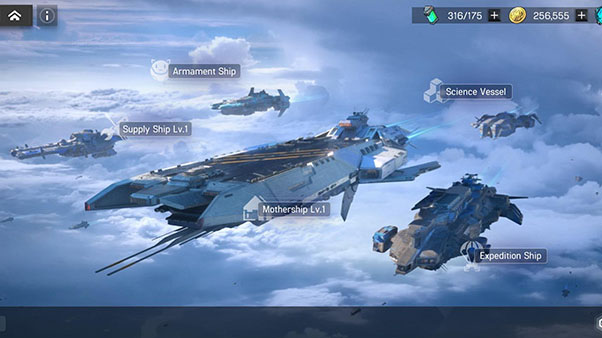
The Puppets are coming, and a full-scale war begins - the mech girl strategy RPG "Artery Gear: Fusion" invites you to the battlefield of doomsday!
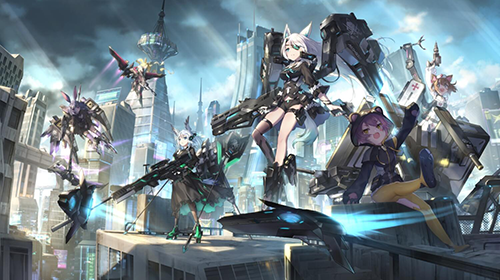
Gather a team of mech girls to fight the brutal "Puppets" that devour the world. Dazzling skill special effects, feel the gorgeous and refreshing visual and auditory battle feast. Plan skill combinations and enjoy the fun of strategic battles. More than 100 beautiful mech girls with distinctive characteristics will fight side by side with you. Commander, this battle needs your participation!
【Game Features】
Apocalyptic Story - A dark and profound apocalyptic epic
The Puppet War is about to break out, and the human world hangs by a thread, but the two remaining forces, "Frontier" and "Autoluna", don't trust each other and cannot reach a comprehensive strategic cooperation... The doomsday, people's hearts and war, the truth of the world will slowly emerge.
You will transform into a joint fleet formed by the two forces, the commander of "Union", and lead the mech girl squad known as "Artery Gear" to fight against the unknown creature "Puppet".
Mechanical Romance - Multi-pedigree Mech Girl
AmanoHa, team Bobcat, the Harpyia, team Carrot, Purifier, the SevenS... More than 12 kinds of diverse genealogy, hundreds of beautiful mech girls with different styles are waiting for your command and deployment. Each mech girl has powerful skills and unique settings, and dozens of popular voice actress such as Akari Kito, Ayana Taketatsu, and Yumiri Hanamori to help out, injecting the voice of the soul into the girls and satisfying your love for mechanical girls. Beyond imagination!
The ultimate display - immersed in a refreshing combat experience
The high-standard team has created exquisite 3D x Spine x new lighting craftsmanship, fully liberated the charm of the characters, and presented a real sense of doomsday war. From gorgeous skill special effects to powerful animations, from meticulously portrayed character portraits to grand and exquisite battle scenes, you can experience an unprecedented visual and auditory feast.
Strategic collocation - tactical command hot blood battle
Hundreds of characters x thousands of skill combinations; three attribute restraints: Molten, Thunder, and Crystal, Striker, Tactician, Balancer, Guardian, Healer, free combination of five occupations. Use strategies and tactics to create the strongest warrior squad to deal with the ever-changing battlefield! There is also an intelligent agent combat system in the game, you can easily play in space time and enjoy!
Fonctionnalités de l'émulateur

Avec un schéma de boutons intelligente et une fonction de reconnaissance d'image, offrez une interface utilisateur plus concise et prenez en charge la personnalisation des mappages de boutons pour répondre à différents besoins.

Exécutez plusieurs jeux indépendamment en même temps, gérez facilement plusieurs comptes, jouez à des jeux avec l'opération synchrone.

Dépassez la limite de FPS et profitez d'une expérience de jeu fluide sans lag ni retard !

Démarrage 3s, mémoire -52%, stabilité +65%, 2,2M jeux Android fluides.
Comment télécharger et jouer à Artery Gear: Fusion sur PC et Mac
Guide d'installation
① Téléchargez et installez MuMuPlayer sur votre PC ou Mac. Il identifiera automatiquement votre système actuel et téléchargera la dernière version.
② Démarrez MuMuPlayer et complétez la connexion Google pour accéder au Play Store, ou faites-le plus tard.
③ Recherchez Artery Gear: Fusion dans le Play Store.
④ Complétez la connexion Google (si vous avez sauté l'étape 2) pour installer Artery Gear: Fusion.
⑤ Une fois l'installation terminée, cliquez sur l'icône Artery Gear: Fusion sur la page d'accueil pour commencer le jeu.
⑥ Profitez de jouer à Artery Gear: Fusion sur votre PC ou Mac avec MuMuPlayer.
Guide d'installation
Configuration informatique recommandée
Pour Windows : Processeur 4 cœurs, 4 Go de RAM, système i5, carte graphique GTX950+
Pour macOS : Processeur 4 cœurs, 4 Go de RAM
Paramètres de performance recommandés pour les appareils Android
Mode du moteur graphique
Vulkan et DirectX tous deux pris en charge
Paramètres de performance
Paramètres de performance recommandés : 2 cœurs, 2 Go. >>>Cliquez ici pour savoir comment ajuster les paramètres de performance.
Paramètres d'affichage recommandés pour les appareils Android
Paramètres de résolution
Allez dans Paramètres de l'appareil > Afficher > Paramètres de résolution pour ajuster la résolution de votre appareil selon vos besoins.
Paramètres FPS
MuMuPlayer prend en charge jusqu'à 240 FPS. >>> Cliquez ici pour savoir comment activer le mode FPS élevé.
Il est recommandé d'activer le VT
L'activation du VT améliorera considérablement la performance de l'émulateur, réduira les gels d'écran et rendra les jeux plus fluides. >>>Cliquez ici pour savoir comment activer le VT