

Azur Lane Redeem Codes - Working Codes and How to Redeem (2026)
In a popular side-scrolling shoot-em-up mobile game such as Azur Lane, one of the easiest ways to collect free in-game resources is by using Azur Lane Redeem Codes. These codes offer a variety of valuable items such as wisdom cubes, coins, gems and other materials that will help you elevate your gaming experience and build your fleets and progress faster.

If you're excited about this game, you can play Azur Lane on PC and Mac with MuMuPlayer, the top Android emulator that offers an optimal gaming experience with smooth keyboard and mouse operation and high FPS.
You could also directly download MuMuPlayer to get the best Azur Lane PC experience.
Usually, the Azur Lane redeem codes are released during major events, livestreams and collaborations. However, these codes are only valid for a limited amount of time and exceeding those limited times will result in the codes’ expiration. Whether you are a veteran or just a beginner, these Azur Lane redeem codes will help you level up your fleets effectively. Our guide will walk you through everything you need to know about the Azur Lane Redeem Codes.
Active Azure Lane Codes ( August 2026)
As of August 2026, there are no officially confirmed public redeem codes for Azur Lane. The developers occasionally release limited-time codes during livestreams, anniversary celebrations, collaborations, and special promotions. We'll update this guide as soon as new official codes become available.
Expired Azure Lane Codes
As Azure Lane codes have a limited life span, they will expire after a certain period of time and no longer work. Some of those expired Azur Lane Codes are:
- 100K
- NEWSERVER
- EVENT
- UPDATE
- 250K
- A88LANE
- AZUR2023
- 50KGEMS
- 58Favs
- NewSever
- AZUR2022
How to Redeem Azure Lane Codes?
Unlike other games where you are required to fulfill some requirements before being eligible for code redemptions, Azur Lane provides a straightforward way of redeeming your Azur Lane redeem Codes.
Follow these following steps to use your redeem codes:
- On your mobile device, open up the Azur Lane game or launch the Azur Lane game
- Click on the avatar which is located in the top-left corner of the main screen. This will open up your profile.
- Once you are inside the Profile, search for the Settings option and tap on it.
- Within the Settings section, look for an option named “Redeem Code.”
- Recheck before entering the codes in the text field to avoid any errors and mistakes.
- After entering the redeem code, click on the confirm button to claim your in-game rewards.
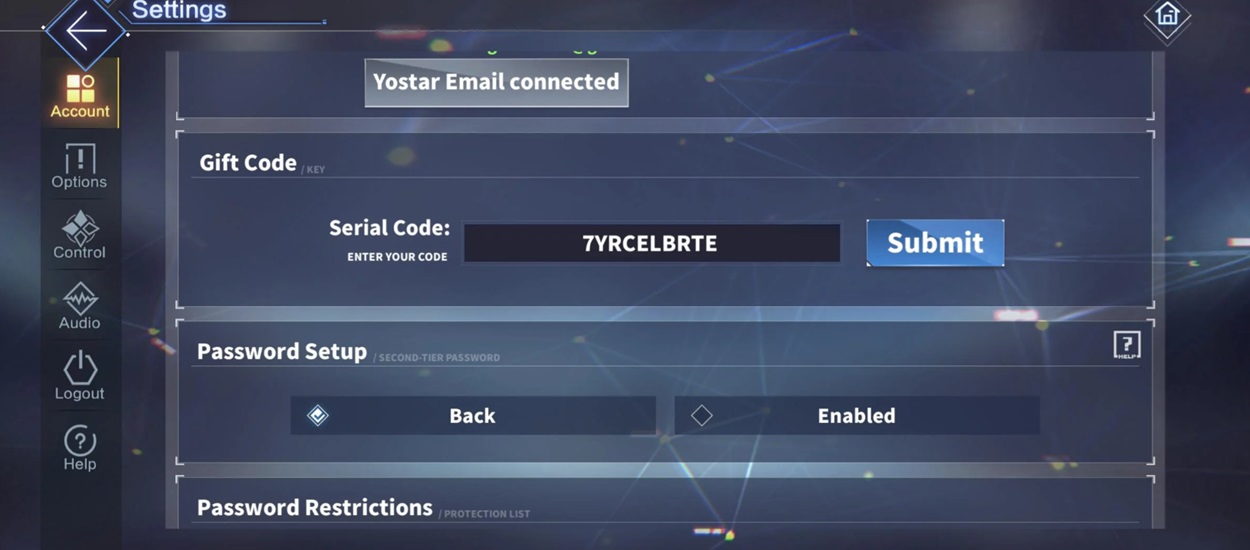
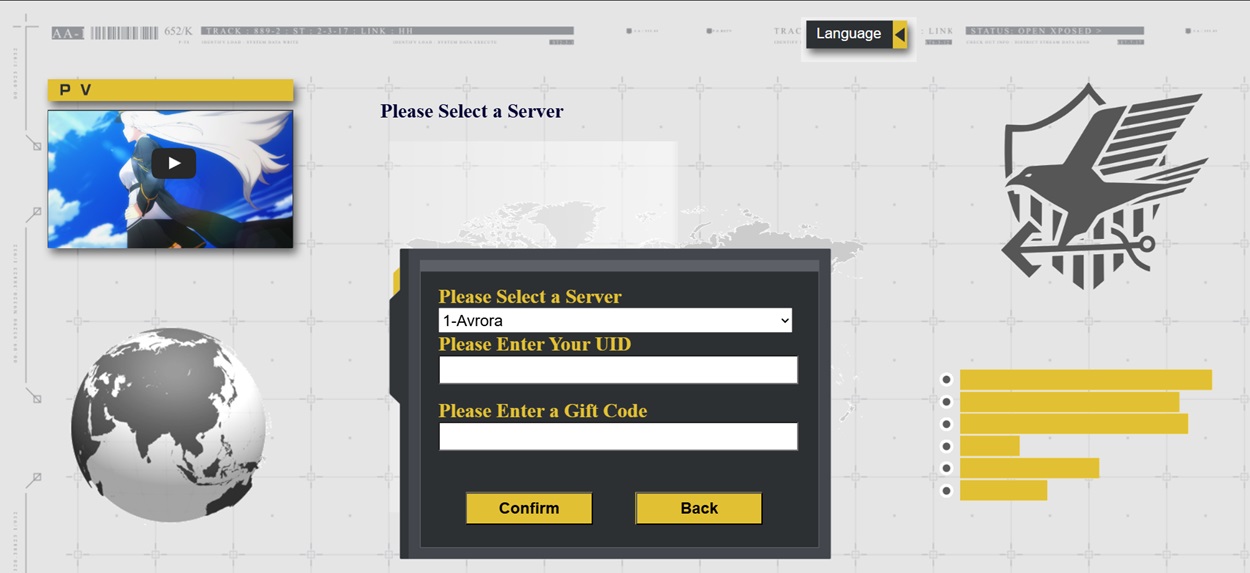
An alternating way of redeeming your Azur Lane codes is through the code redemption website:
- Visit the Azur Lane code redemption website.
- Choose your preferred language.
- From the list, select the region you are currently in.
- Then select your server.
- Enter the UID you want the rewards for and in the input field, enter the redeem code.
- After rechecking your UID and the redeem code, press the Confirm button.
After following these steps carefully and the completion of your redemption process, your rewards will be sent immediately to your game account.
Why Are Your Codes Not Working?
There are several reasons why your Azur Lane codes are not working. Here are the 5 common mistakes that players face due to which their redeem codes are not working:
- Expired Codes: Azur Lane Codes are exclusive codes that are only valid for a limited duration of time. If the code is expired, then it will no longer provide you with any rewards.
- Case Sensitivity: These codes are case sensitive and even a single incorrect capitalization of letters in each code. Therefore, make sure that you are copying the codes correctly.
- Possible Typos: Missing or entering any incorrect letter or number in the code will result in a pop-up of Invalid code.
- Redemption Limit: These redeem codes have a redemption limit and if you have already redeemed the code once, it will be marked as invalid for the 2nd time in the same account.
- Redeem code usage limit: Some Azur Lane Codes have a usage limit, and only a limited number of accounts can redeem these codes.
- Regional limitations: Certain codes are available in some specific regions and might not work for the players outside that region.
How to Get More Azur Lane Codes?
Azur Lane codes are like treasures that players often struggle to find. Most of the time, players find it a challenge to obtain these limited-time codes, let alone staying updated on the active codes. Here are the best ways to make sure you always stay updated whenever a code is released:
- Official Social media platforms: Follow Azur Lane’s official social media handles on popular platforms such as Twitter, Facebook, and YouTube. Developers often share these codes during livestreams, anniversary events and announcements.
- Discord Servers: Join the official community servers on Discord. The community on discord is quite active and this can also prove to be one of the fastest ways to grab the Azur Lane codes.
- Online Blogs: Follow reliable blog sources like MuMuPlayer Blog on the internet that maintain regular updates on publishing active codes.
How to Play Azur Lane on PC or Mac using MuMuPlayer?
1.Click the button to download MuMuPlayer for PC or Mac and install it.
2. Open App Center and search Azur Lane.
3. Click to download Azur Lane from the search results. [NOTE: If you didn't find this game on the Play Store, you can also download the game's apk file to install locally on MuMuPlayer.]
4. Click the Azur Lane icon on the home screen to start playing.
MuMuPlayer delivers superior visual quality and faster loading times for a seamless gaming experience—outperforming most mobile devices. Download now and elevate your gameplay!
Conclusion
Bookmark this page and check back regularly. Since Azur Lane mainly distributes redeem codes during anniversary livestreams, collaborations, and special events, we'll update this guide whenever new official codes are released.
End of Article