

High FPS Games on Mac: 10 Android Games to Try
High frame rates can make games feel smoother and more responsive, especially during fast-paced combat, exploration, and action-heavy scenes. If you're looking for high FPS games to play on Mac, there are plenty of Android titles worth exploring.
With MuMuPlayer for Mac, you can play supported Android games on a larger Mac screen and take advantage of frame rates of up to 240 FPS. In this guide, we'll look at 10 high FPS Android games you can play on Mac and show you how to enable high frame rate settings in MuMuPlayer.
1. Pokémon TCG Pocket
Pokémon Trading Card Game Pocket brings the Pokémon Trading Card Game experience to mobile with collectible cards, deck building, and quick battles. Its compact matches make it easy to jump into a game, while card animations, visual effects, and transitions add more life to each match.
If you want to play Pokémon TCG Pocket on Mac, MuMuPlayer for Mac lets you enjoy the game on a larger display while taking advantage of supported high frame rate settings for a more responsive experience.
2. Pokémon Champions
Pokémon Champions focuses on Pokémon battles, where team composition, timing, and battle strategy all play an important role. Fast Pokémon movements, attacks, and battle effects make responsive gameplay especially useful during intense encounters.
With MuMuPlayer for Mac, you can bring Pokémon Champions to Mac and use high frame rate settings where supported to make battles feel more fluid and responsive.
3. Azur Lane
Azur Lane combines character collection and RPG progression with side-scrolling naval combat. Alongside building your fleet and developing characters, you can take part in battles featuring animated characters, attacks, and visual effects.
MuMuPlayer for Mac provides a way to play Azur Lane on Mac with a larger display and supported high frame rate settings, giving you a more fluid way to experience its battles and animations.
4. SD Gundam G Generation ETERNAL
SD Gundam G Generation ETERNAL is a strategy RPG built around the Gundam universe. You can collect and develop Mobile Suits, build your team, and make tactical decisions during battles featuring detailed attack animations and effects.
If you're looking to play SD Gundam G Generation ETERNAL on Mac, MuMuPlayer for Mac supports high frame rates for compatible gameplay and lets you adjust performance settings to match your setup.
5. Ragnarok X: Next Generation
Ragnarok X: Next Generation is a 3D MMORPG that combines exploration, quests, character progression, equipment systems, and real-time combat. Its 3D environments and active battles benefit from responsive controls and consistent performance.
MuMuPlayer for Mac lets you play Ragnarok X: Next Generation on Mac while adjusting performance settings and using supported high frame rates to suit your gaming setup.
6. Silver and Blood
Silver and Blood is a dark fantasy RPG featuring collectible characters, character progression, and visually detailed battles. Its stylized art direction and cinematic combat effects give encounters a distinctive visual style.
With MuMuPlayer for Mac, you can play Silver and Blood on Mac and configure performance and frame rate settings to create a fluid gameplay experience on your device.
7. NIGHT CROWS
NIGHT CROWS is a 3D MMORPG set in a fantasy world with exploration, character progression, and real-time combat. Detailed environments and large-scale battles can put greater demands on system performance, particularly during action-heavy scenes.
MuMuPlayer for Mac gives you the flexibility to adjust performance settings and use supported high frame rates when playing NIGHT CROWS on Mac.
8. Go Go Muffin
Go Go Muffin offers a more relaxed RPG experience centered around character progression, exploration, and automated combat. Its colorful world, character animations, and combat effects create a lighthearted visual experience.
If you want to play Go Go Muffin on Mac, MuMuPlayer for Mac lets you enjoy the game on a larger display while configuring frame rate and performance settings for your setup.
9. DISSIDIA DUELLUM FINAL FANTASY
DISSIDIA DUELLUM FINAL FANTASY features fast-paced battles built around characters from the Final Fantasy series. Quick movement, attacks, abilities, and visual effects make timing and responsiveness important during combat.
MuMuPlayer for Mac allows you to play DISSIDIA DUELLUM FINAL FANTASY on Mac with supported high frame rate settings and customizable performance options.
10. Star Sailors
Star Sailors takes players into a space-themed setting with exploration and interactive gameplay. Movement through different environments and visual transitions add to the experience as you explore its world.
With MuMuPlayer for Mac, you can play Star Sailors on Mac and adjust supported frame rate and performance settings for a more fluid gaming experience.
How to Play High FPS Android Games on Mac with MuMuPlayer
Getting started takes just a few steps. Once MuMuPlayer is installed, you can enable high frame rate settings before downloading and playing your favorite Android games.
Step 1: Download and Install MuMuPlayer for Mac
Download MuMuPlayer and install it on your Mac, complete the initial setup, and launch the Android environment.
Step 2: Enable High FPS Settings
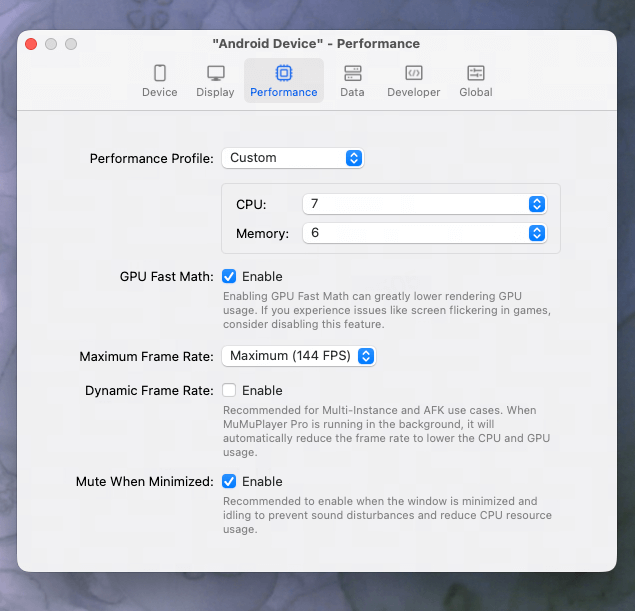
Open MuMu Android Device from the top-left menu, then go to Device Settings for "Android Device" → Performance → Maximum Frame Rate and select 240 FPS.
You can also adjust other performance settings in the Performance section based on your Mac hardware and the requirements of the game.
MuMuPlayer for Mac supports frame rates of up to 240 FPS. Actual frame rates may vary depending on the game, scene, settings, and Mac hardware.
Step 3: Search, Download, and Play Your Game
Search for your favorite game through Google Play or MuMuStore, download and install it, then launch the game and start playing. You can also customize display settings and keyboard and mouse controls based on your preferences.
Why Play High FPS Android Games on Mac with MuMuPlayer?
MuMuPlayer for Mac combines high frame rate support with the flexibility of playing Android games on a Mac, giving you more control over how you want to play.
Enjoy Supported Games at Up to 240 FPS on Mac
MuMuPlayer for Mac supports frame rates of up to 240 FPS, allowing compatible games to take advantage of higher frame rates when your game and Mac hardware support them.
Bring Your Favorite Android Games to a Larger Mac Screen
Play Android games on a larger Mac display instead of a mobile screen. This can make detailed game environments, characters, animations, and interface elements easier to see.
Get Smoother Gameplay with Adjustable Performance Settings
Adjust performance options based on your Mac hardware and the requirements of different games. This gives you more flexibility to find a suitable balance between frame rate, visual quality, and system resource usage.
Play More Comfortably with Keyboard and Mouse Controls
Use keyboard and mouse controls to play supported Android games on Mac. MuMuPlayer also supports customizable control schemes, giving you more flexibility to adapt controls to different games.
Frequently Asked Questions
Can you play high FPS Android games on Mac?
Yes. You can play supported Android games on Mac through an Android emulator such as MuMuPlayer. High frame rate support depends on the game, its settings, and your Mac hardware.
Is an Android emulator needed to play Android games on Mac?
For Android games that do not have a native macOS version, an Android emulator provides a way to run the Android version on Mac. MuMuPlayer for Mac is designed to run supported Android games and apps in an Android environment.
What is the highest FPS supported by MuMuPlayer for Mac?
MuMuPlayer for Mac supports frame rates of up to 240 FPS. Actual performance depends on the game, scene, settings, and Mac hardware.
Can all Android games run at 240 FPS on Mac?
Not every game will reach 240 FPS. You can set the frame rate up to 240 FPS, but the actual FPS you can achieve depends on the specific game, scene, settings, and the refresh rate of your Mac display.
Conclusion
High FPS gaming can make Android games feel more responsive, particularly in titles with fast-paced combat, detailed animations, and active 3D environments. From Pokémon TCG Pocket and Azur Lane to NIGHT CROWS and DISSIDIA DUELLUM FINAL FANTASY, there are plenty of Android games to explore on Mac.
With MuMuPlayer for Mac, you can play supported Android games on a larger screen, adjust performance settings, and configure frame rates based on your game and Mac hardware.
Ready to play your favorite Android games smoothly on Mac? Download MuMuPlayer for Mac and enjoy fluid, responsive gameplay.
End of Article