Play Elemental: 2D MMORPG on PC and Mac
Elemental: 2D MMORPG is a pixel art-driven online role-playing game developed by DAERISOFT, falling under the simulation genre with deep RPG roots. Set in an open world filled with lore and adventure, it invites players to build their characters, master unique class abilities, and explore a vibrant world alongside other players in real time. MuMuPlayer brings this classic MMORPG experience to PC, letting you dive into the full adventure on a larger screen with smoother performance.
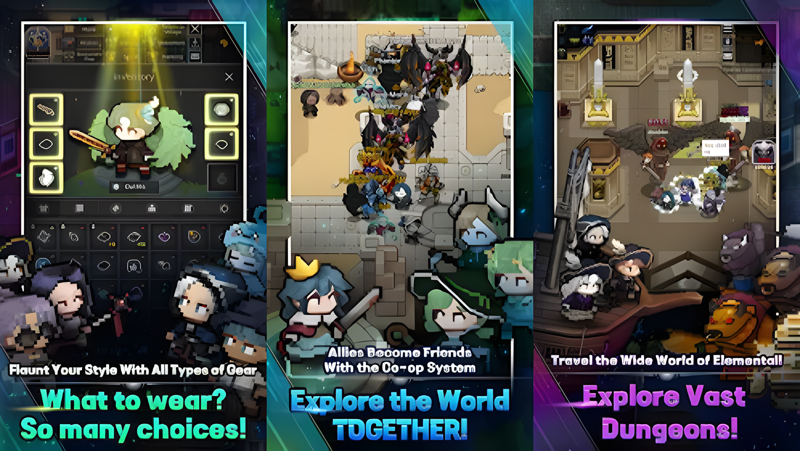
The game stands out by offering a genuine RPG experience that keeps things fair, with no loot boxes standing between you and progression. Players can choose from multiple mercenary classes, each with a distinct combat style, and grow stronger through a dedicated gear upgrade system and a reincarnation mechanic that adds long-term depth. Expansive maps provide room for exploration, while combo attacks and visually striking pixel art skills make every battle feel dynamic. A wide selection of outfits and gear also lets players express their personal style throughout their journey.
Playing Elemental on PC through MuMuPlayer gives you meaningful advantages that enhance the experience considerably. The larger display makes it far easier to navigate the open world, track enemies, and coordinate with other players during co-op encounters. MuMuPlayer also delivers stable and consistent performance, which matters during real-time multiplayer sessions where timing and responsiveness are essential. Whether you are grinding through challenging content, building friendships in-game, or showing off your fashion choices, MuMuPlayer ensures that the full MMORPG experience runs reliably and comfortably on your desktop.
About the Game
Elemental: 2D MMORPG puts a refreshing spin on the classic online RPG formula by combining nostalgic pixel art visuals with a genuinely rewarding progression system. Developed by DAERISOFT, this game is designed for players who miss the era of real MMORPGs, where your strength was earned through dedication rather than spending money. With no loot boxes in sight, every piece of gear and every level gained feels meaningful. The world of Elemental is open, lore-rich, and constantly alive with other adventurers working toward their own goals.
At the heart of the game is a flexible character system built around distinct mercenary classes. Each class plays differently, with its own combat rhythm and skill set, so choosing the right one for your playstyle matters from the very beginning. As you progress, gear upgrades allow you to become noticeably more powerful, and the reincarnation system adds an extra layer of long-term goals for players who want to push their characters to the absolute limit. This layered progression keeps the experience fresh well beyond the early hours.
Here is what makes Elemental worth your time:
- Pixel art world: The entire game is rendered in detailed and expressive pixel art, from character animations to skill effects, creating a charming aesthetic that holds up throughout long play sessions.
- Combo-based combat: Skills chain together in visually satisfying ways, making battles feel active and engaging rather than passive or repetitive.
- Expansive open world: The maps are large and filled with variety, offering plenty of territory to explore solo or with a group.
- Multiplayer co-op: Real-time cooperation with other players is built directly into the experience, letting you tackle tough content alongside friends or new allies you meet along the way.
- Social systems: The game encourages community building through co-op mechanics, giving players tools to find friends, form alliances, and even develop rivalries.
- Outfit customization: A broad selection of gear and cosmetic options means your character can look exactly how you want while still being battle-ready.
The social side of Elemental is a genuine selling point. Rather than playing in isolation, the game nudges you toward cooperation at every turn. Whether it is learning a new system alongside a newcomer or strategizing with veterans during a tough encounter, the multiplayer focus gives the world a sense of life that single-player RPGs simply cannot replicate. Meeting other players, building a community, and taking on challenges together is woven into the core design.
For players who want to experience all of this on a bigger stage, running Elemental through MuMuPlayer on PC is a natural upgrade. The wider screen makes the open world easier to take in, combat becomes more precise with keyboard and mouse input, and the stable performance that MuMuPlayer provides means you stay focused on the game rather than worrying about lag or interruptions during live multiplayer moments. If you are ready to step into a classic MMORPG world built from the ground up for players who want real challenge and real reward, Elemental is ready for you.
Emulator Features

With a smart button scheme and image recognition function, provide a more concise UI, and support custom button mapping to meet different needs.

Run multiple games independently at the same time, easily manage multiple accounts, play games while hanging.

Break through FPS limit, and enjoy a seamless gaming experience without lag and delay!

Get a 3-second startup with 52% less memory usage and 65% more stability.
How to Download and Play Elemental: 2D MMORPG on PC and Mac
Installation Guide
Download MuMuPlayer
Download and install MuMuPlayer on your PC or Mac
Sign-in Google Store
Complete Google sign-in to access the Play Store
Search and Install
Search Elemental: 2D MMORPG in the Play Store
Enjoy Gaming
Enjoy 120 FPS high-def gameplay with big screen
System Requirements
Windows PC
Vulkan / DirectX supported. 4 cores + 4GB RAM recommended. Up to 240 FPS. VT required.
macOS
Recommended: Apple Silicon Mac with 8GB RAM or above. Up to 240 FPS.