Play Skullgirls: Fighting RPG on PC Play Skullgirls: Fighting RPG on PC and Mac
Skullgirls, developed by Autumn Games, LLC, is a free-to-play 2D fighting RPG that blends the intensity of classic arcade combat with a rich character collection system. Set in the dark and stylish city of New Meridian, the game features over 300 collectible fighter variants brought to life through thousands of frames of hand-drawn animation. Every match feels like a moving piece of art, and whether you are stepping into a fighting game for the first time or have years of competitive experience, Skullgirls delivers a deeply rewarding experience. Playing on PC through MuMuPlayer lets you take full advantage of everything the game offers on a much larger screen.
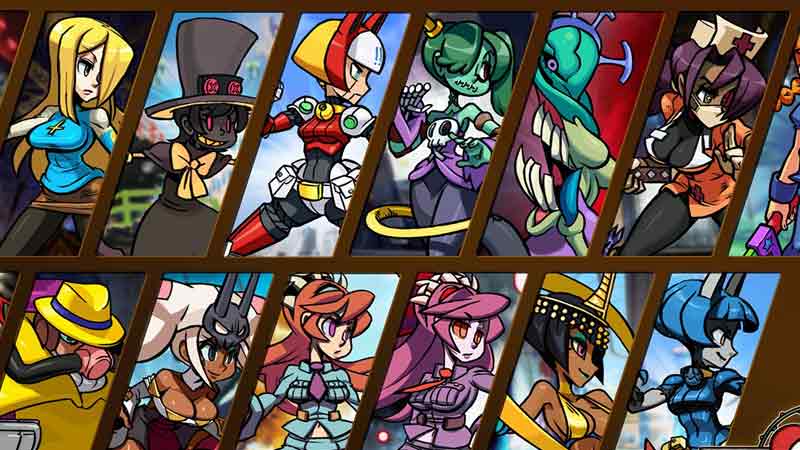
At the heart of Skullgirls is a massive roster built around 20 or more original characters, each available in multiple tiers ranging from Bronze all the way up to Diamond. Every fighter variant carries a unique Signature Ability that shapes how you approach each battle. Players can evolve and upgrade their favorites, unlock Skill Trees, assign Special Moves and Blockbusters, and fine-tune loadouts to match their preferred style. The game also includes a beginner-friendly Fight Assist mode that automates combos, while experienced players can dive into deep combo chains, juggles, and reset techniques. Competitive options are extensive, with real-time PvP through Versus Mode, strategic Rift Battles where you build and attack rival defenses, recurring Prize Fight events offering rare rewards, and Guild-based cooperative challenges. A full Story Mode and individual character Origin Stories add narrative depth to the roster.
Running Skullgirls through MuMuPlayer on PC transforms the experience in meaningful ways. The hand-drawn animation, which is one of the game's most celebrated qualities, looks significantly more impressive on a full desktop monitor compared to a small mobile screen. Keyboard and mouse controls give you more precise input when executing combo chains or navigating menus, and the larger display makes reading fight dynamics and team synergies far easier during competitive play. MuMuPlayer also provides a stable performance environment, which matters in real-time PvP modes where consistent response times make a real difference. If you want to enjoy Skullgirls at its best, downloading it through MuMuPlayer is the most complete way to play.
Download Skullgirls: Fighting RPG on PC or Mac with MuMuPlayer, get a PC like gameplay along with smart control and high graphics performance.
MuMuPlayer, the top Android emulator for PC and Apple silicon Mac, delivers an optimal gaming experience with minimal RAM usage and high FPS. It also allows you to create multiple instances of the emulator and run several games simultaneously, thanks to its Multi-instance feature. Its advanced emulator features ensure smooth gameplay, even on low-end PCs.
Download and play Skullgirls: Fighting RPG on PC or Mac with MuMuPlayer and start enjoying your gaming experience now.
About the Game
Skullgirls is a free-to-play mobile fighting RPG that stands apart from most games in its genre through a commitment to hand-crafted visual quality and genuinely deep combat mechanics. Every fighter in the game is animated with thousands of individually drawn frames, creating movement and personality that no other mobile fighting game has matched. The result is a game that feels as good to watch as it does to play, and one that rewards both casual sessions and serious competitive investment.
The roster is built around a collection system that gives players enormous variety to explore. There are more than 300 unique fighter variants spread across 20 or more original characters, and each variant is more than just a visual reskin. Every version of a character carries its own Signature Ability, which actively changes how that fighter performs in combat and what kind of team strategy works best around them. Fighters are organized into Bronze, Silver, Gold, and Diamond tiers, and players can evolve their favorites over time to unlock stronger forms and greater potential.
Customization goes well beyond collecting. Each fighter supports a Skill Tree system that lets you shape their development, and players can equip specific Special Moves and Blockbuster finishers to build a loadout that fits their approach. Teams are formed with up to three fighters, and finding the right combinations of abilities and synergies between characters is a core part of the experience. Guest assist characters like Minette and Brain Drain add additional strategic layers to team construction. New fighters and variants are regularly added through Relics, a discovery system that expands your roster over time.
Skullgirls handles the challenge of being accessible and deep at the same time through two distinct approaches to controls. Beginners can enable Fight Assist mode, which handles complex combo execution automatically and lets new players focus on the broader flow of battle. Players who want full control can master manual combo chains, aerial juggles, resets, and Blockbuster finishers through tap and swipe inputs designed specifically for touchscreens.
The competitive side of the game is built around several ongoing modes:
- Versus Mode brings real-time PvP battles against players from around the world
- Rift Battles ask you to construct defensive setups while attacking rival territories to climb leaderboards
- Prize Fights run on weekly and monthly cycles, offering rare fighters and resources as rewards
- Guilds allow players to team up with others for cooperative challenges and shared progression
Beyond competition, the game offers a complete Story Mode campaign set in New Meridian as well as individual Origin Stories for specific characters, adding narrative context to the fighters you collect. Monthly content updates bring new events, balance adjustments, and the Backstage Pass, a seasonal reward track with both free and premium content. The Cabinet of Curiosities provides a rotating shop for rarer items.
For anyone who wants to experience the full visual and mechanical quality of Skullgirls, playing through MuMuPlayer on PC is a strong choice. The hand-drawn animation displays with much greater impact on a desktop monitor, keyboard inputs offer precision during combo-heavy play, and the stable performance of a PC environment supports competitive modes where consistency matters most.
Emulator Features
Highest Android 15 Support Best Compatibility on Mac

With a smart button scheme and image recognition function, provide a more concise UI, and support custom button mapping to meet different needs. With a smart button scheme and image recognition, enjoy a cleaner UI and custom button mapping to fit different gaming needs on Mac.

Run multiple games independently at the same time, easily manage multiple accounts, play games while hanging. Take your Mac gaming further with multiple independent instances, easy account management, and seamless AFK gaming on Apple Silicon Mac.

Break through FPS limit, and enjoy a seamless gaming experience without lag and delay! Break through FPS limits for a seamless, lag-free gaming experience on MacBook, Mac mini, iMac, and Mac Studio.

Get a 3-second startup with 52% less memory usage and 65% more stability. Enjoy 3-second startup, 52% less memory usage, and 65% greater stability on Apple Silicon Mac.
How to Download and Play Skullgirls: Fighting RPG on PC and Mac
Installation Guide
Download MuMuPlayer
Download MuMuPlayer and install it on your PC or Mac
Sign-in Google Store
Complete Google sign-in to access the Play Store
Search and Install
Search Skullgirls: Fighting RPG in the Play Store
Enjoy Gaming
Enjoy 120 FPS high-def gameplay with big screen
System Requirements
Windows PC
Vulkan / DirectX supported. 4 cores + 4GB RAM recommended. Up to 240 FPS. VT required.
macOS
Recommended: Apple Silicon Mac with 8GB RAM or above. Up to 240 FPS.