Play Warframe on PC and Mac
Warframe is a free-to-play online action game that drops you into a vast sci-fi universe as a Tenno warrior piloting a powerful biomechanical suit known as a Warframe. With over a decade of story-driven content, cooperative missions, and relentless combat, it stands as one of the most expansive action experiences available today. MuMuPlayer brings the full Warframe experience to your PC, letting you enjoy every mission, cutscene, and customization session on a larger screen with keyboard and mouse support.
The game offers an enormous range of content built around freedom of choice. You can select from more than 57 distinct Warframes, each carrying a unique set of abilities that dramatically change how you approach combat. Team up with friends to form squads, tackle cooperative missions, and earn bonus rewards for working together. The world itself stretches across ground-based parkour missions, open-world environments filled with diverse lifeforms, and large-scale space battles aboard your own customizable spacecraft. On top of all that, hundreds of craftable weapons, companion characters, and vehicles give you near-unlimited options for building out your ideal loadout.
Playing Warframe through MuMuPlayer on PC gives you real advantages that carry over directly into gameplay. The larger display makes navigating open-world zones and tracking enemies during fast-paced parkour sequences far more manageable. Keyboard and mouse controls allow for precise aiming and ability activation that can make a noticeable difference in harder missions. MuMuPlayer also provides stable performance so you can enjoy lengthy play sessions, cinematic quests, and cooperative raids without interruption, making it an excellent way to experience everything Warframe has to offer.
About the Game
Warframe invites you into a sprawling science fiction universe where you take on the role of a Tenno, an ancient warrior class reawakened after a long dormancy. Your primary tool is the Warframe itself, a biomechanical combat suit that serves as both armor and weapon platform. Each Warframe carries its own identity, movement style, and set of four distinct abilities, turning the game into something far more varied than a typical shooter.
At its core, the experience is built around a few interconnected pillars:
- Warframe Variety: With more than 57 available Warframes to earn or unlock, the roster covers an enormous range of playstyles. Some Warframes are built for raw damage output, others for crowd control, healing allies, or reshaping the battlefield entirely. Switching between them fundamentally changes how you engage with every mission.
- Cooperative Multiplayer: Squads of players can team up for missions across the Origin System, and completing objectives together unlocks bonus rewards that solo play does not offer. Built-in matchmaking connects you with other players quickly, so finding help for a difficult mission or a group to grind with is rarely a problem.
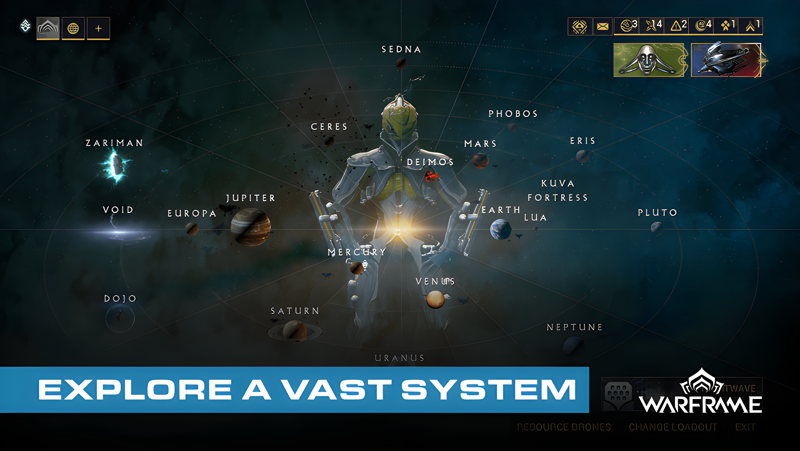
- World Scale and Exploration: The game's environments range from tight corridor-based missions designed for fast parkour movement to expansive open worlds populated with unique creatures and hidden secrets. Space combat adds another layer entirely, letting you command a customizable spacecraft in battles between massive vessels.
- Story and Quests: Over ten years of ongoing expansions have built a deep narrative around the origin of the Tenno, the factions they fight, and the mysteries buried in the history of the Origin System. New players begin with one of three starter Warframes and follow a cinematic storyline that gradually unfolds the lore behind their awakening.
Beyond the Warframes themselves, progression runs through an extensive arsenal of craftable gear. Hundreds of weapons span categories from rifles and melee blades to launchers and unique signature arms tied to specific Warframes. Companion characters and vehicles expand your options further, and every piece of equipment can be leveled up and modified to fit a specific build. The customization system is not limited to stats either. Visual options for Warframes, weapons, and loadouts give each player a personalized look, contributing to a community of more than 70 million accounts each with distinct configurations.
The moment-to-moment gameplay rewards movement and ability management. Parkour traversal is central to ground missions, letting you wall-run, slide, and vault through environments at high speed while managing enemy waves. Abilities layer on top of this with effects ranging from wide-area devastation to precise utility skills that protect or empower squadmates. Finding combinations that complement both your weapon choices and your playstyle is a long-term pursuit that keeps the game engaging well past the early hours.
For players looking to get the most out of Warframe, running it through MuMuPlayer on PC brings the full experience onto a platform where the game's scale really shows. The larger screen helps during open-world exploration and combat, while stable PC performance supports the game's demanding visual environments and lengthy quest sequences without compromise.
Emulator Features
Highest Android 15 Support Best Compatibility on Mac

With a smart button scheme and image recognition function, provide a more concise UI, and support custom button mapping to meet different needs. With a smart button scheme and image recognition, enjoy a cleaner UI and custom button mapping to fit different gaming needs on Mac.

Run multiple games independently at the same time, easily manage multiple accounts, play games while hanging. Take your Mac gaming further with multiple independent instances, easy account management, and seamless AFK gaming on Apple Silicon Mac.

Break through FPS limit, and enjoy a seamless gaming experience without lag and delay! Break through FPS limits for a seamless, lag-free gaming experience on MacBook, Mac mini, iMac, and Mac Studio.

Get a 3-second startup with 52% less memory usage and 65% more stability. Enjoy 3-second startup, 52% less memory usage, and 65% greater stability on Apple Silicon Mac.
How to Download and Play Warframe on PC and Mac
Installation Guide
Download MuMuPlayer
Download MuMuPlayer and install it on your PC or Mac
Sign-in Google Store
Complete Google sign-in to access the Play Store
Search and Install
Search Warframe in the Play Store
Enjoy Gaming
Enjoy 120 FPS high-def gameplay with big screen
System Requirements
Windows PC
Vulkan / DirectX supported. 4 cores + 4GB RAM recommended. Up to 240 FPS. VT required.
macOS
Recommended: Apple Silicon Mac with 8GB RAM or above. Up to 240 FPS.