
Play Lightus on PC and Mac
Download Lightus on PC or Mac with MuMuPlayer, get a PC like gameplay along with smart control and high graphics performance.
MuMuPlayer, the top Android emulator for PC and Apple silicon Mac, delivers an optimal gaming experience with minimal RAM usage and high FPS. It also allows you to create multiple instances of the emulator and run several games simultaneously, thanks to its Multi-instance feature. Its advanced emulator features ensure smooth gameplay, even on low-end PCs.
Download and play Lightus on PC or Mac with MuMuPlayer and start enjoying your gaming experience now.
About the Game
"Lightus" is an open-world role-playing and simulation game. You will play as a traveler without a "past," embarking on an adventure in the unfamiliar land of "Seofar," exploring lost ruins around the world, searching for lost memories, and creating a new world with other travelers.
——
The moment you set foot on the continent of "Seofar," the adventure begins...

—— Run and explore freely on the continent of "Seofar"
Travel through Wedge Rift Valley, Serpent Creek Land, Oran River Valley, Misty Deep Valley... Immerse yourself in the beauty of lush forests, tranquil lakes, verdant meadows, and feel the sunlight spreading across the land, the breeze brushing your face, as you create a world of your own with the rise and fall of the sun and moon, and the chirping of birds and insects!

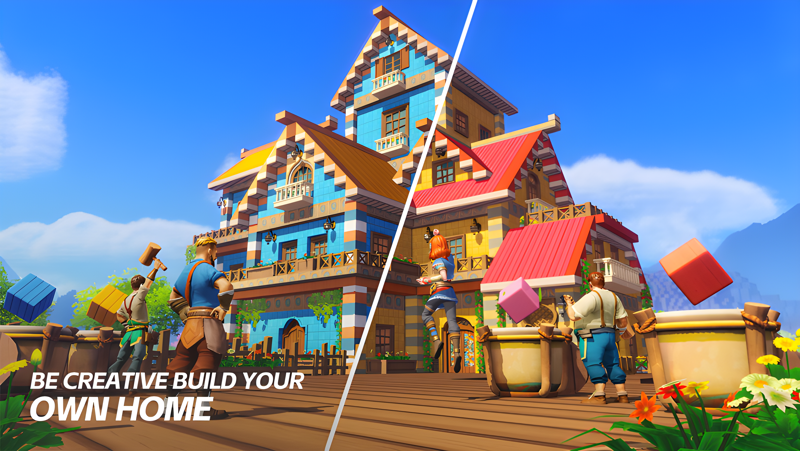
—— Build a unique and cozy home
Collect resources by logging, breaking stones, and mining; dozens of items are available for crafting. Freely choose blocks of different colors and types to build your ideal structure according to your preferences. Plant trees, nurture flowers, add furniture, outdoor decorations... Experience the DIY joy of transforming a bare house into a luxurious mansion!

—— Freely socialize and establish a popular town
Homeland Circle, an interactive feature where you can collaborate with friends to build various large projects! Work together to construct amusement parks, build Ferris wheels, and more, creating a charming town of your own. Chat about daily life, have wonderful interactions, and enjoy a life of freedom!

—— Relaxing farm life: you reap what you sow
Work at sunrise, rest at sunset, and fall in love with the simple life of farming. There's a bounty of fruits, vegetables, and flowers. Perfect care might result in the chance to grow giant crops, vying for the title of the strongest farmer! Different colored flowers can also be refined into dyes, allowing you to color your furniture beautifully!

—— Capture pets to work for you
Too tired to make furniture? No time to tend to crops? No worries, pets are here to help! The continent of "Seofar" is rich in species, including "Bubu" the Radish Head, the "Armored Axe Bear," the Butterfly Spirit "Night Spirit," and more. Here you can hunt to your heart's content, capture pets for your use! They can also accompany you on adventures, battle monsters together, and bravely traverse "Seofar"!
Emulator Features

With a smart button scheme and image recognition function, provide a more concise UI, and support custom button mapping to meet different needs.

Run multiple games independently at the same time, easily manage multiple accounts, play games while hanging.

Break through FPS limit, and enjoy a seamless gaming experience without lag and delay!

Get a 3-second startup with 52% less memory usage and 65% more stability.
How to Download and Play Lightus on PC and Mac
Installation Guide
Download MuMuPlayer
Download and install MuMuPlayer on your PC or Mac
Sign-in Google Store
Complete Google sign-in to access the Play Store
Search and Install
Search Lightus in the Play Store
Enjoy Gaming
Enjoy 120 FPS high-def gameplay with big screen
System Requirements
Windows PC
Vulkan / DirectX supported. 4 cores + 4GB RAM recommended. Up to 240 FPS. VT required.
macOS
Recommended: Apple Silicon Mac with 8GB RAM or above. Up to 240 FPS.

(1).png?fop=imageView/0/w/150/h/150)