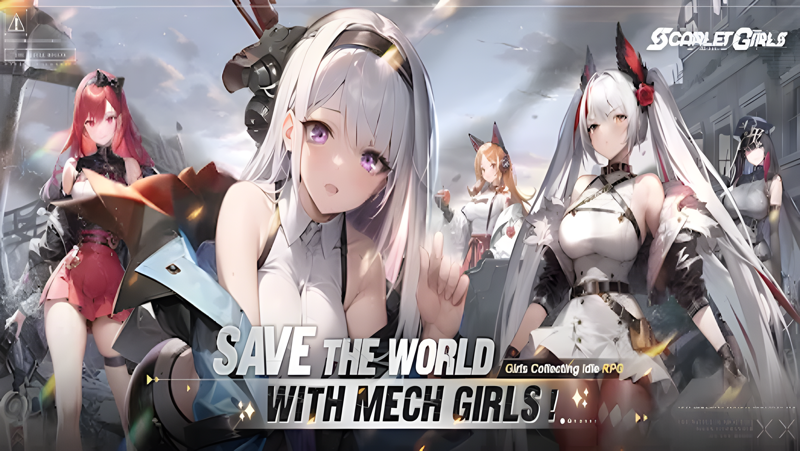
Play Scarlet Girls on PC and Mac
Download Scarlet Girls on PC or Mac with MuMuPlayer, get a PC like gameplay along with smart control and high graphics performance.
MuMuPlayer, the top Android emulator for PC and Apple silicon Mac, delivers an optimal gaming experience with minimal RAM usage and high FPS. It also allows you to create multiple instances of the emulator and run several games simultaneously, thanks to its Multi-instance feature. Its advanced emulator features ensure smooth gameplay, even on low-end PCs.
Download and play Scarlet Girls on PC or Mac with MuMuPlayer and start enjoying your gaming experience now.
About the Game
Pre-register now for Scarlet Girls and claim your chosen SSR! Enjoy free draws for 365 days and build your ultimate team in this thrilling Girls Collecting Idle RPG.
Exclusive Google Play rewards:Diamonds*100, Echo Permit*5, and Stellaris EXP*50K

Game Background

In the 119th year of the Old Euro Calendar, a mysterious catastrophe gave rise to crazed "Catastromechs" that swept through civilization. Survivors created new shelters and fused Catastromech cores with humans, creating powerful "Stellar Spirit" battle maidens. As Commander, lead these battle maidens to combat the Catastromechs, rebuild a new home called "Pax," and restore peace.

Game Features

▶ Generous Rewards, Complete Your Collection
Enjoy 10 free daily draws for a whole year, with an SSR guaranteed every 200 pulls. New players receive exclusive buffs to complete the collection within seven days.

▶ Live2D Interactions, Immersive Dating
Every girl has dynamic Live2D animations, bringing realistic interactions. With a hundred outfit options, including bikinis and wedding dresses, each character offers unique fun.

▶ Strategic Roguelike, No Wasted Resources
No-waste card system with 100% resource inheritance. Hundreds of strategy combos make for fun, casual play with a strategic edge.

▶ Mecha Fusion, Power Awakening
Girl-mecha fusion amplifies combat power, blending strength and romance in thrilling synergy with the Commander.

▶ Casual Idle, Easy Gains
Earn rewards offline, with simplified dungeons and relaxed gameplay.

Commander, the girls await your call. Are you ready for this epic journey?

Facebook: https://www.facebook.com/ScarletGirlsSEA/
Discord: https://discord.gg/pbRXG8AtcA
Emulator Features

With a smart button scheme and image recognition function, provide a more concise UI, and support custom button mapping to meet different needs.

Run multiple games independently at the same time, easily manage multiple accounts, play games while hanging.

Break through FPS limit, and enjoy a seamless gaming experience without lag and delay!

Get a 3-second startup with 52% less memory usage and 65% more stability.
How to Download and Play Scarlet Girls on PC and Mac
Installation Guide
① Download and install MuMuPlayer on your PC or Mac. It will identify automatically your current system and download the latest version.
② Start MuMuPlayer and complete Google sign-in to access the Play Store, or do it later.
③ Search Scarlet Girls in the Play Store.
④ Complete Google sign-in (if you skipped step 2) to install Scarlet Girls.
⑤ Once installation completes, click the Scarlet Girls icon on the home page to start the game.
⑥ Enjoy playing Scarlet Girls on your PC or Mac with MuMuPlayer.
Installation Guide
Recommended computer configuration
For Windows:4-core CPU, 4GB RAM, i5 OS, GTX950+ graphics card
For macOS: 4-core CPU, 4GB RAM
Recommended Android Device performance settings
Graphics renderer mode
Vulkan and DirectX both supported
Performance Settings
Recommended performance settings: 2 cores, 2GB. >>How to adjust performance settings
Recommended Android Device Display Settings
Resolution Settings
Go to Device Settings > Display > Resolution Settings to adjust your device's resolution as needed.
FPS Settings
MuMuPlayer supports up to 240 FPS. >>How to enable high FPS mode
Recommended to enable VT
Enabling VT will significantly improve emulator performance, reduce screen freezing, and make games run more smoothly. >>How to enable VT