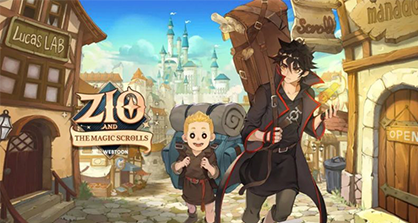
Play ZIO and the Magic Scrolls on PC and Mac
Download ZIO and the Magic Scrolls on PC or Mac with MuMuPlayer, get a PC like gameplay along with smart control and high graphics performance.
MuMuPlayer, the top Android emulator for PC and Apple silicon Mac, delivers an optimal gaming experience with minimal RAM usage and high FPS. It also allows you to create multiple instances of the emulator and run several games simultaneously, thanks to its Multi-instance feature. Its advanced emulator features ensure smooth gameplay, even on low-end PCs.
Download and play ZIO and the Magic Scrolls on PC or Mac with MuMuPlayer and start enjoying your gaming experience now.
About the Game
"Magic must be for humans!"

Magic Scrolls allow even ordinary humans to use magic!
You too can become the world's strongest wizard as long as you have the magic scrolls created by Zio!

----------------------------------------------------------------------------------------
In the war between mages and warlocks over the wizarding land 'Aerok'...
'Zio' succeeded in sealing the strongest warlock.
However, he lost most of his magic power, leaving him only the ability to craft magic scrolls.

Despite his sacrifice, the peace is short-lived as those who want to resurrect the warlock appear.
Gods, demons, and even dragons begin to intervene...
-----------------------------------------------------------------------------------------

[Game Introduction]

■ Auto battle game with 5 heroes and magic scrolls
- Both battle and skill use are automatic! Enjoy this AFK RPG.
- When the battle situation turns dire, activate magic scrolls! Get the upper hand with some exhilarating special moves!
- Without repeat play, you can obtain AFK rewards.

■ Strategic choices, become a magic scroll master!
- Collect and enhance a total of 12 magic scrolls with various abilities from magic to black magic!
- Only 3 magic scrolls at a time can be used in battle - make your choice wisely!
- You need mana to use magic scrolls, and each magic scroll requires different amounts of mana.

■ The story of the ordinary yet extraordinary ‘Zio’
- Formerly an archmage, now an ordinary scroll merchant! What is Zio's true identity?
- Explore the world map in 4 chapters and 22 episodes and enjoy the vast world and exciting story.
- Discover hidden episodes of the heroes with comic-like vivid stories.

■ From archmages to warlocks and demons! All heroes have assembled!
- Level up all heroes easier and faster with 'Teamwork' and 'Break the limit'!
- Heroes who do not participate in the battle will provide additional combat power by registering as a supporter!
- Unlock additional abilities by completing the hero collection.

■ If you come to the Kingdom of Aerok, rewards are abundant and fun is certain!
- Stop by the scroll shop ‘Manadonna’, where you can craft and enhance scrolls.
- In ‘Lucas’ Lab’, conduct various studies that will make you stronger.
- Open a ‘Magic Guild’ with your friends to conduct magic research and socialize!
- Many adventures await you, such as daily changing dungeons, the 'Mage's Tower' where you can test your limits, and the 'Duel Circle'.
Emulator Features

With a smart button scheme and image recognition function, provide a more concise UI, and support custom button mapping to meet different needs.

Run multiple games independently at the same time, easily manage multiple accounts, play games while hanging.

Break through FPS limit, and enjoy a seamless gaming experience without lag and delay!

Get a 3-second startup with 52% less memory usage and 65% more stability.
How to Download and Play ZIO and the Magic Scrolls on PC and Mac
Installation Guide
① Download and install MuMuPlayer on your PC or Mac. It will identify automatically your current system and download the latest version.
② Start MuMuPlayer and complete Google sign-in to access the Play Store, or do it later.
③ Search ZIO and the Magic Scrolls in the Play Store.
④ Complete Google sign-in (if you skipped step 2) to install ZIO and the Magic Scrolls.
⑤ Once installation completes, click the ZIO and the Magic Scrolls icon on the home page to start the game.
⑥ Enjoy playing ZIO and the Magic Scrolls on your PC or Mac with MuMuPlayer.
Installation Guide
Recommended computer configuration
For Windows:4-core CPU, 4GB RAM, i5 OS, GTX950+ graphics card
For macOS: 4-core CPU, 4GB RAM
Recommended Android Device performance settings
Graphics renderer mode
Vulkan and DirectX both supported
Performance Settings
Recommended performance settings: 2 cores, 2GB. >>How to adjust performance settings
Recommended Android Device Display Settings
Resolution Settings
Go to Device Settings > Display > Resolution Settings to adjust your device's resolution as needed.
FPS Settings
MuMuPlayer supports up to 240 FPS. >>How to enable high FPS mode
Recommended to enable VT
Enabling VT will significantly improve emulator performance, reduce screen freezing, and make games run more smoothly. >>How to enable VT