Play eBaseball™: MLB PRO SPIRIT on PC Play eBaseball™: MLB PRO SPIRIT on PC and Mac
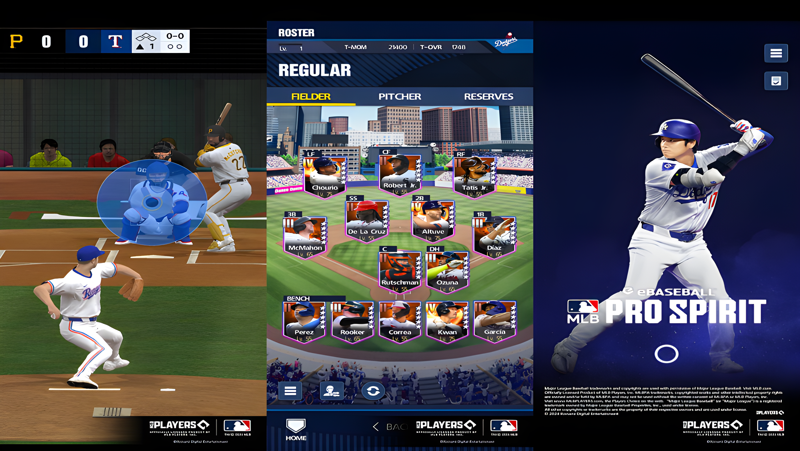
MLB PRO SPIRIT is an officially licensed baseball game developed by KONAMI, bringing the full excitement of Major League Baseball to mobile under the sports genre. Featuring real MLB players, authentic stadiums, and cover athlete Shohei Ohtani, the game delivers fast-paced baseball action that ranges from quick home run sessions to deep competitive team-building. Playing on PC through MuMuPlayer gives you access to all of that energy on a larger screen, with smoother performance and a keyboard-and-mouse setup that makes every swing and pitch feel more precise.
The game covers a wide range of baseball experiences in one package. You can battle through a 52-game season mode, jump into real-time online matches against players worldwide, compete in simulated Auto League contests, or simply enjoy Arcade mode by touring all 30 MLB stadiums and knocking out home runs. All 30 MLB teams are represented with authentic uniforms, faithfully recreated ballparks, and lifelike player models built on a simulation engine that KONAMI has refined over more than three decades. Weekly limited-time events rotate fresh challenges into the schedule, keeping the rewards and competition moving at a steady pace.
Running MLB PRO SPIRIT through MuMuPlayer on PC transforms the experience in several meaningful ways. The larger display makes it easier to track pitches, read fielder positioning, and appreciate the detailed stadium visuals that the game is designed around. MuMuPlayer's stable connection support is a clear advantage for the real-time online ranked matches where latency can decide close games. Keyboard mapping lets you assign swing timing, pitching controls, and menu navigation to comfortable keys, reducing the finger fatigue that comes from extended mobile sessions. Whether you are grinding through a full season or chasing leaderboard rankings in competitive play, MuMuPlayer gives you a more comfortable and consistent environment to do it in.
Download eBaseball™: MLB PRO SPIRIT on PC or Mac with MuMuPlayer, get a PC like gameplay along with smart control and high graphics performance.
MuMuPlayer, the top Android emulator for PC and Apple silicon Mac, delivers an optimal gaming experience with minimal RAM usage and high FPS. It also allows you to create multiple instances of the emulator and run several games simultaneously, thanks to its Multi-instance feature. Its advanced emulator features ensure smooth gameplay, even on low-end PCs.
Download and play eBaseball™: MLB PRO SPIRIT on PC or Mac with MuMuPlayer and start enjoying your gaming experience now.
About the Game
When KONAMI set out to build MLB PRO SPIRIT, the goal was to capture genuine Major League Baseball energy in a format that works at any pace and for any type of fan. The result is a sports title with official licensing covering all 30 MLB teams, real player likenesses, authentic ballparks, and Shohei Ohtani as the face of the game. Whether you have five minutes or five hours, the game is built to meet you where you are.
At the core of MLB PRO SPIRIT is a baseball simulation engine that KONAMI has been developing and refining for over 30 years. That history shows up in the small details: the way player models move through their wind-ups and swings, how fielders react to hit trajectories, and the overall feel of each at-bat. Stadiums are recreated with care, and teams take the field in their official uniforms with celebration animations that reflect real MLB culture.
The game offers four main ways to play, each targeting a different kind of experience:
- Arcade Mode: The fastest entry point in the game. You step in at critical moments, swing for home runs, and cycle through all 30 MLB stadiums without needing to manage rosters or standings. It is ideal for quick sessions or for players who want to focus purely on hitting.
- Season Mode: A full 52-game season structure where you manage your roster, make lineup decisions, and work toward the World Series. You can play every game manually or simulate portions of the schedule depending on how much time you want to invest.
- Online Mode: Real-time head-to-head matchups against other players from around the world. Casual games are available for lower-pressure fun, while Ranked Games track your performance on a competitive ladder.
- Auto League: A roster-building mode where your assembled team competes through simulated matches. Strategy goes into constructing the lineup, and the simulation handles the games.
Beyond the main modes, Limited Time Events run on a weekly cycle. These events introduce fresh objectives and offer exclusive rewards that are not available through regular play. The rotating schedule gives returning players a consistent reason to check back in.
Building your roster is a central part of the long-term experience. The player pool includes both current MLB stars and legendary figures from the sport's history, giving collectors a wide range of targets to pursue. Assembling the right combination of athletes adds a strategic layer that runs underneath all of the action-focused modes.
Controls are designed to be approachable without feeling shallow. The basics are quick to learn, but timing and decision-making create enough depth to reward practice. Pitching, hitting, and fielding each have their own rhythm, and the game supports a playstyle similar to Ohtani's two-way approach, letting you operate on both offense and defense.
MLB PRO SPIRIT is free to play and requires an internet connection. It runs on iOS 15 or later, and performance may vary depending on device hardware and 3D graphics capabilities. Playing through MuMuPlayer on PC expands the experience with a bigger screen, more stable connectivity for online matches, and customizable keyboard controls that can make timing-sensitive plays more manageable across long sessions.
Emulator Features
Highest Android 15 Support Best Compatibility on Mac

With a smart button scheme and image recognition function, provide a more concise UI, and support custom button mapping to meet different needs. With a smart button scheme and image recognition, enjoy a cleaner UI and custom button mapping to fit different gaming needs on Mac.

Run multiple games independently at the same time, easily manage multiple accounts, play games while hanging. Take your Mac gaming further with multiple independent instances, easy account management, and seamless AFK gaming on Apple Silicon Mac.

Break through FPS limit, and enjoy a seamless gaming experience without lag and delay! Break through FPS limits for a seamless, lag-free gaming experience on MacBook, Mac mini, iMac, and Mac Studio.

Get a 3-second startup with 52% less memory usage and 65% more stability. Enjoy 3-second startup, 52% less memory usage, and 65% greater stability on Apple Silicon Mac.
How to Download and Play eBaseball™: MLB PRO SPIRIT on PC and Mac
Installation Guide
Download MuMuPlayer
Download MuMuPlayer and install it on your PC or Mac
Sign-in Google Store
Complete Google sign-in to access the Play Store
Search and Install
Search eBaseball™: MLB PRO SPIRIT in the Play Store
Enjoy Gaming
Enjoy 120 FPS high-def gameplay with big screen
System Requirements
Windows PC
Vulkan / DirectX supported. 4 cores + 4GB RAM recommended. Up to 240 FPS. VT required.
macOS
Recommended: Apple Silicon Mac with 8GB RAM or above. Up to 240 FPS.