Play Fantasy Voyager on PC and Mac
Download Fantasy Voyager on PC or Mac with MuMuPlayer, get a PC like gameplay along with smart control and high graphics performance.
MuMuPlayer, the top Android emulator for PC and Apple silicon Mac, delivers an optimal gaming experience with minimal RAM usage and high FPS. It also allows you to create multiple instances of the emulator and run several games simultaneously, thanks to its Multi-instance feature. Its advanced emulator features ensure smooth gameplay, even on low-end PCs.
Download and play Fantasy Voyager on PC or Mac with MuMuPlayer and start enjoying your gaming experience now.
About the Game
【The Awakening of Nightmares】
The long-slumbering "Lord of Nightmares" has suddenly awakened. As the princess of the Dream Kingdom inherits the essence of dreams and becomes the guardian of its power, the Lord of Nightmares invades her dreams, aiming to control her and steal the source of dream power. To thwart his plans, the princess forcibly unleashes the inherited dream power. However, this causes her power to spiral out of control, scattering her spirit across lost dreams as the source crystal shatters, plunging the people into a deep sleep.
【A Twisted Fairy Tale: Little Red Riding Hood Fears the Big Bad Wolf】
"Little Red Riding Hood is worried about the Big Bad Wolf. Only the wise river knows that Little Red Riding Hood suppresses her transformation into a wolf with her red cloak."
What kind of fairy tale game will emerge from dark artistry and narrative? This is the tale of the princess’s battle against the Lord of Nightmares, and it is up to you to write her fantasy journey to rescue her!
【Dark Dream Adventure: Progress is Your Only Choice】
Many dreams await exploration! Random monsters lurk, appearing in unpredictable locations. Each step forward requires courage to face fears, utilize intellect, and make the right choices. Numerous dungeons and maps attract many adventurers.
【Warcraft-Inspired Tower Defense? Here Comes Randomized TD!】
Warcraft-style thief, unbeatable humans, gem TD—experience the charm of classic Warcraft tower defense maps. Retaining the essence of defense towers and resource management, it introduces Roguelike elements for a nostalgic yet fresh experience with new random changes.
【Spirit Cards Arrive: Easily Defeat Nightmare Monsters】
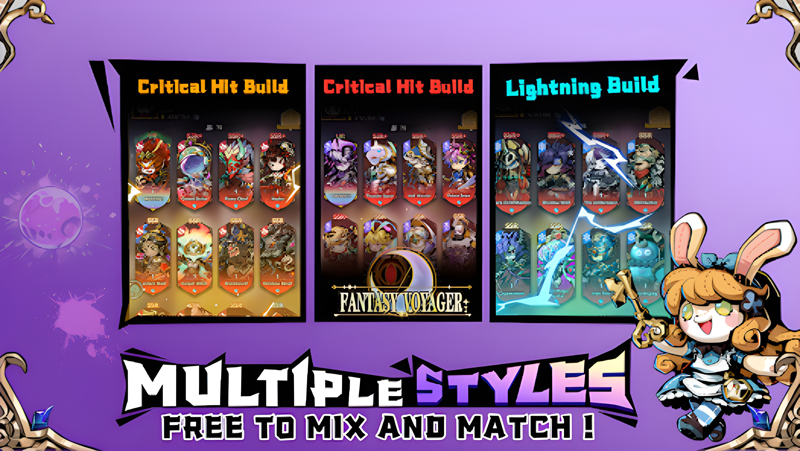
Spirits possess different classes and skills, each unique and distinct. They have personalities too: Little Red Riding Hood wields an axe with fangs bared, while the cute Red Boy’s wrath unleashes fierce flames you cannot escape.
【Star-Up Bond Strategy: Unleash the Wisdom of Travelers】
The connections between spirits create wonderful bond effects, ignoring elemental and class restrictions. The same spirit can form various bond combinations. In addition to combining auto-chess gameplay's bonding features, a star-up mechanism allows spirits of the same tier to synthesize and evolve, gaining powerful attributes and skills.
Emulator Features

With a smart button scheme and image recognition function, provide a more concise UI, and support custom button mapping to meet different needs.

Run multiple games independently at the same time, easily manage multiple accounts, play games while hanging.

Break through FPS limit, and enjoy a seamless gaming experience without lag and delay!

Get a 3-second startup with 52% less memory usage and 65% more stability.
How to Download and Play Fantasy Voyager on PC and Mac
Installation Guide
① Download and install MuMuPlayer on your PC or Mac. It will identify automatically your current system and download the latest version.
② Start MuMuPlayer and complete Google sign-in to access the Play Store, or do it later.
③ Search Fantasy Voyager in the Play Store.
④ Complete Google sign-in (if you skipped step 2) to install Fantasy Voyager.
⑤ Once installation completes, click the Fantasy Voyager icon on the home page to start the game.
⑥ Enjoy playing Fantasy Voyager on your PC or Mac with MuMuPlayer.
Installation Guide
Recommended computer configuration
For Windows:4-core CPU, 4GB RAM, i5 OS, GTX950+ graphics card
For macOS: 4-core CPU, 4GB RAM
Recommended Android Device performance settings
Graphics renderer mode
Vulkan and DirectX both supported
Performance Settings
Recommended performance settings: 2 cores, 2GB. >>How to adjust performance settings
Recommended Android Device Display Settings
Resolution Settings
Go to Device Settings > Display > Resolution Settings to adjust your device's resolution as needed.
FPS Settings
MuMuPlayer supports up to 240 FPS. >>How to enable high FPS mode
Recommended to enable VT
Enabling VT will significantly improve emulator performance, reduce screen freezing, and make games run more smoothly. >>How to enable VT