Play Game of Sky on PC and Mac
Game of Sky is a strategy game developed by IGG.COM that takes place across a breathtaking world of floating islands suspended high above the clouds. Players build and manage a thriving sky city, send fleets of customizable airships on missions through the open air, gather resources, and guide their island residents toward prosperity. The game blends city-building with large-scale aerial combat, giving strategy fans a rich and visually distinct experience to explore. You can download Game of Sky on PC through MuMuPlayer and enjoy everything the game has to offer on a bigger screen.
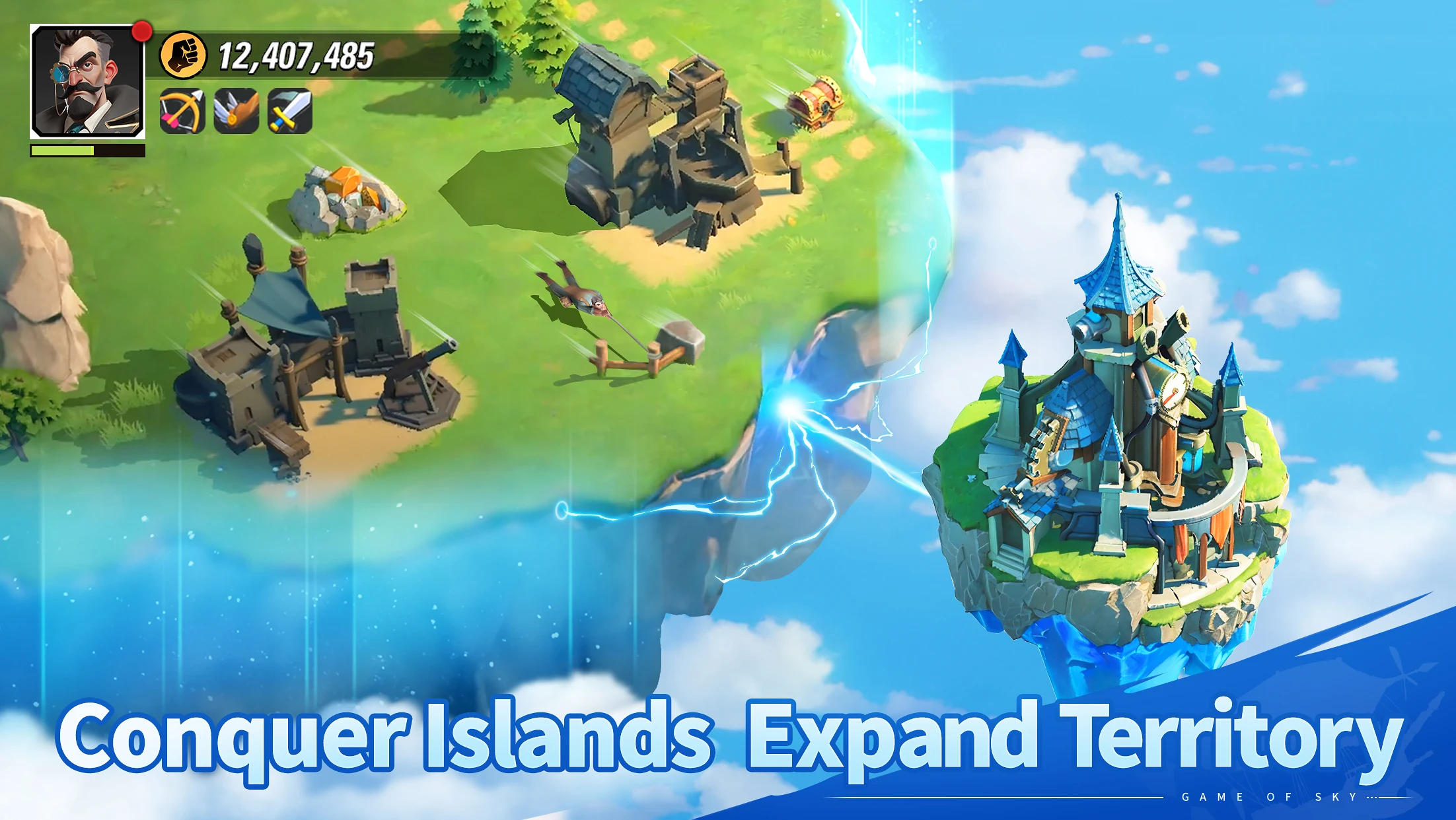
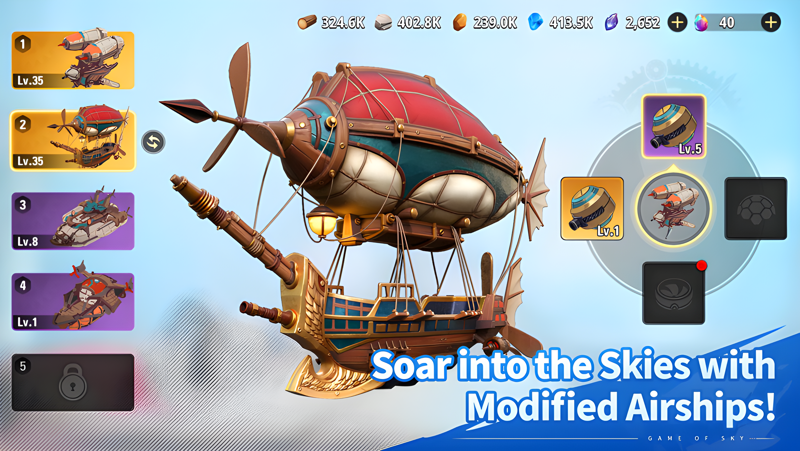
Game of Sky stands out through the variety of activities it layers together. Players can uncover hidden islands concealed beneath drifting clouds, decode ancient mysteries left by forgotten civilizations, and claim those islands as extensions of their growing territory. Beyond exploration, the game allows players to capture and tame massive flying dragon beasts, raising them as battle companions and developing their abilities over time. Airships can be outfitted with different weapon configurations and customized across multiple model types, letting players shape their fleet to match their preferred combat approach. Alliances with other players worldwide open the door to collaborative resource sharing and coordinated large-scale battles, while a deep technology tree lets players unlock new troop types and aerospace advancements to refine their strategy.
Playing Game of Sky on PC through MuMuPlayer brings genuine advantages to a game that demands constant attention and precise coordination. The larger display makes managing island territories, monitoring fleet movements, and tracking ongoing battles far more comfortable than on a small mobile screen. Keyboard and mouse controls simplify city management tasks and speed up airship customization. MuMuPlayer also delivers stable performance during real-time aerial combat, where smooth frame rates and consistent response times can make a meaningful difference. For players investing serious time into alliance coordination and territory expansion, having the game running on a dedicated PC setup through MuMuPlayer is a practical and rewarding choice.
About the Game
Set in a world where civilization has taken root among the clouds, Game of Sky invites players into a sprawling aerial kingdom built across a chain of floating islands. Developed by IGG.COM, this strategy game challenges players to grow from a modest sky settlement into a dominant force that commands the heavens, blending the careful rhythms of city management with the intensity of real-time aerial warfare.
At its foundation, the game centers on building a functioning city in the sky. Players oversee the daily labor of island residents, organize the collection of resources, and construct an expanding network of structures that power their civilization. The islands themselves serve as both home base and battlefield, with territory growth requiring steady planning and smart resource allocation over time.
One of the most compelling aspects of the experience is the fleet system. Airships form the backbone of both exploration and combat, and players have meaningful control over how those vessels are equipped and deployed. Several distinct airship models are available, each compatible with a range of weapons and configurations. Building a fleet is not a passive exercise. It involves deliberate choices about loadouts and tactics, ensuring that no two players approach the skies in exactly the same way.
Exploration adds another layer to the gameplay loop. Hidden islands drift beneath layers of cloud cover throughout the game world, waiting to be discovered. These locations are not simply empty land. They hold remnants of ancient civilizations, including mechanisms and encoded secrets left behind by long-gone predecessors. Unraveling these mysteries rewards players with the ability to absorb new islands into their territory, steadily widening the reach of their sky empire.
The creature system introduces a uniquely exciting dynamic. Enormous flying beasts patrol the skies, and players have the ability to pursue, capture, and tame these creatures. Once brought into the fold, they become loyal combat companions whose abilities can be cultivated and strengthened over time. Deploying these beasts alongside trained military units creates a formidable combined force with real impact on the battlefield.
Key features at a glance: - Real-time aerial battles across floating island territories - Fully customizable airships with multiple weapon and model options - Hidden islands to discover, explore, and claim as your own - Capturable flying dragon beasts that grow into powerful battle allies - Global alliance system with shared resources and cooperative combat - Expanding technology branches that unlock new troop types and military options
The alliance system ensures that the game remains social and competitive at a wide scale. Partnering with players from different parts of the world allows groups to pool resources, coordinate attacks, and pursue shared goals that would be difficult to achieve alone. Large-scale conflicts involving allied forces create some of the most memorable moments the game offers.
For players who want to experience all of this on a larger screen with more precise controls, running Game of Sky through MuMuPlayer on PC is a natural fit. The combination of a widescreen view, keyboard shortcuts, and stable performance makes every aspect of the game, from island construction to fleet combat, easier to manage and more enjoyable to engage with over long sessions.
Emulator Features

With a smart button scheme and image recognition function, provide a more concise UI, and support custom button mapping to meet different needs.

Run multiple games independently at the same time, easily manage multiple accounts, play games while hanging.

Break through FPS limit, and enjoy a seamless gaming experience without lag and delay!

Get a 3-second startup with 52% less memory usage and 65% more stability.
How to Download and Play Game of Sky on PC and Mac
Installation Guide
Download MuMuPlayer
Download and install MuMuPlayer on your PC or Mac
Sign-in Google Store
Complete Google sign-in to access the Play Store
Search and Install
Search Game of Sky in the Play Store
Enjoy Gaming
Enjoy 120 FPS high-def gameplay with big screen
System Requirements
Windows PC
Vulkan / DirectX supported. 4 cores + 4GB RAM recommended. Up to 240 FPS. VT required.
macOS
Recommended: Apple Silicon Mac with 8GB RAM or above. Up to 240 FPS.