Play Back2Back: 2 Player Co-op Game on PC and Mac
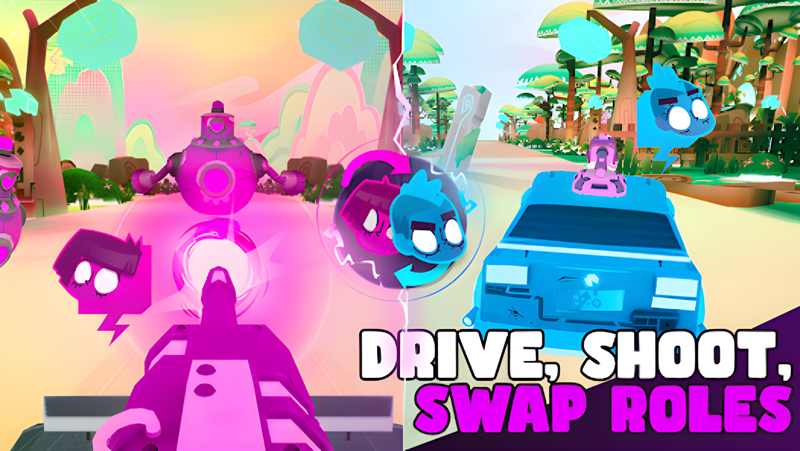
Back2Back: 2 Player Co-op Game is an arcade cooperative experience built entirely around two-player teamwork. Designed for pairs playing on separate phones, it drops you and a partner into a fast-moving, robot-filled world where one person drives and the other shoots. Every run demands quick thinking, constant communication, and tight coordination. Now you can bring that same cooperative chaos to a bigger screen by running Back2Back on your PC through MuMuPlayer, the Android emulator that lets you enjoy mobile games with the comfort and stability of a desktop setup.
Back2Back stands out because its core design forces genuine collaboration rather than just side-by-side play. The game introduces a Switch mechanic where certain enemies can only be eliminated by one specific player, so you and your partner must swap the driver and shooter roles on the fly to survive. Difficulty scales as you progress, adding more obstacles and deadlier robots the further you push. Controls use gyroscope input for an immersive feel, making every turn and aim feel physical. The experience rewards communication, trust, and the kind of natural rhythm that only comes from playing together repeatedly, making it a strong pick for couples or close friends looking for something genuinely interactive.
Playing Back2Back through MuMuPlayer on PC opens up real practical advantages for this style of game. The larger display makes it far easier to read incoming threats and react to role-switch moments before they overwhelm you. MuMuPlayer also provides stable, low-latency performance that keeps the gyroscope and touch inputs responsive, so the fast-paced driving and shooting sequences feel smooth rather than sluggish. If you want to enjoy the full cooperative tension of Back2Back without the limitations of a small mobile screen, launching it through MuMuPlayer is a straightforward way to upgrade the experience.
About the Game
Back2Back is a cooperative arcade game built from the ground up for two players. Unlike most mobile titles that can technically be played solo, this one makes partnership non-negotiable. Both players use separate phones, each controlling one half of the action, and neither can succeed without the other. One person handles the vehicle, steering through increasingly dangerous environments, while the other manages combat, targeting and taking down robotic threats that block the path ahead. The further you go, the more intense things get, and the more clearly your team chemistry shows.
What separates Back2Back from typical co-op experiences is its Switch mechanic. Certain enemies in the game are only vulnerable to attacks from one specific player. When those threats appear, the team has to react fast, flipping roles so the driver becomes the shooter and the shooter takes the wheel. This single mechanic completely changes how you approach every run. You cannot just settle into a comfortable rhythm and stay there. You have to stay alert, call out what you see, and trust your partner to respond in time.
Key gameplay elements include:
- A dedicated two-player structure where both participants play on their own devices simultaneously
- A role-swap system that requires players to trade driver and shooter responsibilities mid-run
- Gyroscope-based controls that add a physical, responsive layer to steering and aiming
- Escalating difficulty that introduces more obstacles and enemy types the deeper you go
- A scoring system that rewards distance, encouraging repeat runs to climb higher
The game does not assume you are already an experienced gamer. Its controls are designed to feel intuitive from the first session, and the early stages ease you in before the real challenge begins. That said, seasoned players will find plenty to push against as the robot encounters grow more complex and the margin for error shrinks.
Back2Back is especially well-suited for couples or close friends who want something more engaging than watching content together. Because the game demands verbal communication and synchronized reactions, it naturally creates shared moments, whether that is celebrating a clean role swap that saved the run or laughing through a chaotic collapse when timing fell apart. The developers have also indicated that new content and features are in development, so the game is positioned to grow over time rather than stay static.
For those who have enjoyed cooperative titles that require real coordination and presence from both players, Back2Back offers a mobile-native take on that format. Running it through MuMuPlayer on PC lets you experience that cooperation on a larger display, with the added comfort of a desktop environment and the performance consistency that makes fast-paced reaction gameplay feel responsive and fair.
Emulator Features
Highest Android 15 Support Best Compatibility on Mac

With a smart button scheme and image recognition function, provide a more concise UI, and support custom button mapping to meet different needs. With a smart button scheme and image recognition, enjoy a cleaner UI and custom button mapping to fit different gaming needs on Mac.

Run multiple games independently at the same time, easily manage multiple accounts, play games while hanging. Take your Mac gaming further with multiple independent instances, easy account management, and seamless AFK gaming on Apple Silicon Mac.

Break through FPS limit, and enjoy a seamless gaming experience without lag and delay! Break through FPS limits for a seamless, lag-free gaming experience on MacBook, Mac mini, iMac, and Mac Studio.

Get a 3-second startup with 52% less memory usage and 65% more stability. Enjoy 3-second startup, 52% less memory usage, and 65% greater stability on Apple Silicon Mac.
How to Download and Play Back2Back: 2 Player Co-op Game on PC and Mac
Installation Guide
Download MuMuPlayer
Download MuMuPlayer and install it on your PC or Mac
Sign-in Google Store
Complete Google sign-in to access the Play Store
Search and Install
Search Back2Back: 2 Player Co-op Game in the Play Store
Enjoy Gaming
Enjoy 120 FPS high-def gameplay with big screen
System Requirements
Windows PC
Vulkan / DirectX supported. 4 cores + 4GB RAM recommended. Up to 240 FPS. VT required.
macOS
Recommended: Apple Silicon Mac with 8GB RAM or above. Up to 240 FPS.