Play Bloons Card Storm on PC Play Bloons Card Storm on PC and Mac
Download Bloons Card Storm on PC with MuMuPlayer, get a PC like gameplay along with smart control and high graphics performance.
MuMuPlayer, the top Android emulator for PC and Apple silicon Mac, delivers an optimal gaming experience with minimal RAM usage and high FPS. It also allows you to create multiple instances of the emulator and run several games simultaneously, thanks to its Multi-instance feature. Its advanced emulator features ensure smooth gameplay, even on low-end PCs.
Download and play Bloons Card Storm on PC with MuMuPlayer and start enjoying your gaming experience now.
Download Bloons Card Storm on PC or Mac with MuMuPlayer, get a PC like gameplay along with smart control and high graphics performance.
MuMuPlayer, the top Android emulator for PC and Apple silicon Mac, delivers an optimal gaming experience with minimal RAM usage and high FPS. It also allows you to create multiple instances of the emulator and run several games simultaneously, thanks to its Multi-instance feature. Its advanced emulator features ensure smooth gameplay, even on low-end PCs.
Download and play Bloons Card Storm on PC or Mac with MuMuPlayer and start enjoying your gaming experience now.
About the Game
The Storm gathers, and only true Heroes can stem the Bloon tide. Gather up your cards, choose your favorite Hero, and enter the Arena to claim victory!

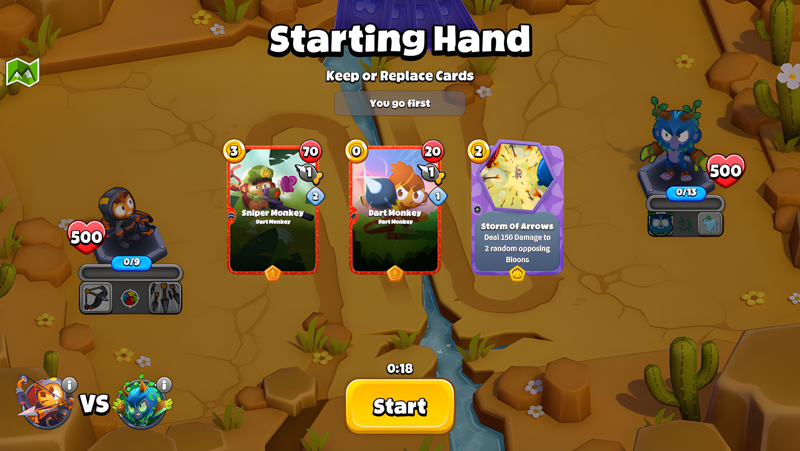
From the makers of Bloons TD 6 comes a revolutionary collectible card game featuring the fan-favorite Monkeys and Bloons, rendered and animated in gorgeous 3D. Develop deep strategies, build your collection by crafting awesome cards, and carefully construct decks to help you win PvP and single player games.

Featuring 4 unique Heroes with 3 Hero Abilities each, 130+ cards at launch, and 5 different Arenas to battle on, the tactical combinations are endless!

BALANCE OFFENSE AND DEFENSE

Monkeys can't attack other Monkeys, so you'll need to stock up on both Bloon AND Monkey cards in order to win. Send Bloons swarming at your opponent, fend off opposing Bloon rushes with your Monkeys, and find that perfect balance essential for victory!

USE HERO ABILITIES WISELY

Playing Bloons will power up Hero Abilities that can turn the tide of battle in your favor. Whether it is Quincy with his bow or Gwen with her flamethrower, each Hero has a unique set of potent Hero Abilities. Choose them wisely!

TEST YOURSELF IN SOLO ADVENTURES

Looking for something more relaxing than fur-flying PvP action? Our solo Adventures are crafted single-player experiences that will test your deck building and game management skills to the limit. Try out the Prologue Adventures or support the game by buying the full DLC Adventures.

FULLY CROSS-PLATFORM

Take your collection of Bloons and Monkeys with you wherever you go, as Bloons Card Storm is fully cross-platform - just register your account and your progress stays with you.

BUILD THE BEST DECKS

Build crazy combo behemoths, fun theme decks, or use the latest meta decklists - the choice is yours!

PLAY AGAINST YOUR FRIENDS

Private match support at launch so you can challenge your friends to a game anywhere, anytime! Matchmaking is also fully cross-platform so what are you waiting for?

Download now and join the Card Storm!
Emulator Features
Highest Android 15 Support Best Compatibility on Mac

With a smart button scheme and image recognition function, provide a more concise UI, and support custom button mapping to meet different needs. With a smart button scheme and image recognition, enjoy a cleaner UI and custom button mapping to fit different gaming needs on Mac.

Run multiple games independently at the same time, easily manage multiple accounts, play games while hanging. Take your Mac gaming further with multiple independent instances, easy account management, and seamless AFK gaming on Apple Silicon Mac.

Break through FPS limit, and enjoy a seamless gaming experience without lag and delay! Break through FPS limits for a seamless, lag-free gaming experience on MacBook, Mac mini, iMac, and Mac Studio.

Get a 3-second startup with 52% less memory usage and 65% more stability. Enjoy 3-second startup, 52% less memory usage, and 65% greater stability on Apple Silicon Mac.
How to Download and Play Bloons Card Storm on PC and Mac
Installation Guide
Download MuMuPlayer
Download MuMuPlayer and install it on your PC or Mac
Sign-in Google Store
Complete Google sign-in to access the Play Store
Search and Install
Search Bloons Card Storm in the Play Store
Enjoy Gaming
Enjoy 120 FPS high-def gameplay with big screen
System Requirements
Windows PC
Vulkan / DirectX supported. 4 cores + 4GB RAM recommended. Up to 240 FPS. VT required.
macOS
Recommended: Apple Silicon Mac with 8GB RAM or above. Up to 240 FPS.