Play Carrion on PC Play Carrion on PC and Mac
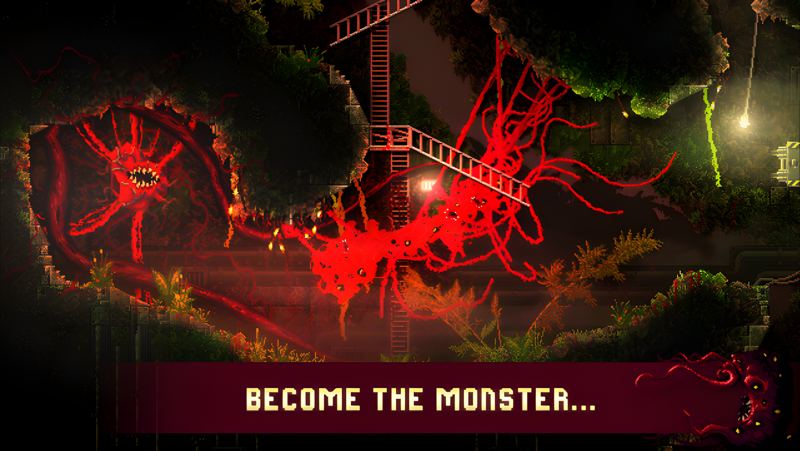
Carrion is a reverse horror action game developed by DevolverDigital, where you control an amorphous creature of unknown origin. Instead of fleeing from monsters, you become the monster, stalking and consuming those who imprisoned you to spread fear throughout the facility. You can play Carrion on PC through MuMuPlayer, bringing this unsettling experience to a larger screen with the precision of keyboard and mouse controls. The game's core loop revolves around growing and evolving as you tear down the prison, acquiring more devastating abilities on your path to retribution.
The main features of Carrion, as highlighted in its Google Play description, include a free trial with no ads, followed by a single in-app purchase to unlock the full game and DLC. There are no gems, hearts, or virtual currency systems, keeping the focus purely on the gameplay. You assume the role of an amorphous creature, stalking and consuming those who imprisoned you. As you progress, you grow and evolve, gaining more and more devastating abilities. The reverse horror theme puts you in the role of the predator, spreading fear and panic throughout the facility.
Playing Carrion on PC with MuMuPlayer enhances the experience by providing a larger screen to appreciate the eerie atmosphere and detailed environments. The keyboard and mouse controls offer precise movement and targeting, which is especially useful when stalking prey and using your evolving abilities. MuMuPlayer also ensures smooth performance, allowing you to fully immerse yourself in the role of the creature without distraction. Whether you are playing on a Windows PC or a Mac, MuMuPlayer provides a reliable way to enjoy Carrion with enhanced controls and visuals.
Download Carrion on PC or Mac with MuMuPlayer, get a PC like gameplay along with smart control and high graphics performance.
MuMuPlayer, the top Android emulator for PC and Apple silicon Mac, delivers an optimal gaming experience with minimal RAM usage and high FPS. It also allows you to create multiple instances of the emulator and run several games simultaneously, thanks to its Multi-instance feature. Its advanced emulator features ensure smooth gameplay, even on low-end PCs.
Download and play Carrion on PC or Mac with MuMuPlayer and start enjoying your gaming experience now.
About the Game
Carrion is a reverse horror game that flips the traditional survival horror formula on its head. Developed by DevolverDigital, this action game puts you in control of an amorphous creature of unknown origin. Your goal is not to escape but to hunt down and consume those who imprisoned you, spreading fear and panic throughout the facility. As you progress, you grow and evolve, acquiring new and more devastating abilities on your path to retribution.
The game offers a free trial with no ads, allowing you to experience the core gameplay before committing. A single in-app purchase unlocks the full game and DLC, with no gems, hearts, or virtual currency required. This straightforward approach keeps the focus on the gameplay and the unsettling atmosphere.
Key features of Carrion include:
- Reverse horror gameplay: Play as the monster, stalking and consuming your captors.
- Evolution system: Grow and acquire new abilities as you tear down the prison.
- No virtual currency: A single purchase unlocks everything, with no ads in the free trial.
- Atmospheric tension: Spread fear and panic throughout the facility as you hunt.
Playing Carrion on PC with MuMuPlayer adds several advantages. The larger screen makes it easier to spot hidden areas and track your prey. Keyboard and mouse controls provide precise movement and targeting, which is crucial when using your evolving abilities. MuMuPlayer also offers smooth performance, ensuring that the atmospheric tension is never broken by lag or stuttering.
For players on Mac, MuMuPlayer provides a way to play Carrion on MacBook, Mac mini, or any Macintosh with Apple Silicon (M1, M2, M3, M4, M5, M5 Pro, M6). While the game does not have native Mac support, MuMuPlayer allows you to run it on macOS seamlessly. This means you can enjoy the game on your Mac without needing a separate Windows PC.
Whether you are playing on a Windows PC or a Mac, MuMuPlayer enhances your experience with Carrion. The emulator's customization options let you adjust controls to your preference, and its performance optimization ensures that the game runs smoothly. Dive into the role of the creature and spread fear throughout the facility, all from the comfort of your PC or Mac.
Emulator Features
Highest Android 15 Support Best Compatibility on Mac

With a smart button scheme and image recognition function, provide a more concise UI, and support custom button mapping to meet different needs. With a smart button scheme and image recognition, enjoy a cleaner UI and custom button mapping to fit different gaming needs on Mac.

Run multiple games independently at the same time, easily manage multiple accounts, play games while hanging. Take your Mac gaming further with multiple independent instances, easy account management, and seamless AFK gaming on Apple Silicon Mac.

Break through FPS limit, and enjoy a seamless gaming experience without lag and delay! Break through FPS limits for a seamless, lag-free gaming experience on MacBook, Mac mini, iMac, and Mac Studio.

Get a 3-second startup with 52% less memory usage and 65% more stability. Enjoy 3-second startup, 52% less memory usage, and 65% greater stability on Apple Silicon Mac.
How to Download and Play Carrion on PC and Mac
Installation Guide
Download MuMuPlayer
Download MuMuPlayer and install it on your PC or Mac
Sign-in Google Store
Complete Google sign-in to access the Play Store
Search and Install
Search Carrion in the Play Store
Enjoy Gaming
Enjoy 120 FPS high-def gameplay with big screen
System Requirements
Windows PC
Vulkan / DirectX supported. 4 cores + 4GB RAM recommended. Up to 240 FPS. VT required.
macOS
Recommended: Apple Silicon Mac with 8GB RAM or above. Up to 240 FPS.