Play Duet Night Abyss on PC Play Duet Night Abyss on PC and Mac
Duet Night Abyss is a fantasy adventure role playing game developed by Hero Games Pan Studio, built around a high degree of freedom and a core loop of multiple weapon loadouts combined with 3D combat. The story follows the lives of Demons from two distinct perspectives, drawing you into a world where magic and machinery exist side by side. You can experience this ambitious RPG on PC through MuMuPlayer, which brings the dual protagonist journey and its fast paced battles to a larger screen with smooth performance.
The game gives you the freedom to unlock every character and weapon by farming fragments and forging materials at your own pace, with no forced progression or rigid templates. Combat breaks away from fixed weapon classes, letting you swap freely between melee and ranged options such as whipblades, crossbows, sniper rifles, grenade launchers, and high tech hover guns, creating your own multidimensional combos. Battles are fast and agile, with aerial assaults, ground takedowns, and varied mission types including tracking, reconnaissance, and rescue. You also get deep customization through dyes and accessories, mixing and matching colors for weapons and outfits to match your personal style.
Playing Duet Night Abyss on PC with MuMuPlayer makes it easier to manage the game's many systems, from character and weapon farming to weapon loadout experimentation and dye customization. The larger screen helps you track fast paced combat and aerial maneuvers, while keyboard and mouse controls offer precision during weapon swaps and combo execution. If you prefer a MacBook, macOS, or an Apple Silicon device like a Mac mini, you can also play on Mac with MuMuPlayer, keeping your progress and account accessible across setups. Whether you are on a Windows PC or a Macintosh, MuMuPlayer provides a stable environment to explore both protagonists' journeys and uncover the truth behind their intertwined fate.
Download Duet Night Abyss on PC or Mac with MuMuPlayer, get a PC like gameplay along with smart control and high graphics performance.
MuMuPlayer, the top Android emulator for PC and Apple silicon Mac, delivers an optimal gaming experience with minimal RAM usage and high FPS. It also allows you to create multiple instances of the emulator and run several games simultaneously, thanks to its Multi-instance feature. Its advanced emulator features ensure smooth gameplay, even on low-end PCs.
Download and play Duet Night Abyss on PC or Mac with MuMuPlayer and start enjoying your gaming experience now.
About the Game
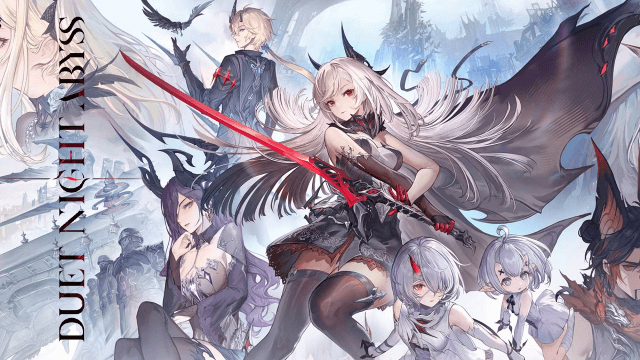
Duet Night Abyss is a fantasy adventure RPG from Hero Games Pan Studio that places freedom at the center of its design. The game combines multiple weapon loadouts with 3D combat, and it tells the story of Demons through two different perspectives. You step into a land where magic and machinery coexist, following two protagonists with very different backgrounds as they fight, explore, and gradually uncover the truth behind a thorny fate. The narrative moves between two shores: one protagonist survives exile in the harsh North Border, while the other is caught in a maelstrom of power and conspiracies. As time flows forward, the two shores are destined to meet.
One of the most distinctive systems is the freedom to unlock characters and weapons without rigid progression. You can farm character fragments and forging materials at your own pace, focusing on a core squad or experimenting with endless tactical possibilities. There is no forced template telling you how to build your roster, so the joy comes from free cultivation and strategic experimentation.
Combat is built around fluid weapon swapping. In battle, you can switch freely between melee and ranged weapons, breaking free from the limitations of a single weapon class. The arsenal includes cool melee options like whipblades and crossbows, as well as heavy firepower such as sniper rifles, grenade launchers, and high tech hover guns. This lets you create unique weapon loadouts and multi dimensional combos that suit your playstyle.
Battles are fast paced and hack and slash in nature. You face waves of relentless enemies and can use both close and long range attacks, along with aerial assaults and ground takedowns. The game also mixes in diverse combat gameplay, including tracking, reconnaissance, and rescue missions, so the action stays unpredictable and thrilling.
Customization goes beyond combat. You can dye and switch weapon and character aesthetics at will, swapping color schemes on the fly to match your combat style with your personal flair. A wealth of accessories, from elegant headpieces to lively waist ornaments, lets you choose between refined beauty and playful fun.
The world itself is filled with a variety of demonic beings, each with their own perspectives. As you engage in constant battles and exploration, you encounter these demons of a hundred faces and gradually piece together the truth behind the spiral of suffering. The dual protagonist structure means you experience the story from two angles, and the game encourages you to uncover how their paths intertwine.
For players who want a bigger screen and more control, playing Duet Night Abyss on PC with MuMuPlayer is a natural choice. The game's weapon swapping and aerial combat benefit from precise keyboard and mouse input, and the larger display makes it easier to follow fast paced fights and manage character and weapon farming. If you use a MacBook, macOS, or an Apple Silicon device such as a Mac mini, you can also play on Mac with MuMuPlayer, giving you flexibility across PC and Mac setups. Whether you are on Windows or a Macintosh, MuMuPlayer helps you stay immersed in the dual journey and the freedom of building your own lineup.
Emulator Features
Highest Android 15 Support Best Compatibility on Mac

With a smart button scheme and image recognition function, provide a more concise UI, and support custom button mapping to meet different needs. With a smart button scheme and image recognition, enjoy a cleaner UI and custom button mapping to fit different gaming needs on Mac.

Run multiple games independently at the same time, easily manage multiple accounts, play games while hanging. Take your Mac gaming further with multiple independent instances, easy account management, and seamless AFK gaming on Apple Silicon Mac.

Break through FPS limit, and enjoy a seamless gaming experience without lag and delay! Break through FPS limits for a seamless, lag-free gaming experience on MacBook, Mac mini, iMac, and Mac Studio.

Get a 3-second startup with 52% less memory usage and 65% more stability. Enjoy 3-second startup, 52% less memory usage, and 65% greater stability on Apple Silicon Mac.
How to Download and Play Duet Night Abyss on PC and Mac
Installation Guide
Download MuMuPlayer
Download MuMuPlayer and install it on your PC or Mac
Sign-in Google Store
Complete Google sign-in to access the Play Store
Search and Install
Search Duet Night Abyss in the Play Store
Enjoy Gaming
Enjoy 120 FPS high-def gameplay with big screen
System Requirements
Windows PC
Vulkan / DirectX supported. 4 cores + 4GB RAM recommended. Up to 240 FPS. VT required.
macOS
Recommended: Apple Silicon Mac with 8GB RAM or above. Up to 240 FPS.
Get more news, guides and redeem codes about Duet Night Abyss
Duet Night Abyss Huaxu: The Wind Awakening - Part 2 Update Notes Overview
Duet Night Abyss Kezhou Build Guide: Best Weapons, Demon Wedges, Introns & Team
The Most Efficient Duet Night Abyss Berenica Build
Overwhelm Your Enemies With This Duet Night Abyss Lynn Build
Duet Night Abyss Weapon Build Guide: Best Weapons & Upgrades
How to Get & Unlock Characters in Duet Night Abyss
Duet Night Abyss Beginner Guide (2025): Essential Guides
Duet Night Abyss Tier List for September 2025: Your Path to Victory