Play Mini Games: Brainrot Challenge on PC Play Mini Games: Brainrot Challenge on PC and Mac
Mini Games: Calm and Relax is a casual collection of bite-sized games built around viral social media trends, Italian Brainrot memes, and popular filter challenges. The game bundles together a wide variety of short, playful experiences into a single app, offering everything from tap-based reflex games to merge puzzles and sound challenges. Whether you are winding down after work or looking for a quick laugh during a commute, the game is designed to deliver light entertainment across all ages, and you can enjoy every mini-game in full on PC by launching it through MuMuPlayer.
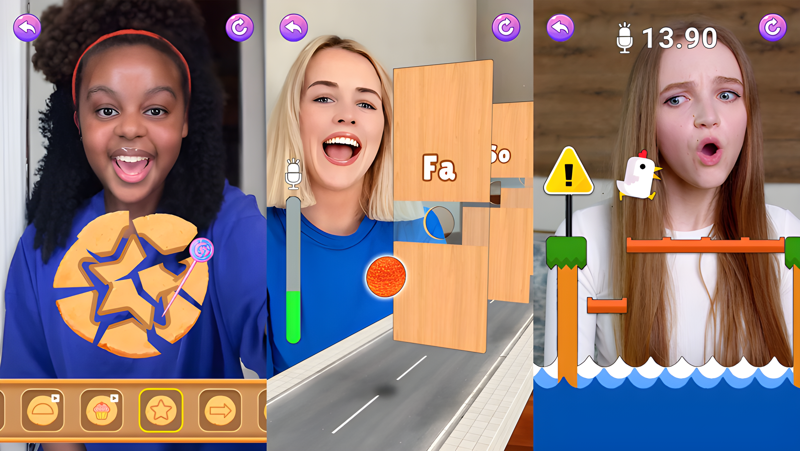
The game draws its content from some of the most recognizable viral moments on social media. Players can take on the Scream Chicken Challenge, the Animal Sound Challenge, the Do Re Mi Challenge, and a range of Italian Brainrot-inspired modes including Brainrot Fusion, Merge Brainrot, and Ranking Brainrot Meme. The controls are kept intentionally simple so anyone can pick up and play without a learning curve, while the colorful 2D visuals keep the experience visually lively. With a constantly rotating roster of mini-games covering puzzles, tap challenges, and meme-driven chaos modes, there is always something new to jump into.
Playing Mini Games: Calm and Relax on PC through MuMuPlayer gives you a noticeably more comfortable setup for these kinds of fast-reaction and tap-heavy games. The larger screen makes reading meme character details and colorful game elements much easier, while keyboard and mouse input can replace touch controls for certain challenge types. MuMuPlayer also keeps your session stable without worrying about battery drain or overheating on a mobile device, so you can chain together mini-game sessions as long as you like without interruption.
Download Mini Games: Brainrot Challenge on PC or Mac with MuMuPlayer, get a PC like gameplay along with smart control and high graphics performance.
MuMuPlayer, the top Android emulator for PC and Apple silicon Mac, delivers an optimal gaming experience with minimal RAM usage and high FPS. It also allows you to create multiple instances of the emulator and run several games simultaneously, thanks to its Multi-instance feature. Its advanced emulator features ensure smooth gameplay, even on low-end PCs.
Download and play Mini Games: Brainrot Challenge on PC or Mac with MuMuPlayer and start enjoying your gaming experience now.
About the Game
Mini Games: Calm and Relax takes the chaotic energy of viral internet culture and turns it into a playable experience built around short, satisfying game sessions. Rather than asking players to commit to a single game mode, it hands them a full collection of mini-games that pull from trending social media filters, popular meme formats, and classic casual game mechanics, all packaged together in one app.
The content is split across two main inspirations. One side of the game leans into recognizable social media filter challenges that have taken over platforms in recent years. These include:
- Scream Chicken Challenge: React-based gameplay inspired by the viral scream filter trend
- Animal Sound Challenge: A listening and response game built around funny animal audio
- Do Re Mi Challenge: A rhythm and sequence challenge tied to the popular musical meme format
- Additional filter-inspired modes that keep the lineup feeling current
The other side of the game goes deep into Italian Brainrot territory, pulling from the surreal meme characters and absurd scenarios that became a major trend across short-form video platforms. Mini-games in this category include:
- Brainrot Fusion: Combine characters and elements in a merge-style format
- Merge Brainrot: A dedicated merging puzzle game built around Brainrot characters
- Ranking Brainrot Meme: Sort and rank meme characters in challenge scenarios
- Various chaos-style mini-games that lean into the unpredictable humor of the Brainrot genre
Beyond the meme-driven content, the game is structured to be genuinely accessible. Controls are kept simple across all game modes, relying on taps and swipes rather than complex input combinations. This makes it easy to pick up any game in the collection without reading instructions or adjusting to new systems. The 2D art style uses bright colors and expressive character designs that stay visually engaging without being overly demanding on the eyes.
The game positions itself as a stress relief tool as much as an entertainment app. Short session lengths mean players can dip in for a few minutes during a break and still feel like they have experienced something complete. There is no pressure to grind through levels or optimize a build. The focus is entirely on immediate, low-stakes fun that gives the brain a chance to switch off from the demands of the day.
For players who want to enjoy this kind of content on a bigger screen, running the game through MuMuPlayer on PC makes the experience noticeably better. The larger display gives every mini-game more visual breathing room, especially for merge puzzles and ranking modes where reading small character details matters. Tap and swipe inputs translate naturally to mouse clicks and drags, and the stable PC environment means long back-to-back sessions are perfectly comfortable. If you are looking for a collection of casual, trend-inspired mini-games that range from silly filter challenges to full Brainrot meme gameplay, this app covers the full spectrum in one place.
Emulator Features
Highest Android 15 Support Best Compatibility on Mac

With a smart button scheme and image recognition function, provide a more concise UI, and support custom button mapping to meet different needs. With a smart button scheme and image recognition, enjoy a cleaner UI and custom button mapping to fit different gaming needs on Mac.

Run multiple games independently at the same time, easily manage multiple accounts, play games while hanging. Take your Mac gaming further with multiple independent instances, easy account management, and seamless AFK gaming on Apple Silicon Mac.

Break through FPS limit, and enjoy a seamless gaming experience without lag and delay! Break through FPS limits for a seamless, lag-free gaming experience on MacBook, Mac mini, iMac, and Mac Studio.

Get a 3-second startup with 52% less memory usage and 65% more stability. Enjoy 3-second startup, 52% less memory usage, and 65% greater stability on Apple Silicon Mac.
How to Download and Play Mini Games: Brainrot Challenge on PC and Mac
Installation Guide
Download MuMuPlayer
Download MuMuPlayer and install it on your PC or Mac
Sign-in Google Store
Complete Google sign-in to access the Play Store
Search and Install
Search Mini Games: Brainrot Challenge in the Play Store
Enjoy Gaming
Enjoy 120 FPS high-def gameplay with big screen
System Requirements
Windows PC
Vulkan / DirectX supported. 4 cores + 4GB RAM recommended. Up to 240 FPS. VT required.
macOS
Recommended: Apple Silicon Mac with 8GB RAM or above. Up to 240 FPS.