Play Mister Antonio on PC Play Mister Antonio on PC and Mac
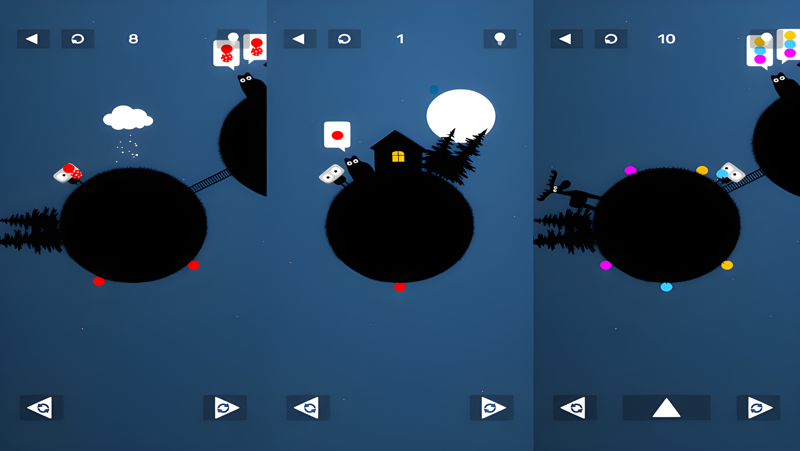
Mister Antonio is a puzzle game from developer Bart Bonte that centers on a quirky cat with rather curious demands. Your job is to navigate around different worlds using the control buttons and fetch the right ball combinations for your cat in increasingly challenging levels. You can play Mister Antonio on PC through MuMuPlayer, which brings this charming puzzle adventure to a larger screen with smooth performance.
The game features surprising encounters, lovingly crafted puzzles, and satisfying sounds. Each level presents a new challenge as you work out the correct ball combinations for Mister Antonio. The control buttons let you move around the different worlds, and the puzzles grow more demanding as you progress. The combination of clever design and audio feedback makes every solved puzzle feel rewarding.
Playing Mister Antonio on PC with MuMuPlayer gives you a comfortable way to enjoy this Bart Bonte puzzle game. The larger display makes it easier to spot the details in each world, and the controls feel responsive as you navigate and test ball combinations. MuMuPlayer provides a stable environment for playing on Windows, and you can also play on Mac with MuMuPlayer if you prefer macOS. Whether you use a PC or a MacBook, the game runs smoothly, and the satisfying sounds and visual clues are easier to appreciate on a bigger screen.
Download Mister Antonio on PC or Mac with MuMuPlayer, get a PC like gameplay along with smart control and high graphics performance.
MuMuPlayer, the top Android emulator for PC and Apple silicon Mac, delivers an optimal gaming experience with minimal RAM usage and high FPS. It also allows you to create multiple instances of the emulator and run several games simultaneously, thanks to its Multi-instance feature. Its advanced emulator features ensure smooth gameplay, even on low-end PCs.
Download and play Mister Antonio on PC or Mac with MuMuPlayer and start enjoying your gaming experience now.
About the Game
Mister Antonio is a puzzle game adventure about a quirky cat with rather curious demands. Developed by Bart Bonte, this game invites you to navigate around different worlds using the control buttons and fetch the right ball combinations for your cat in increasingly challenging levels. The experience is built around surprising encounters, lovingly crafted puzzles, and satisfying sounds that make each solution feel rewarding.
Gameplay and Progression
The core loop is simple to understand but gradually becomes more demanding. You move through various worlds by using the control buttons, and in each level you must figure out which ball combinations Mister Antonio wants. The puzzles are designed to be logical and satisfying, with each world offering a fresh set of challenges. As you advance, the combinations become more complex, encouraging you to observe carefully and think ahead.
Key Features
- Puzzle adventure centered on a cat with curious demands.
- Multiple worlds to navigate using control buttons.
- Increasingly challenging levels that test your logic and observation.
- Surprising encounters and lovingly crafted puzzles.
- Satisfying sounds that provide feedback and enhance the experience.
A Bart Bonte Puzzle Game
Bart Bonte is known for creating thoughtful puzzle games, and Mister Antonio continues that tradition. The game focuses on clean design, intuitive interactions, and puzzles that are enjoyable to solve. The charming theme and the cat's quirky personality add a lighthearted tone to the challenge.
Playing on PC and Mac with MuMuPlayer
You can play Mister Antonio on PC through MuMuPlayer, which offers a smooth and stable environment for this puzzle game. The larger screen makes it easier to see the details in each world, and the controls are responsive as you navigate and test ball combinations. If you prefer macOS, you can also play on Mac with MuMuPlayer, including on a MacBook or Mac mini through MuMuPlayer. The game works well on Apple Silicon Macs, and MuMuPlayer provides a consistent way to enjoy the puzzles on a bigger display. Whether you are using Windows or macOS, MuMuPlayer helps you focus on the gameplay without distractions.
Tips for Playing
- Pay attention to the ball combinations required in each level.
- Use the control buttons to explore each world thoroughly.
- Listen to the satisfying sounds for feedback on your progress.
- Take your time with the increasingly challenging puzzles.
Mister Antonio is a charming puzzle game that rewards careful observation and logical thinking. With its quirky cat, clever puzzles, and satisfying audio, it offers an enjoyable experience for puzzle fans. Playing on PC with MuMuPlayer enhances the experience with a larger screen and stable performance, and you can also play on Mac with MuMuPlayer if you use macOS.
Emulator Features
Highest Android 15 Support Best Compatibility on Mac

With a smart button scheme and image recognition function, provide a more concise UI, and support custom button mapping to meet different needs. With a smart button scheme and image recognition, enjoy a cleaner UI and custom button mapping to fit different gaming needs on Mac.

Run multiple games independently at the same time, easily manage multiple accounts, play games while hanging. Take your Mac gaming further with multiple independent instances, easy account management, and seamless AFK gaming on Apple Silicon Mac.

Break through FPS limit, and enjoy a seamless gaming experience without lag and delay! Break through FPS limits for a seamless, lag-free gaming experience on MacBook, Mac mini, iMac, and Mac Studio.

Get a 3-second startup with 52% less memory usage and 65% more stability. Enjoy 3-second startup, 52% less memory usage, and 65% greater stability on Apple Silicon Mac.
How to Download and Play Mister Antonio on PC and Mac
Installation Guide
Download MuMuPlayer
Download MuMuPlayer and install it on your PC or Mac
Sign-in Google Store
Complete Google sign-in to access the Play Store
Search and Install
Search Mister Antonio in the Play Store
Enjoy Gaming
Enjoy 120 FPS high-def gameplay with big screen
System Requirements
Windows PC
Vulkan / DirectX supported. 4 cores + 4GB RAM recommended. Up to 240 FPS. VT required.
macOS
Recommended: Apple Silicon Mac with 8GB RAM or above. Up to 240 FPS.