Nightfall: Kingdom Frontier TD (macOS)
Play Nightfall: Kingdom Frontier TD on PC Play Nightfall: Kingdom Frontier TD on PC and Mac
Nightfall: Kingdom Frontier TD is a strategy game from Fansipan Limited that blends medieval kingdom building with tactical tower defense. You play as a knight defending the frontier from creatures that emerge after dark, balancing daytime construction with nighttime battles. The game is available on mobile, and you can play it on PC with MuMuPlayer for a smoother, more controlled experience. The core loop of preparing your defenses by day and surviving waves by night gives each session a clear rhythm and a satisfying sense of progression.
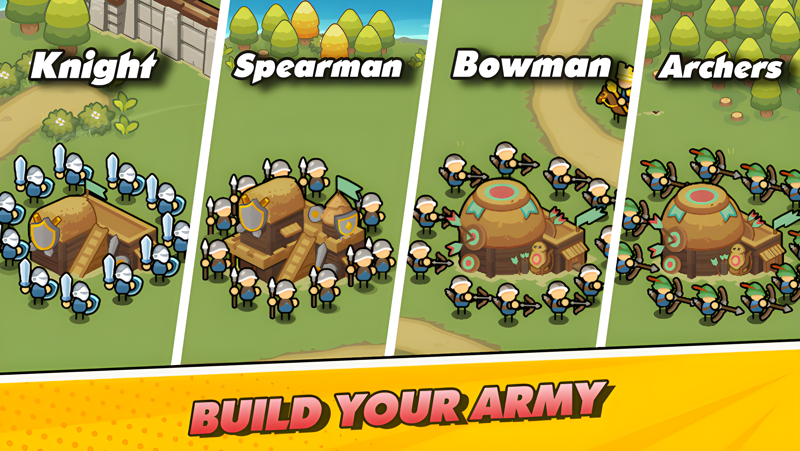
The game's main features center on that day and night cycle. During the day you construct a medieval fortress, manage resources by building gold houses, and strengthen your tower defense units. When nightfall arrives, savage creatures spawn from the darkness and you must hold the frontier with the strategy you prepared. The description highlights resource management as a key element, requiring you to balance your economy with your knight barracks. There are also offline modes that let you play the tower defense adventure anywhere, and the overall structure will appeal to players who enjoy tactical choices similar to those found in Thronefall.
Playing Nightfall: Kingdom Frontier TD on PC with MuMuPlayer gives you a larger screen and more precise control over your base layout and unit placement. The game's mix of building and defending benefits from a stable environment where you can see the entire battlefield and react quickly during night waves. MuMuPlayer is designed to run Android games on Windows, and it also lets you play on Mac with MuMuPlayer, including on MacBook, Mac mini, and Apple Silicon models like M1, M2, M3, M4, M5, M5 Pro, and M6. Whether you are on a desktop PC or a Macintosh, you can enjoy the game with keyboard and mouse support and customizable settings, making each nightfall defense easier to manage.
Download Nightfall: Kingdom Frontier TD on PC or Mac with MuMuPlayer, get a PC like gameplay along with smart control and high graphics performance.
MuMuPlayer, the top Android emulator for PC and Apple silicon Mac, delivers an optimal gaming experience with minimal RAM usage and high FPS. It also allows you to create multiple instances of the emulator and run several games simultaneously, thanks to its Multi-instance feature. Its advanced emulator features ensure smooth gameplay, even on low-end PCs.
Download and play Nightfall: Kingdom Frontier TD on PC or Mac with MuMuPlayer and start enjoying your gaming experience now.
About the Game
Nightfall: Kingdom Frontier TD is a strategy title developed by Fansipan Limited that puts you in the role of a knight defending a medieval frontier. The game is built around a repeating cycle: you spend daylight hours constructing and upgrading your fortress, then face waves of savage creatures when nightfall arrives. This structure creates a clear tactical loop where every decision you make during the day directly affects your chances of survival at night.
The story begins with Lord James VII, a brave knight who once ruled a medieval kingdom. As darkness falls, creatures spawn from the night and threaten the frontier. Your mission is to lead your knight, build defenses, and hold the line against these hordes. The narrative framing gives context to the action, but the real focus is on the strategy you deploy each time the sun goes down.
Gameplay is divided into two distinct phases. During the day, you act as a master of strategy, constructing a medieval fortress and upgrading the frontier. You build gold houses to generate resources and maintain a knight barracks to train your defenders. This phase is about preparation and economy management. When nightfall begins, the war rises. You must use the tower defense units and fortifications you have prepared to repel waves of enemies. The balance between resource generation and military strength is central to success.
The game emphasizes resource management as a core mechanic. You cannot simply build defenses without considering your economy. Gold houses provide the income needed to sustain your army, while the barracks determine the units available to you. Finding the right balance between these elements is key to keeping the frontier safe through the nightfall cycle. This economic layer adds depth to the tower defense formula and rewards players who plan ahead.
Offline play is another highlighted feature. The game includes offline modes that let you enjoy the tower defense adventure without a constant internet connection. This makes it possible to play anywhere, whether you are commuting or traveling. The description notes that the adventure does not stop, and offline support ensures you can continue your campaign even when you are not online.
For players who enjoy tactical choices similar to those in Thronefall, Nightfall: Kingdom Frontier TD offers a comparable rhythm of preparation and defense. The game is designed for strategy enthusiasts who like to see the results of their planning unfold in real time. Each nightfall wave tests your setup, and each new day gives you a chance to adjust and improve.
Key features include the day and night cycle, where you build by day and defend by night. Resource management through gold houses and barracks adds an economic layer. Epic offline tower defense modes extend the experience beyond a single session. The game is built for players who want a deep tower defense experience with a medieval setting.
On PC, you can play Nightfall: Kingdom Frontier TD with MuMuPlayer. The emulator provides a larger screen and precise controls, which helps when you are placing buildings or managing units during a night wave. MuMuPlayer is designed for Windows, and it also allows you to play on Mac with MuMuPlayer, including MacBook, Mac mini, and Apple Silicon chips such as M1, M2, M3, M4, M5, M5 Pro, and M6. Whether you are using a desktop PC or a Macintosh, you can enjoy the game with keyboard and mouse support and customizable settings. The stable environment of an emulator can make it easier to focus on the strategic elements of the game, especially during intense nightfall battles.
If you enjoy tower defense games with a medieval theme and a strong emphasis on preparation and resource management, Nightfall: Kingdom Frontier TD offers a structured experience. The cycle of building and defending, combined with offline play and the option to play on PC or Mac with MuMuPlayer, makes it accessible to a wide range of strategy fans.
Emulator Features
Highest Android 15 Support Best Compatibility on Mac

With a smart button scheme and image recognition function, provide a more concise UI, and support custom button mapping to meet different needs. With a smart button scheme and image recognition, enjoy a cleaner UI and custom button mapping to fit different gaming needs on Mac.

Run multiple games independently at the same time, easily manage multiple accounts, play games while hanging. Take your Mac gaming further with multiple independent instances, easy account management, and seamless AFK gaming on Apple Silicon Mac.

Break through FPS limit, and enjoy a seamless gaming experience without lag and delay! Break through FPS limits for a seamless, lag-free gaming experience on MacBook, Mac mini, iMac, and Mac Studio.

Get a 3-second startup with 52% less memory usage and 65% more stability. Enjoy 3-second startup, 52% less memory usage, and 65% greater stability on Apple Silicon Mac.
How to Download and Play Nightfall: Kingdom Frontier TD on PC and Mac
Installation Guide
Download MuMuPlayer
Download MuMuPlayer and install it on your PC or Mac
Sign-in Google Store
Complete Google sign-in to access the Play Store
Search and Install
Search Nightfall: Kingdom Frontier TD in the Play Store
Enjoy Gaming
Enjoy 120 FPS high-def gameplay with big screen
System Requirements
Windows PC
Vulkan / DirectX supported. 4 cores + 4GB RAM recommended. Up to 240 FPS. VT required.
macOS
Recommended: Apple Silicon Mac with 8GB RAM or above. Up to 240 FPS.