Play Vinland Tales・ Viking Survival on PC Play Vinland Tales・ Viking Survival on PC and Mac
Vinland Tales・ Viking Surviva is a survival action RPG developed by Colossi Games that blends casual sandbox mechanics with deep village-building and open-world exploration. Set in a harsh Viking world inspired by the journeys of Leif Eriksson, you gather resources, fight enemies, and carve out a settlement for rescued clansmen. While it is designed for mobile, you can play it on PC with MuMuPlayer, giving you a larger screen and smoother controls for every expedition.
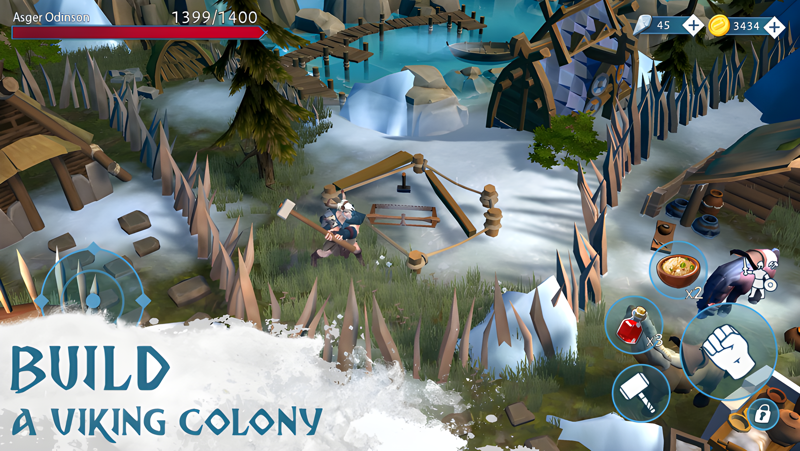
The game stands out by casualizing survival staples: instead of managing hunger, you rely on a replenishable health pool, so each session starts with exploration rather than survival maintenance. You chop trees, hunt wildlife, and mine stone and copper to fuel your progress. Building is central: start with a simple camp and grow it into a full Viking village, assigning jobs to settlers, refining resources, and adding wells and defenses. Combat lets you craft and upgrade clubs, swords, bows, spears, and more, then face bandits and the armies of Ragnarök. Exploration leads you through dark medieval history, sieges on rival strongholds, and construction of mining shafts and worship sites for Thor and Odin. Additional features include events, quests, talent trees, coop building, mini games, achievements, clan PvP leaderboards, guilds, and chat.
Playing Vinland Tales on PC with MuMuPlayer transforms the experience: the keyboard and mouse setup makes resource gathering, village management, and combat more precise, while the larger display lets you appreciate the detailed world and plan your settlement layout. MuMuPlayer also supports Mac, so you can play on MacBook, Mac mini, or any macOS device with Apple Silicon (including M1, M2, M3, M4, M5, M5 Pro, or M6) through the emulator. Whether you are on a Windows PC or a Mac, MuMuPlayer keeps the game running smoothly and lets you enjoy Viking survival without being tied to a small screen.
Download Vinland Tales・ Viking Survival on PC or Mac with MuMuPlayer, get a PC like gameplay along with smart control and high graphics performance.
MuMuPlayer, the top Android emulator for PC and Apple silicon Mac, delivers an optimal gaming experience with minimal RAM usage and high FPS. It also allows you to create multiple instances of the emulator and run several games simultaneously, thanks to its Multi-instance feature. Its advanced emulator features ensure smooth gameplay, even on low-end PCs.
Download and play Vinland Tales・ Viking Survival on PC or Mac with MuMuPlayer and start enjoying your gaming experience now.
About the Game
Vinland Tales・ Viking Surviva, from developer Colossi Games, is a survival action RPG that mixes casual sandbox gameplay with extensive village building. You step into a Viking world where exploration, resource management, and combat are woven into a continuous open-world progression. The game draws inspiration from the journeys of Leif Eriksson, the great Viking explorer, and adds frosty winter surprises and the looming threat of Ragnarök. While the core experience is built for mobile, you can play it on PC with MuMuPlayer for a more comfortable and expansive session.
Survival, Simplified Traditional survival games often force you to babysit hunger meters, but Vinland Tales takes a more relaxed approach. You have a replenishable health pool, so you can focus on exploration and discovery from the moment you start playing. Resource gathering remains essential: chop down trees, hunt rabbits and deer, and mine stone and copper. These materials feed into crafting, building, and upgrading, forming the backbone of your progress.
Build and Manage a Viking Settlement Your journey begins with a small camp, but it can grow into a thriving Viking village. Rescued clansmen arrive to settle as workers, and you can assign them to resource refining jobs. Construct houses, add wells for water, and build defensive structures to protect your people. The village becomes a living hub that supports your adventures and reflects your decisions as a leader.
Craft, Fight, and Upgrade Combat in Vinland Tales is varied and customizable. You can craft weapons from a selection of clubs, swords, bows, spears, and more. Upgrade them to improve their effectiveness, and embellish your gear with gems that add attributes. Enemies include bandit bosses, the armies of Ragnarök, and other unfriendly folk. Whether you prefer ranged attacks with a bow or close combat with a sword, there is a playstyle for you.
Explore a Harsh Open World The world of Vinland is rich with medieval history and Norse mythology. You can unravel the story of Leif Eriksson, lead sieges against strongholds held by other survivor players, and build mining shafts and worship sites dedicated to Thor and Odin. The open-world design encourages continuous progression, with quests and events that keep you engaged. Dark winters bring additional challenges, but also opportunities for raids and discovery.
More Features on the Horizon The developers have outlined a roadmap that includes events, quests, talent trees, coop building, mini games, achievements, clan PvP leaderboards, guilds, and chat. These additions aim to deepen the social and competitive aspects of the game, giving players more ways to interact and compete.
Why Play on PC with MuMuPlayer Playing Vinland Tales on PC with MuMuPlayer offers several advantages. The keyboard and mouse controls provide greater precision for resource gathering, combat, and village management. The larger screen makes it easier to plan your settlement layout and appreciate the detailed environments. MuMuPlayer also supports Mac, so you can play on MacBook, Mac mini, or any macOS device with Apple Silicon (including M1, M2, M3, M4, M5, M5 Pro, or M6) through the emulator. Whether you are on a Windows PC or a Mac, MuMuPlayer delivers a smooth experience that lets you enjoy Viking survival without being limited by a small screen.
Join the Community Colossi Games encourages players to share feedback and connect directly. You can join the official Discord to discuss the game, suggest features, and stay updated on new content. The developers are actively engaged with the community and value player input as they continue to expand Vinland Tales.
Emulator Features
Highest Android 15 Support Best Compatibility on Mac

With a smart button scheme and image recognition function, provide a more concise UI, and support custom button mapping to meet different needs. With a smart button scheme and image recognition, enjoy a cleaner UI and custom button mapping to fit different gaming needs on Mac.

Run multiple games independently at the same time, easily manage multiple accounts, play games while hanging. Take your Mac gaming further with multiple independent instances, easy account management, and seamless AFK gaming on Apple Silicon Mac.

Break through FPS limit, and enjoy a seamless gaming experience without lag and delay! Break through FPS limits for a seamless, lag-free gaming experience on MacBook, Mac mini, iMac, and Mac Studio.

Get a 3-second startup with 52% less memory usage and 65% more stability. Enjoy 3-second startup, 52% less memory usage, and 65% greater stability on Apple Silicon Mac.
How to Download and Play Vinland Tales・ Viking Survival on PC and Mac
Installation Guide
Download MuMuPlayer
Download MuMuPlayer and install it on your PC or Mac
Sign-in Google Store
Complete Google sign-in to access the Play Store
Search and Install
Search Vinland Tales・ Viking Survival in the Play Store
Enjoy Gaming
Enjoy 120 FPS high-def gameplay with big screen
System Requirements
Windows PC
Vulkan / DirectX supported. 4 cores + 4GB RAM recommended. Up to 240 FPS. VT required.
macOS
Recommended: Apple Silicon Mac with 8GB RAM or above. Up to 240 FPS.