Play Wizardry Variants Daphne on PC Play Wizardry Variants Daphne on PC and Mac
Wizardry Variants Daphne, developed by Drecom, is a role-playing game that continues the legendary Wizardry lineage while bringing its iconic dungeon-crawling formula into a modern era. Set against a world consumed by a cursed force known as the Abyss, the game challenges players to assemble a party, explore treacherous 3D labyrinths, and uncover the fate of a kingdom left without its king. With MuMuPlayer, this deeply atmospheric RPG adventure is fully playable on PC, letting you experience every dark corridor and story moment on a larger screen.
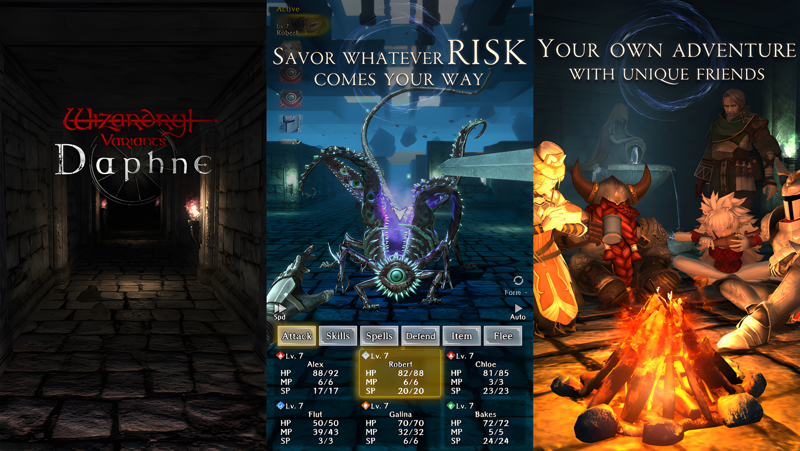
At the heart of the experience is a challenging dungeon system built around meaningful choices. Players build parties using a combination of races and classes, creating diverse team compositions that directly affect how encounters play out. The dungeons themselves are filled with deadly traps and formidable enemies, maintaining the high difficulty the Wizardry series has always been known for. The game features a fully voiced scenario in both English and Japanese, with renowned voice casts bringing major characters like Lulunarde, Dylanhardt, and Shagtis of Sorrow to life. Creative contributions come from notable talents including character designer Yusuke Kozaki, monster designer Katsuya Terada, and composer Hitoshi Sakimoto, whose soundtrack spans more than 130 game titles. Controls are designed for one-handed vertical smartphone play, making the interface clean and accessible.
Playing Wizardry Variants Daphne through MuMuPlayer on PC opens up real advantages for an RPG of this depth. The larger display makes reading dungeon maps, tracking enemy positions, and managing party details far more comfortable during extended play sessions. Keyboard and mouse support gives players more precise control when navigating menus and exploring complex labyrinths that demand attention to detail. MuMuPlayer also provides stable performance, which matters when every step through a dangerous dungeon needs to be deliberate and calculated.
Download Wizardry Variants Daphne on PC or Mac with MuMuPlayer, get a PC like gameplay along with smart control and high graphics performance.
MuMuPlayer, the top Android emulator for PC and Apple silicon Mac, delivers an optimal gaming experience with minimal RAM usage and high FPS. It also allows you to create multiple instances of the emulator and run several games simultaneously, thanks to its Multi-instance feature. Its advanced emulator features ensure smooth gameplay, even on low-end PCs.
Download and play Wizardry Variants Daphne on PC or Mac with MuMuPlayer and start enjoying your gaming experience now.
About the Game
Few names carry as much weight in role-playing game history as Wizardry. First released in the United States in 1981, the original series helped define what RPGs could be, introducing concepts like party-based exploration, character classes, and dungeon progression that would go on to shape countless games across decades. Wizardry Variants Daphne, developed by Drecom, honors that foundation while delivering a fully realized modern experience built around the tension and darkness the series has always embraced.
The world of Wizardry Variants Daphne is one on the edge of collapse. A catastrophic curse called the Abyss awakens once every hundred years, spreading death across the continent and consuming everything in its path. For generations, a royal bloodline held the power to seal this force and protect the kingdom. That protection has now failed. The king has disappeared, the curse is spreading unchecked, and the world inches closer to total ruin. The story unfolds against this backdrop of despair, following characters caught in a struggle where survival itself feels uncertain.
Building the right party is central to everything in this game. Players choose from a range of races and classes, combining them to create adventurers suited to the dangers ahead. Each combination produces a different playstyle, encouraging experimentation and strategic thinking before a single step is taken into the dungeon. This flexibility allows players to approach the labyrinth in ways that feel personal and invested.
The dungeons themselves are rendered in full 3D, creating an immersive sense of depth as players push deeper into dangerous territory. What awaits inside is not forgiving:
- Traps are scattered throughout the environment and can catch unprepared adventurers off guard
- Enemy encounters are designed around meaningful difficulty, not just stat scaling
- Navigation requires attention and planning rather than button mashing
- The high challenge level stays true to the demanding spirit of classic Wizardry
The game is presented with production quality that elevates the entire experience. Yusuke Kozaki, known for his detailed character design work across anime and games, handled the main character designs. Katsuya Terada, a veteran of both manga and game character work, gave form to the boss monsters. Composer Hitoshi Sakimoto, whose music credits span more than 130 titles across every genre, created the soundtrack, delivering the kind of rich and cinematic audio the Wizardry world deserves.
The scenario is fully voiced in both English and Japanese, with distinguished casts in both languages. In English, characters like Dylanhardt are voiced by Doug Cockle, while other roles are filled by a wide ensemble of experienced performers. The Japanese cast includes Inori Minase as Lulunarde and Takehito Koyasu as Shagtis of Sorrow, among many others. This level of voice production brings real personality to every major figure in the story.
Controls are designed for one-handed vertical smartphone use, keeping the interface clean and manageable during exploration. For players who prefer a more expansive setup, running Wizardry Variants Daphne on PC through MuMuPlayer transforms the experience. A larger monitor makes dungeon maps easier to read, character management more comfortable, and the detailed art style easier to appreciate. The stable performance MuMuPlayer provides is especially valuable in a game where careful, deliberate movement through every floor of the labyrinth can mean the difference between survival and losing a party member permanently.
Emulator Features
Highest Android 15 Support Best Compatibility on Mac

With a smart button scheme and image recognition function, provide a more concise UI, and support custom button mapping to meet different needs. With a smart button scheme and image recognition, enjoy a cleaner UI and custom button mapping to fit different gaming needs on Mac.

Run multiple games independently at the same time, easily manage multiple accounts, play games while hanging. Take your Mac gaming further with multiple independent instances, easy account management, and seamless AFK gaming on Apple Silicon Mac.

Break through FPS limit, and enjoy a seamless gaming experience without lag and delay! Break through FPS limits for a seamless, lag-free gaming experience on MacBook, Mac mini, iMac, and Mac Studio.

Get a 3-second startup with 52% less memory usage and 65% more stability. Enjoy 3-second startup, 52% less memory usage, and 65% greater stability on Apple Silicon Mac.
How to Download and Play Wizardry Variants Daphne on PC and Mac
Installation Guide
Download MuMuPlayer
Download MuMuPlayer and install it on your PC or Mac
Sign-in Google Store
Complete Google sign-in to access the Play Store
Search and Install
Search Wizardry Variants Daphne in the Play Store
Enjoy Gaming
Enjoy 120 FPS high-def gameplay with big screen
System Requirements
Windows PC
Vulkan / DirectX supported. 4 cores + 4GB RAM recommended. Up to 240 FPS. VT required.
macOS
Recommended: Apple Silicon Mac with 8GB RAM or above. Up to 240 FPS.