
Grimguard Tactics: Fantasy RPG (macOS)
Play Grimguard Tactics: Fantasy RPG on PC and Mac
Download Grimguard Tactics: Fantasy RPG on PC or Mac with MuMuPlayer, get a PC like gameplay along with smart control and high graphics performance.
MuMuPlayer, the top Android emulator for PC and Apple silicon Mac, delivers an optimal gaming experience with minimal RAM usage and high FPS. It also allows you to create multiple instances of the emulator and run several games simultaneously, thanks to its Multi-instance feature. Its advanced emulator features ensure smooth gameplay, even on low-end PCs.
Download and play Grimguard Tactics: Fantasy RPG on PC or Mac with MuMuPlayer and start enjoying your gaming experience now.
About the Game
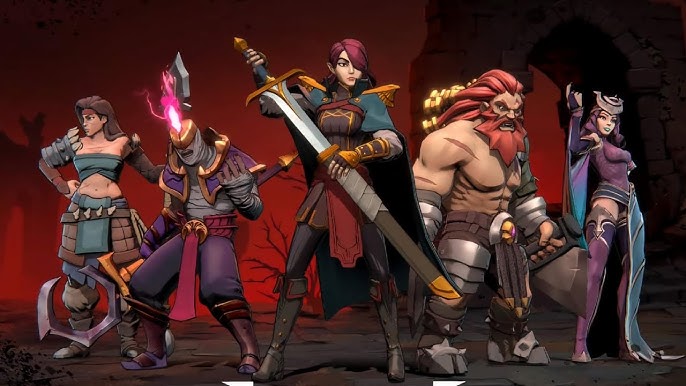
Grimguard Tactics is an epic, dark fantasy RPG strategy game with expansive Hero summoning and simple easy to learn turn-based tactics gameplay.

The Primorva, an ancient evil has awoken from the shadows. To free the world of Terenos you must summon and bring together its most powerful, legendary, and dangerous heroes in attempt to drive back the oncoming darkness. In battle you'll forge unlikely alliances and assemble an epic team of the greatest heroes this world has ever seen!

Download Grimguard Tactics: Fantasy RPG now to join the epic fight and free Terenos!

*FEATURES*

STRATEGY TACTICS RPG
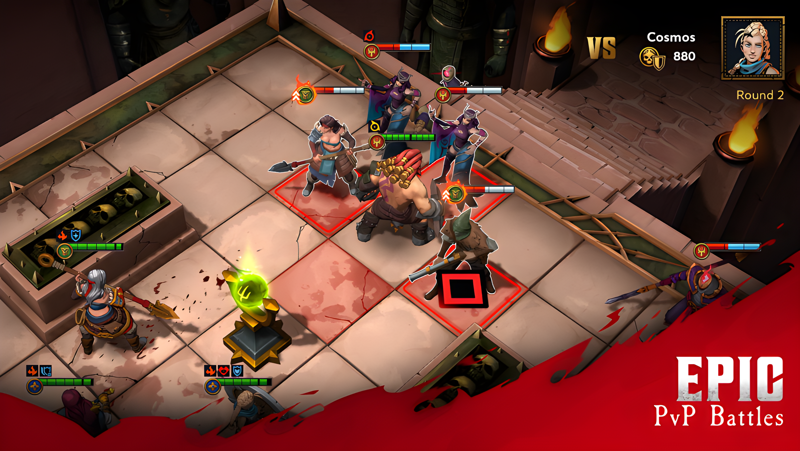
Featuring turn-based RPG tactics gameplay with strategy that is easy to play, but tough to master. Command a team of epic heroes using devastating RPG style combos and powerful tactics to change the tides of combat!

PVP ARENA
Mark your place in history, by battling it out with players from around the world. Climb to the top of the leaderboard and reap the rewards just waiting to taken!

EPIC HERO COLLECTOR
Recruit the most epic of heroes with unique perks, abilities, factions, and bonus stats through the Hero Recruitment Caravan. Upgrade Gear, Level Up and then Ascend your Heroes to raid enemies and take part in the epic war against the evil Primorvan hoard in this dark fantasy RPG!

TEAM CUSTOMIZATION
Customize your team with epic Heroes from different RPG roles such as Assault, Tank, and Support and create the perfect epic hero squad! As you battle and raid the enemy, experiment to discover the powerful hidden synergistic combinations that provide your heroes with epic tactical bonuses.

TACTICAL BOSS BATTLES
Encounter epic tactical turn-based team Boss fights, challenging Dungeon raids, and even nightmarish corrupted Heroes that stand in your way. Put all your RPG strategy and tactics skills to the test to vanquish your epic foes and free Terenos!

TOWN BUILDING
Gather your team and embark on epic raids into the Primorvan controlled empires and enemy camps. You'll obtain many resources from these raids and battles, which you can then use to rebuild and upgrade Holdfast, the last free bastion of humanity.

QUICK IDLE AFK AUTOPLAY
If you're busy or your raid team is feeling weary, feel free to go AFK and play idle with autoplay! It's your choice, either use turn-based tactics to play your battles with skill and strategy or take it easy and raid hands free AFK idle style in this dark fantasy tactics RPG strategy game!

Story thus far-

The evil Primorva were the first creatures to inhabit the free lands of Terenos, and the first embodiments of life’s basest cravings; hunger, lust, and pain. Like epic nightmares of dark fantasy fleeing from the dawn, they were driven into the shadows by the powerful Dawnseekers, a legendary squad of Heroes established to fight and defeat Primorva wherever they show up.

Now this epic dark force has managed to escape from their exile in the Umbral Plane; they have evolved far beyond the whispered legends of ‘beasties and boogeymen’ that were once told by parents to scare their children. In an unthinkable fantasy, the Primorvan forces learned to corrupt the free folk with their loathsome tactics, trading being free for unlimited power.

This is an invasion of unutterable terror and unthinkable insanity. Humanity isn’t just being conquered, it is being plunged into an epic nightmare from which it may never awaken.

* Network connection is required to play Grimguard Tactics: Fantasy RPG.
* Grimguard Tactics: Fantasy RPG is free to download and play, some items are available for in game purchasing for real money.

Help & Support Email: gg-support@outerdawn.com
Privacy Policy: https://www.outerdawn.com/privacypolicy/en
Facebook: facebook.com/grimguardtactics
X (Twitter): GrimguardGame
Instagram: grimguardtactics
Emulator Features

With a smart button scheme and image recognition function, provide a more concise UI, and support custom button mapping to meet different needs.

Run multiple games independently at the same time, easily manage multiple accounts, play games while hanging.

Break through FPS limit, and enjoy a seamless gaming experience without lag and delay!

Get a 3-second startup with 52% less memory usage and 65% more stability.
How to Download and Play Grimguard Tactics: Fantasy RPG on PC and Mac
Installation Guide
Download MuMuPlayer
Download and install MuMuPlayer on your PC or Mac
Sign-in Google Store
Complete Google sign-in to access the Play Store
Search and Install
Search Grimguard Tactics: Fantasy RPG in the Play Store
Enjoy Gaming
Enjoy 120 FPS high-def gameplay with big screen
System Requirements
Windows PC
Vulkan / DirectX supported. 4 cores + 4GB RAM recommended. Up to 240 FPS. VT required.
macOS
Recommended: Apple Silicon Mac with 8GB RAM or above. Up to 240 FPS.
(1).png?fop=imageView/0/w/150/h/150)