How to fix MuMuPlayer startup failure with the prompt 'Please try to exit the antivirus software and restart the emulator'?
When some users use MuMuPlayer, they may encounter a pop-up window prompting "MuMuPlayer failed to start, please try to exit the antivirus software and restart MuMuPlayer" when starting MuMuPlayer. Users who encounter such situations can try the following steps:
1. Exit or uninstall antivirus software
Exit or uninstall your antivirus software.
2. Re-download and Install MuMuPlayer
Download the latest version, overwrite and install MuMuPlayer.
3. Restart MuMuPlayer
Wait for MuMuPlayer to complete the installation, and then try to restart MuMuPlayer.
Note: Some users may not install security software, but when installing MuMuPlayer it still pops up the code 50016. This is because MuMuPlayer may be automatically blocked by the security program. You can refer to the following steps:
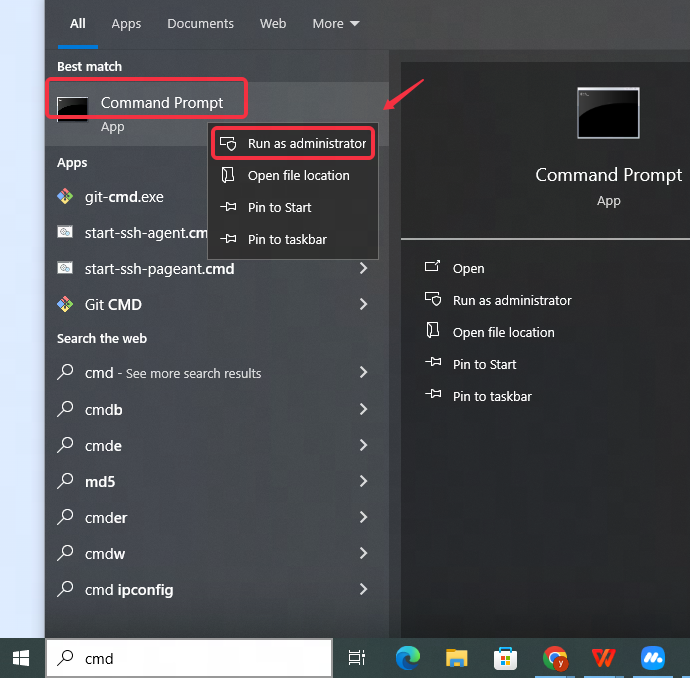
Click Win+R, type cmd, or in the input box of the start menu, type cmd, right-click on Command Prompt - Run as administrator (as shown in the following picture)
In the pop-up cmd window (i.e. Command Prompt window), type sc.exe delete AlibabaProtect, and then click Enter to execute the code. Then restart your computer and try to reinstall MuMuPlayer.
If the solution above still cannot resolve your problem, please contact us via Facebook or join our Discord server for online support.
End of Article