
Play KMA on PC and Mac
Download KMA on PC or Mac with MuMuPlayer, get a PC like gameplay along with smart control and high graphics performance.
MuMuPlayer, the top Android emulator for PC and Apple silicon Mac, delivers an optimal gaming experience with minimal RAM usage and high FPS. It also allows you to create multiple instances of the emulator and run several games simultaneously, thanks to its Multi-instance feature. Its advanced emulator features ensure smooth gameplay, even on low-end PCs.
Download and play KMA on PC or Mac with MuMuPlayer and start enjoying your gaming experience now.
About the Game
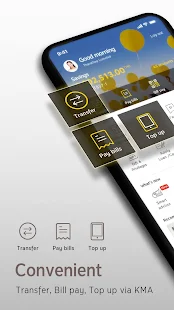
Krungsri Mobile Application (KMA)

It’s time to truly put the power of your financial resources in your hands with the New Krungsri Mobile Application. Simplified, personalized and intuitively easy to use, every facet has been tailor-made to ensure that you can access the required services in the smoothest possible way.

Make your life that much easier today with banking on the go 24 Hours.

Highlighted Services:

- Log on with 6-digit Pin
- Fast access to the menu from the first page
- Customized Menu and decorated as you like
- Simply access all of your accounts and all Krungsri Products including Credit Card, Krungsri iFIN, Car4cash, Home loan, insurance and Mutual fund in one page
- Check account balance and statement
- Check transfer and payment transaction history
- Fund transfer service within Krungsri account or to other bank account, PromptPay ID or international fund transfer.
- Billing Payment for services with more than hundreds of billers
- Easy to top up electronic wallets, Mobile phone operator, Express way Easy Pass and others.
- Scan barcode to pay
- Cashless ATM- Save favorite transaction
- Manage Mutual fund Portfolio
- Save and Share E-slip with QR code scanning for verification
- Scheduling payments and fund transfer
- Apply SMS banking and auto debit service
- Credit card service including billed and unbilled statement checking, Credit Card payment, Credit Card points checking and redemption
- Apply electronic savings account, Credit Card, Krungsri iFIN, Krungsri Car4Cash, Insurance, Krungsri Boarding Card and Subscription for Debenture/equity.
- Identity authentication service through linkage with the National Digital ID (NDID) network or Krungsri i-Confirm service points.
- Special privileges for mobile app users such as accumulation of Krungsri Gift monthly reward points from all financial transactions for redemption of gifts or discount codes, purchase of selected items on e-Marketplace.
- Find branches and ATM locations

Get start by following these easy steps:

- Download Krungsri Mobile App and register instantly by using Krungsri saving account, Krungsri Car4Cash or Krungsri Credit Card
- Register at any Krungsri Branch to get Password then download Krungsri Mobile App and log on

For further assistance please call 1572 or visit www.krungsri.com
Emulator Features

With a smart button scheme and image recognition function, provide a more concise UI, and support custom button mapping to meet different needs.

Run multiple games independently at the same time, easily manage multiple accounts, play games while hanging.

Break through FPS limit, and enjoy a seamless gaming experience without lag and delay!

Get a 3-second startup with 52% less memory usage and 65% more stability.
How to Download and Play KMA on PC and Mac
Installation Guide
① Download and install MuMuPlayer on your PC or Mac. It will identify automatically your current system and download the latest version.
② Start MuMuPlayer and complete Google sign-in to access the Play Store, or do it later.
③ Search KMA in the Play Store.
④ Complete Google sign-in (if you skipped step 2) to install KMA.
⑤ Once installation completes, click the KMA icon on the home page to start the game.
⑥ Enjoy playing KMA on your PC or Mac with MuMuPlayer.
Installation Guide
Recommended computer configuration
For Windows:4-core CPU, 4GB RAM, i5 OS, GTX950+ graphics card
For macOS: 4-core CPU, 4GB RAM
Recommended Android Device performance settings
Graphics renderer mode
Vulkan and DirectX both supported
Performance Settings
Recommended performance settings: 2 cores, 2GB. >>How to adjust performance settings
Recommended Android Device Display Settings
Resolution Settings
Go to Device Settings > Display > Resolution Settings to adjust your device's resolution as needed.
FPS Settings
MuMuPlayer supports up to 240 FPS. >>How to enable high FPS mode
Recommended to enable VT
Enabling VT will significantly improve emulator performance, reduce screen freezing, and make games run more smoothly. >>How to enable VT