Play Mega Zombie M on PC and Mac
Download Mega Zombie M on PC or Mac with MuMuPlayer, get a PC like gameplay along with smart control and high graphics performance.
MuMuPlayer, the top Android emulator for PC and Apple silicon Mac, delivers an optimal gaming experience with minimal RAM usage and high FPS. It also allows you to create multiple instances of the emulator and run several games simultaneously, thanks to its Multi-instance feature. Its advanced emulator features ensure smooth gameplay, even on low-end PCs.
Download and play Mega Zombie M on PC or Mac with MuMuPlayer and start enjoying your gaming experience now.
About the Game
A zombie virus filled the world with horror like a dark night's fog.
Powerful armies fell before the huge legion of zombies, and terrifying zombie predators turned the beautiful city into a warzone.

Treading a thin line between life and death, humans became ferocious beasts who would point a gun at their friends if it got them what they needed.
Survivors are left isolated from the former partners who became enemies and zombie threats, waiting for a helping hand.

Check your weapons, equip armor, and pack bullets. Team up with isolated survivors and fight this menace. Scout the area and implement strategies to survive.

Mega Zombie M is a multiplayer third-person shooter where players battle against each other, and zombies hunt all players during the battle.
Protect yourself in a brutal warpath, and kill zombies to survive. The outcome depends on the decisions you make.

🧟 Chaotic Zombie Apocalypse 🧟
Humans? Zombies? In a battle for survival, your enemies will attack with all their might, and hungry zombies will give it their all to hunt you dotn and tear you apart.
When zombies run toward your enemies in an unpredictable battleground, who knows who they will attack? If you hesitate, it could well be you.

🧟 Thrilling Shooter Game 🧟
Arm yourself with powerful weapons and a variety of armor for each part. Charge with an assault rifle, or take careful aim at your target with a sniper rifle.
Wipe out the running zombies with a machine gun. The only way to survive a zombie attack is to be merciless.

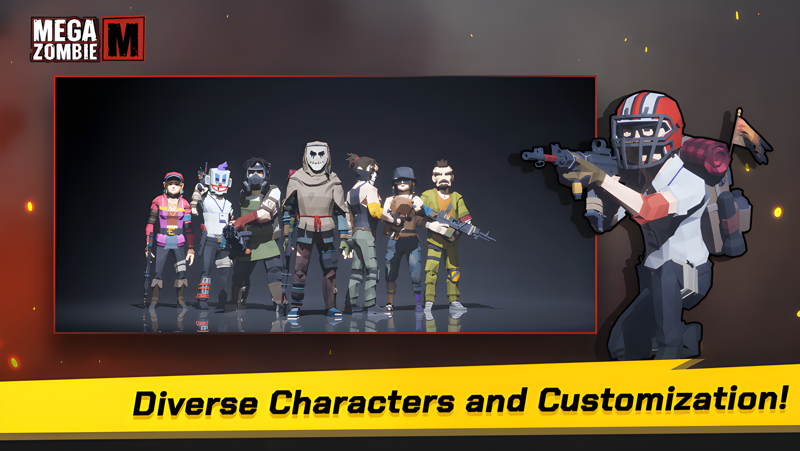
🧟 Customizable Characters🧟
Customize your character with unique fashion items like hats, glasses, and masks.
You can dress up to fool your enemies, but some fashion choices can make you an easy target for enemies.
The important thing to remember is that fashion does not matter to zombies.

🧟 Interesting AI 🧟
Forget about dumb zombies who would mindlessly run forward. Different types of zombies use different attack patterns in each battle. Focus on their behavior and react to it. Geography-based strategy can help you emerge victorious.

🧟 Predator from Hell! Mega Zombie 🧟
Cooperation is sometimes vital for humanity's survival. Collect brave squad, and
follow the orders of a powerful leader. Mega zombie hunt can be a surprisingly fun experience.

Realistic battle maps built with Unreal Engine and the unique battle mode of PvPvZombie will provide a fresh and fun experience.
Ballistics optimized for a shooter game and satisfying sound/visual effects make the game almost complete.
The only thing it's missing is YOU!

Mega Zombie can be enjoyed for free anytime, anywhere! Download now and play to survive!


====================================================
[Permissions & Developer Info]

Permissions
Storage Access : Required to save game data and settings.
Network Access : Necessary for multiplayer features and game updates.
In-App Purchases : Allows for purchasing items and upgrades within the game.

Developer Info
Contact Email : info@parkesm.co.kr
Emulator Features

With a smart button scheme and image recognition function, provide a more concise UI, and support custom button mapping to meet different needs.

Run multiple games independently at the same time, easily manage multiple accounts, play games while hanging.

Break through FPS limit, and enjoy a seamless gaming experience without lag and delay!

Get a 3-second startup with 52% less memory usage and 65% more stability.
How to Download and Play Mega Zombie M on PC and Mac
Installation Guide
① Download and install MuMuPlayer on your PC or Mac. It will identify automatically your current system and download the latest version.
② Start MuMuPlayer and complete Google sign-in to access the Play Store, or do it later.
③ Search Mega Zombie M in the Play Store.
④ Complete Google sign-in (if you skipped step 2) to install Mega Zombie M.
⑤ Once installation completes, click the Mega Zombie M icon on the home page to start the game.
⑥ Enjoy playing Mega Zombie M on your PC or Mac with MuMuPlayer.
Installation Guide
Recommended computer configuration
For Windows:4-core CPU, 4GB RAM, i5 OS, GTX950+ graphics card
For macOS: 4-core CPU, 4GB RAM
Recommended Android Device performance settings
Graphics renderer mode
Vulkan and DirectX both supported
Performance Settings
Recommended performance settings: 2 cores, 2GB. >>How to adjust performance settings
Recommended Android Device Display Settings
Resolution Settings
Go to Device Settings > Display > Resolution Settings to adjust your device's resolution as needed.
FPS Settings
MuMuPlayer supports up to 240 FPS. >>How to enable high FPS mode
Recommended to enable VT
Enabling VT will significantly improve emulator performance, reduce screen freezing, and make games run more smoothly. >>How to enable VT