Play Pal Go: Tower Defense TD on PC and Mac
Download Pal Go: Tower Defense TD on PC or Mac with MuMuPlayer, get a PC like gameplay along with smart control and high graphics performance.
MuMuPlayer, the top Android emulator for PC and Apple silicon Mac, delivers an optimal gaming experience with minimal RAM usage and high FPS. It also allows you to create multiple instances of the emulator and run several games simultaneously, thanks to its Multi-instance feature. Its advanced emulator features ensure smooth gameplay, even on low-end PCs.
Download and play Pal Go: Tower Defense TD on PC or Mac with MuMuPlayer and start enjoying your gaming experience now.
About the Game
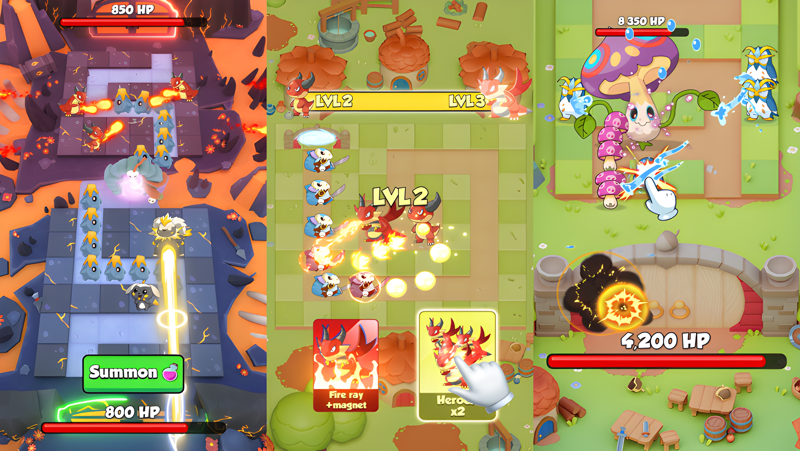
Get ready for an epic adventure in Pal Go! This fantasy tower defense game offers a unique blend of strategy, crash mechanics, merges, and competitive PvP battles. Easy to play but challenging to master, Pal Go dares you to protect your tower and emerge victorious against all odds.

As a brave monster hunter, your mission is to defend the Acorn Kingdoms from the dark wizard Mazdor the Black and his evil army. Assemble your pals, merge your units, rank them up, and lead them into epic battles against the forces of darkness. Unlock your monsters’ unique abilities to unleash devastating attacks and ensure victory. Every position on the battlefield can mean the difference between crashing to defeat and rising in triumph, so deploy your best units wisely to conquer the Dark Army.

Merge your troops to create powerful combinations that enhance your tower defense strategy, bringing even more epic moments to your battles! Don’t let your defenses crash—merge strategically to build unstoppable forces that can withstand any assault. But beware! A single miscalculation could cause your defenses to crash under pressure, forcing you to regroup and rethink your strategy to turn the tide.

Dominate the battlefield in PvP mode! Battle other players in fast-paced skirmishes where strategic thinking and quick reflexes are your greatest weapons. Break through their defenses, climb the leaderboard, and earn legendary rewards. In Pal Go, your wits and skills will determine who wins the ultimate tower defense showdown, where the stakes are high and one wrong move could lead to a crash!

Are you ready to answer the call? Embark on your heroic journey now!

Key Features:

- FUN & EPIC BATTLES: Immerse yourself in thrilling battles with a new roguelite skill experience, offering endless combinations in tower defense strategy.
- FORGE ALLIANCES: Team up with pals to conquer your adversaries and strengthen your defenses against crashing failures.
- MERGE & RANK UP: Enhance your troops by merging them to take on formidable foes and improve your tower defense capabilities. Ensure your strategies are robust enough to avoid crashing under pressure!
- CHOOSE YOUR STRATEGY: Customize your approach by selecting different hero roles and skills for maximum success in defense, and always be prepared to adapt to avoid a crash!
- PVP COMPETITION: Challenge other players in PvP battles and rise through the ranks to showcase your tower defense mastery—where a single crash could mean the end of your winning streak.
- VARIOUS STAGES: Experience the challenge of each new tower defense stage with varying difficulties, where a misstep could lead to crashing defeat or glorious victory.
- ONGOING UPDATES: Discover new heroes, towers, and participate in time-limited events to keep the excitement going in your tower defense journey.

==============================
Join Pal Go's Official Community Now!

Facebook: https://www.facebook.com/PalGoTD/
YouTube: https://youtube.com/@palgoofficial
Discord: https://discord.gg/hqM6NJgxBc
TikTok: https://www.tiktok.com/@palgoofficial
Instagram: https://www.instagram.com/palgoofficial/

Enjoying Pal Go? Leave us a review and share your thoughts! :)
Emulator Features

With a smart button scheme and image recognition function, provide a more concise UI, and support custom button mapping to meet different needs.

Run multiple games independently at the same time, easily manage multiple accounts, play games while hanging.

Break through FPS limit, and enjoy a seamless gaming experience without lag and delay!

Get a 3-second startup with 52% less memory usage and 65% more stability.
How to Download and Play Pal Go: Tower Defense TD on PC and Mac
Installation Guide
Download MuMuPlayer
Download and install MuMuPlayer on your PC or Mac
Sign-in Google Store
Complete Google sign-in to access the Play Store
Search and Install
Search Pal Go: Tower Defense TD in the Play Store
Enjoy Gaming
Enjoy 120 FPS high-def gameplay with big screen
System Requirements
Windows PC
Vulkan / DirectX supported. 4 cores + 4GB RAM recommended. Up to 240 FPS. VT required.
macOS
Recommended: Apple Silicon Mac with 8GB RAM or above. Up to 240 FPS.