Sword of Convallaria (macOS)
Play Sword of Convallaria on PC and Mac
Sword of Convallaria is a tactical role-playing game developed by XD Entertainment Pte Ltd that brings the classic Japanese turn-based and pixel art tradition into the modern era. Set in the mineral-rich land of Iria, the game drops players into a world where a hard-won peace is beginning to unravel, casting them as a mercenary leader navigating political tension, faction conflict, and moral choices at every turn. All of this unfolds with striking enhanced pixel art visuals, a sweeping orchestral score, and a deeply layered narrative that rewards strategic thinking. Whether you are discovering it for the first time or returning to a favorite genre, playing Sword of Convallaria on PC through MuMuPlayer gives you the full experience on a larger screen with greater control precision.
The game stands out for several reasons that go well beyond its visual style. At its core is a grid-based tactical combat system where unit positioning, terrain advantages, and skill combinations determine the outcome of every battle. The storyline unfolds through a choice-based narrative structure, meaning the decisions you make actively reshape your town, your relationships with characters, and how the plot develops. Hitoshi Sakimoto, the acclaimed composer behind Final Fantasy Tactics, Final Fantasy XII, and Tactics Ogre, composed the entire soundtrack, delivering what many consider his finest musical work to date. Character development is equally deep, allowing players to recruit companions at the tavern, craft gear at the forge, assign skills, and build a fully customized mercenary roster. More than forty Japanese voice actors, including Inoue Kazuhiko, Yuki Aoi, and Eguchi Takuya, give each character a distinct and memorable presence.
Playing Sword of Convallaria through MuMuPlayer on PC brings meaningful advantages to a game that rewards careful, deliberate play. The larger display makes reading the grid battlefield significantly easier, letting you spot enemy positions, terrain features, and unit ranges at a glance without squinting at a small screen. Mouse-based input gives you more precise control when selecting tiles and targeting abilities during tactical encounters, reducing misclicks in critical moments. MuMuPlayer also keeps the game running smoothly in the background, so you can manage your town, check on resource timers, and follow story developments without interrupting your day. For an adventure game built around strategy, storytelling, and long-form character progression, MuMuPlayer is the practical way to enjoy it all at full comfort on your desktop.
About the Game
Peace has finally settled over Iria after a brutal Liberation War, but tranquility in a land this rich in magical minerals was never going to last long. Sword of Convallaria is a tactical adventure game that places you at the center of a world where external factions covet Iria's resources, civil unrest threatens to reignite old conflicts, and every choice you make as a mercenary leader carries real weight. Rather than following a fixed path, the game constantly asks you to decide how to respond, and the story evolves around those decisions in ways that make each playthrough feel personal.
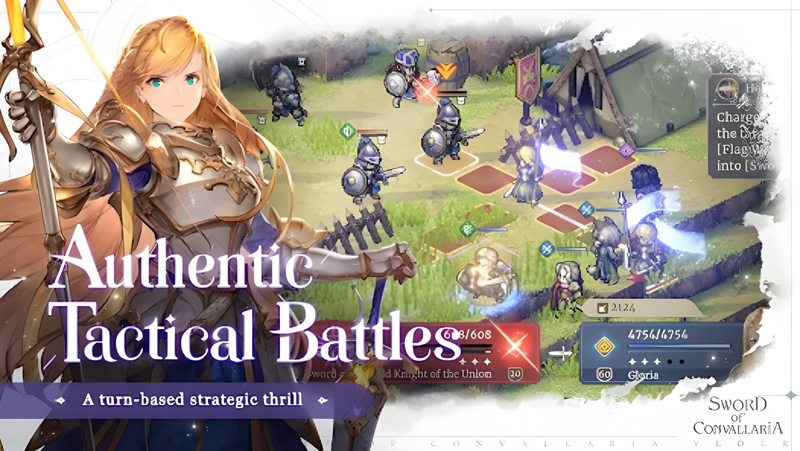
At the heart of the experience is a grid-based tactical combat system that will feel immediately familiar to fans of classic strategy RPGs while offering enough modern depth to keep veterans engaged. Battles take place on structured maps where positioning is everything. Flanking an enemy from elevated terrain, timing an ability to hit multiple targets, or protecting a vulnerable unit by placing tougher allies in key spots are the kinds of decisions that separate victory from defeat. The system rewards planning over reaction, and the variety of enemy types ensures that no single strategy works forever.
Building and developing your mercenary group is just as satisfying as the battles themselves. Key ways to grow your team include:
- Recruiting companions with unique abilities at the tavern
- Crafting and upgrading equipment at the in-game forge
- Teaching new skills to individual characters as they grow
- Training stats in the practice field to prepare for harder content
- Forming bonds with allies that feed back into the storyline
The narrative layer wrapped around all of this is unusually ambitious for a mobile strategy title. As you build your base town and forge alliances with different factions across Iria, the world reacts to your choices. Certain characters become closer depending on how you interact with them, while others may drift away or become adversaries. The branching structure means that story beats and outcomes genuinely differ from one player to the next, giving the game strong replayability beyond simply clearing maps.
Visually, Sword of Convallaria does something interesting by combining beloved pixel art aesthetics with modern rendering techniques. Real-time shading, high dynamic range lighting, dynamic depth of field, and full-screen bloom effects give the pixel-style world a sense of atmosphere and dimensionality that older titles in the genre could never achieve. The result is a look that feels nostalgic and fresh at the same time.
The audio design matches the visual ambition. Hitoshi Sakimoto, one of the most respected composers in role-playing game history and the mind behind the soundtracks of Final Fantasy Tactics, Final Fantasy XII, and Tactics Ogre, wrote the entire score for Sword of Convallaria. His compositions shift seamlessly between quiet, contemplative moments and dramatic battle sequences, reinforcing the emotional texture of the story throughout. Complementing the music are voice performances from over forty Japanese voice actors drawn from anime and gaming, each bringing a named character to life with genuine expressiveness.
For players who want to engage with the full depth of the game, from carefully reading battlefield layouts to tracking relationship developments and managing town growth, running Sword of Convallaria on PC through MuMuPlayer provides a noticeably more comfortable experience. The combination of a large monitor display and precise mouse controls makes tactical navigation more fluid and less prone to error, letting you stay focused on the strategy rather than fighting with touch input limitations.
Emulator Features

With a smart button scheme and image recognition function, provide a more concise UI, and support custom button mapping to meet different needs.

Run multiple games independently at the same time, easily manage multiple accounts, play games while hanging.

Break through FPS limit, and enjoy a seamless gaming experience without lag and delay!

Get a 3-second startup with 52% less memory usage and 65% more stability.
How to Download and Play Sword of Convallaria on PC and Mac
Installation Guide
Download MuMuPlayer
Download and install MuMuPlayer on your PC or Mac
Sign-in Google Store
Complete Google sign-in to access the Play Store
Search and Install
Search Sword of Convallaria in the Play Store
Enjoy Gaming
Enjoy 120 FPS high-def gameplay with big screen
System Requirements
Windows PC
Vulkan / DirectX supported. 4 cores + 4GB RAM recommended. Up to 240 FPS. VT required.
macOS
Recommended: Apple Silicon Mac with 8GB RAM or above. Up to 240 FPS.