Play Urban Heat on PC and Mac
Urban Heat is a fast-paced multiplayer first-person shooter built around street-level gang warfare, where players compete for dominance in gritty urban environments. Designed with mobile gameplay in mind, it delivers high-energy gunfights and team-based combat that puts you right in the middle of a relentless warzone. PC players can now dive into all of that action by running Urban Heat through MuMuPlayer, bringing the full mobile experience to a larger screen with more responsive controls.
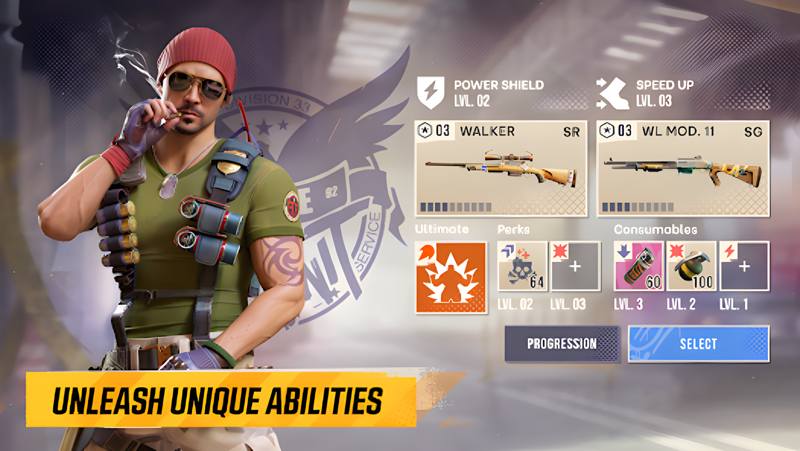
The game centers on multiplayer deathmatch battles where choosing the right loadout can make or break a match. Players have access to a wide arsenal of fully customizable weapons, allowing each person to shape their combat style around the gear they prefer. Characters can be unlocked as you progress, adding variety to how you approach each fight. The smooth shooting mechanics and visually impressive graphics are crafted specifically for mobile hardware, keeping performance consistent across different sessions.
Playing Urban Heat on PC through MuMuPlayer adds a meaningful layer of precision to every firefight. Keyboard and mouse controls replace touch inputs, giving you sharper aim and faster reaction times during intense multiplayer encounters. MuMuPlayer also handles the technical side cleanly, so you get stable frame rates and consistent performance without the battery drain or overheating that can slow down mobile devices during long play sessions. Whether you are coordinating with your crew or going solo in a deathmatch, MuMuPlayer makes the experience feel more controlled and comfortable from start to finish.
About the Game
Urban Heat throws players into a brutal street-level power struggle where rival crews clash in close-quarters combat across gritty urban environments. The entire game revolves around multiplayer engagements, pitting teams and individuals against each other in fast, unforgiving gunfights where preparation and precision matter as much as reaction speed. If you enjoy competitive shooters that keep the pressure high from the first shot to the last, Urban Heat is built around exactly that kind of relentless tension.
At the heart of the experience is a weapon customization system that gives players real control over how they show up to a fight. The arsenal spans a wide range of firearms, each one adjustable to suit different combat preferences. Whether you favor aggressive close-range builds or a more measured approach from a distance, the loadout system accommodates a variety of playstyles. This flexibility means no two players have to approach a match the same way, which keeps the competition feeling varied and unpredictable.
Character progression adds another dimension to long-term engagement. As players put time into the game, new characters become available, each bringing their own look and presence to the battlefield. Unlocking these characters gives a sense of advancement that goes beyond simply winning matches, rewarding consistent play with visible results.
Here is what makes Urban Heat stand out in the multiplayer shooter space:
- Team-based and free-for-all deathmatch modes that keep every session competitive
- A fully customizable weapon system designed to support different combat approaches
- Unlockable characters that reflect your progress through the game
- Smooth shooting mechanics optimized for mobile hardware
- Visually detailed urban environments that set the tone for gritty street warfare
The game was designed from the ground up with mobile players in mind, which shows in how fluidly the controls and visuals come together. Graphics hold up well under the demands of fast-paced multiplayer action, and the overall performance is tuned to stay consistent even during the most chaotic firefights.
For players who want to take that experience further, running Urban Heat on PC through MuMuPlayer shifts the dynamic considerably. Mouse aiming replaces touch-based targeting, which translates directly into more accurate shots and quicker adjustments during heated exchanges. Keyboard bindings give faster access to loadout options and movement, which can be a real advantage in deathmatch scenarios where every second counts. MuMuPlayer also keeps performance steady over extended sessions, avoiding the slowdowns and heat issues that sometimes affect mobile devices during prolonged play. The larger screen real estate makes it easier to track movement across the map and spot threats before they close in. Whether you are grinding through matches solo or coordinating with a crew, Urban Heat on MuMuPlayer brings the full intensity of the street warzone to a setup that feels natural and responsive.
Emulator Features

With a smart button scheme and image recognition function, provide a more concise UI, and support custom button mapping to meet different needs.

Run multiple games independently at the same time, easily manage multiple accounts, play games while hanging.

Break through FPS limit, and enjoy a seamless gaming experience without lag and delay!

Get a 3-second startup with 52% less memory usage and 65% more stability.
How to Download and Play Urban Heat on PC and Mac
Installation Guide
Download MuMuPlayer
Download and install MuMuPlayer on your PC or Mac
Sign-in Google Store
Complete Google sign-in to access the Play Store
Search and Install
Search Urban Heat in the Play Store
Enjoy Gaming
Enjoy 120 FPS high-def gameplay with big screen
System Requirements
Windows PC
Vulkan / DirectX supported. 4 cores + 4GB RAM recommended. Up to 240 FPS. VT required.
macOS
Recommended: Apple Silicon Mac with 8GB RAM or above. Up to 240 FPS.