
Play ALTDEUS: Beyond Chronos on PC Play ALTDEUS: Beyond Chronos on PC and Mac
Download ALTDEUS: Beyond Chronos on PC with MuMuPlayer, get a PC like gameplay along with smart control and high graphics performance.
MuMuPlayer, the top Android emulator for PC and Apple silicon Mac, delivers an optimal gaming experience with minimal RAM usage and high FPS. It also allows you to create multiple instances of the emulator and run several games simultaneously, thanks to its Multi-instance feature. Its advanced emulator features ensure smooth gameplay, even on low-end PCs.
Download and play ALTDEUS: Beyond Chronos on PC with MuMuPlayer and start enjoying your gaming experience now.
Download ALTDEUS: Beyond Chronos on PC or Mac with MuMuPlayer, get a PC like gameplay along with smart control and high graphics performance.
MuMuPlayer, the top Android emulator for PC and Apple silicon Mac, delivers an optimal gaming experience with minimal RAM usage and high FPS. It also allows you to create multiple instances of the emulator and run several games simultaneously, thanks to its Multi-instance feature. Its advanced emulator features ensure smooth gameplay, even on low-end PCs.
Download and play ALTDEUS: Beyond Chronos on PC or Mac with MuMuPlayer and start enjoying your gaming experience now.
About the Game
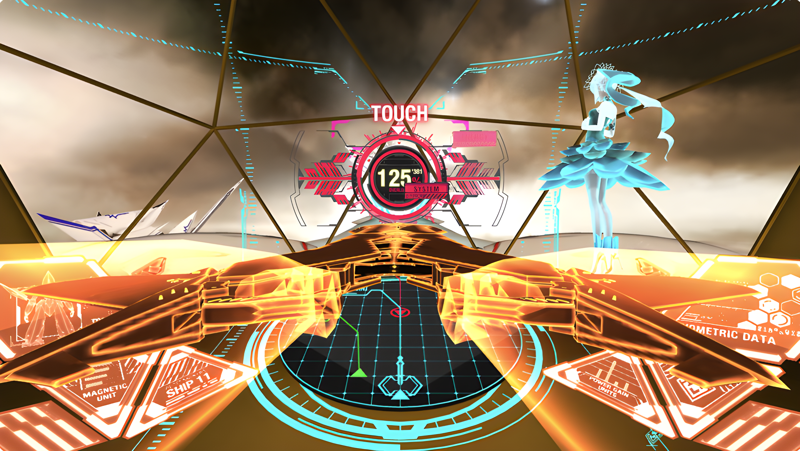
The award-winning, critically acclaimed SF adventure VR game is finally available on smartphones!
ALTDEUS is the second installment of the Chronos Universe.
Character design by LAM, voiced by a star-studded cast, and music by renowned artists such as ASCA, R!N, Wolpis Carter, Setsuko, YuNi, and Konomi Suzuki!

■Story
In 2080, the sudden appearance of colossal beings known as "Meteoras" forced humanity to seek refuge in a subterranean city with a radius of only 2 kilometers, A.T. (Augmented Tokyo).
Two centuries later, Chloe, a Meteoras opposing organization "Prometheus" member, pilots the humanoid city-defense weapon Makhia, surviving the harsh battles alongside her comrades.
Everything she does is to avenge her dear friend, Coco.
As numerous crucial decisions loom ever closer, will you be able to pull the trigger?

■ Characters
 Chloe (VA. Chelsey Moore - English, Akari Kito - Japanese)
 Coco Coconoe (VA. Danii Meger - English, Kaya Okuno - Japanese)
 Noa (VA. Grace Chan - English, Yumiri Hanamori - Japanese)
 Anima (VA. Yui Ishikawa - Japanese)
 Yamato Amanagi (VA. Jesse Inocalla - English, Yusuke Kobayashi - Japanese)
 Aoba Iwaza (VA. Adam Fedyk - English, Yoshihiko Aramaki - Japanese)
 Julie (VA. Asia Mattu - English, Yu Serizawa - Japanese)
 Deiter (VA. Chris Garnier - English, Show Hayami - Japanese)
 AARC Ares (VA. Nobuhiko Okamoto - Japanese)

■ Artists
 ASCA / R!N / Setsuko / YuNi / Wolpis Carter / Konomi Suzuki / Kuniyuki Takahashi (MONACA) / kz / Yosuke Kori

■ Voice Languages: Japanese / English
■ Subtitle Languages: Japanese / English / German / French / Chinese (Traditional / Simplified)
 *Please note that ALTDEUS: Beyond Chronos 'EXTRA EPISODE' does not support German.
Emulator Features
Highest Android 15 Support Best Compatibility on Mac

With a smart button scheme and image recognition function, provide a more concise UI, and support custom button mapping to meet different needs. With a smart button scheme and image recognition, enjoy a cleaner UI and custom button mapping to fit different gaming needs on Mac.

Run multiple games independently at the same time, easily manage multiple accounts, play games while hanging. Take your Mac gaming further with multiple independent instances, easy account management, and seamless AFK gaming on Apple Silicon Mac.

Break through FPS limit, and enjoy a seamless gaming experience without lag and delay! Break through FPS limits for a seamless, lag-free gaming experience on MacBook, Mac mini, iMac, and Mac Studio.

Get a 3-second startup with 52% less memory usage and 65% more stability. Enjoy 3-second startup, 52% less memory usage, and 65% greater stability on Apple Silicon Mac.
How to Download and Play ALTDEUS: Beyond Chronos on PC and Mac
Installation Guide
Download MuMuPlayer
Download MuMuPlayer and install it on your PC or Mac
Sign-in Google Store
Complete Google sign-in to access the Play Store
Search and Install
Search ALTDEUS: Beyond Chronos in the Play Store
Enjoy Gaming
Enjoy 120 FPS high-def gameplay with big screen
System Requirements
Windows PC
Vulkan / DirectX supported. 4 cores + 4GB RAM recommended. Up to 240 FPS. VT required.
macOS
Recommended: Apple Silicon Mac with 8GB RAM or above. Up to 240 FPS.
.png?fop=imageView/0/w/150/h/150)