Play Golden Spatula on PC Play Golden Spatula on PC and Mac
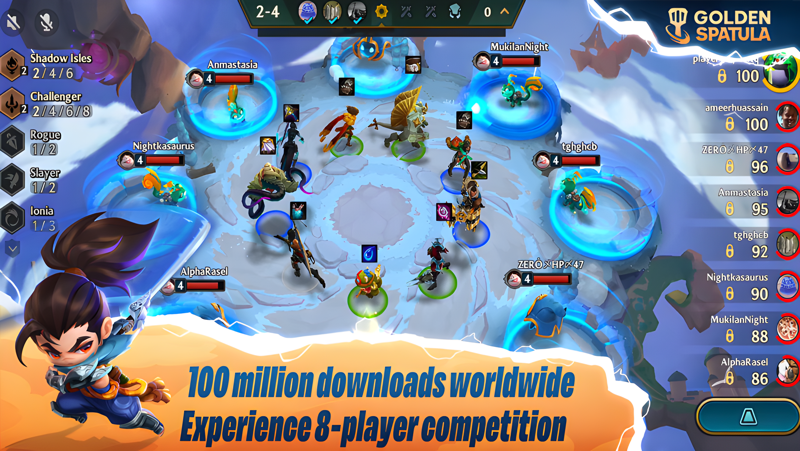
Golden Spatula is a strategy game that challenges players to collect champions, build synergistic team compositions, and watch fast-paced automatic battles play out in real time. With a constantly evolving roster of characters and a deep layering of tactical decisions, the game rewards both casual players looking for a quick match and dedicated strategists chasing the perfect team build. Now you can experience all of this on a bigger screen by running Golden Spatula on PC through MuMuPlayer.
The game is packed with content designed to keep every session feeling fresh and rewarding. The current season introduces ten powerful divine figures, including the God of Time, God of Love, God of the Abyss, and God of Opulence, each bringing distinct abilities that can completely reshape how a match unfolds. A brand-new mechanic called the God Realm lets you choose from divine rewards spanning items, champions, economy boosts, and special hexes, giving you meaningful choices that define your personal playstyle. Seasonal celebrations like the Golden Songkran event add even more to engage with, offering exclusive cosmetics such as the Songkran Exclusive Chibi Chroma Lux and special draws for rare rewards like the Mythic Chibi Ezreal.
Playing Golden Spatula on PC through MuMuPlayer brings real advantages to your experience. The larger display makes it far easier to read the battlefield, track champion positioning, and plan your comp adjustments round by round. MuMuPlayer delivers stable, smooth performance so that automatic battles run without interruption, and the keyboard and mouse setup gives you more precise control when managing your bench, shop refreshes, and item distribution. Whether you are grinding ranked matches or exploring new God Realm builds, MuMuPlayer turns your PC into the ideal platform for Golden Spatula.
Download Golden Spatula on PC or Mac with MuMuPlayer, get a PC like gameplay along with smart control and high graphics performance.
MuMuPlayer, the top Android emulator for PC and Apple silicon Mac, delivers an optimal gaming experience with minimal RAM usage and high FPS. It also allows you to create multiple instances of the emulator and run several games simultaneously, thanks to its Multi-instance feature. Its advanced emulator features ensure smooth gameplay, even on low-end PCs.
Download and play Golden Spatula on PC or Mac with MuMuPlayer and start enjoying your gaming experience now.
About the Game
Golden Spatula brings together the addictive loop of champion collecting, team building, and auto-battle competition in a format that is approachable for newcomers yet deep enough to keep experienced players engaged for hours. The core experience revolves around recruiting a roster of champions, positioning them strategically on the board, and then watching your carefully constructed squad fight through waves of opponents. Victory comes not just from having strong units, but from understanding how different champions work together and adapting your approach as each match progresses.
At the heart of the current season is a celestial theme built around ten divine figures who each bring something completely different to the battlefield. These Gods, ranging from the God of Time to the God of Love, the God of the Abyss, and the God of Opulence, are more than just powerful champions. Their presence shapes the flow of a match in ways that can turn the tide at critical moments. Building around these divine characters opens up entirely new strategic possibilities and adds a layer of excitement to every draft decision.
Supporting this celestial cast is the God Realm, a new in-game mechanic that functions as an expanded decision-making layer. When you enter the God Realm, you are presented with a selection of divine rewards that can include:
- Powerful items to equip your champions
- New champions to strengthen your roster
- Economy boosts to help you stay ahead in gold management
- Special hexes that introduce unique effects to your board
This system encourages players to think about their builds in a more flexible way, since the rewards you choose can define an entirely different playstyle run to run. No two sessions need to play out the same way.
For players who enjoy seasonal content, the Golden Songkran celebration gives everyone a reason to log in and complete event missions. By participating, players can earn the Songkran Exclusive Chibi Chroma Lux at no cost, while special draws give those chasing rarer cosmetics a shot at the Mythic Chibi Ezreal. Events like this keep the community active and give both new and returning players fresh goals to work toward.
Despite the depth on offer, Golden Spatula is designed so that getting started never feels overwhelming. The automatic battle system removes the need for real-time mechanical skill, placing the emphasis squarely on preparation, positioning, and adapting your strategy as the round timer counts down. This makes it a great fit for on-the-go play, but also surprisingly satisfying for longer sessions when you want to experiment with every possible team combination.
The development team maintains an active update schedule driven by player feedback, ensuring that balance adjustments, new content, and quality-of-life improvements arrive regularly. Players can stay connected and share their thoughts through the game's official channels on Facebook, YouTube, TikTok, Instagram, X, and Discord, as well as through the official website at goldenspatula.com.
For anyone who wants to take their Golden Spatula experience further, running the game on PC through MuMuPlayer is a natural step. The expanded screen real estate makes reading the board and tracking multiple champion interactions far more comfortable, while the stable PC environment ensures that matches run smoothly from start to finish.
Emulator Features
Highest Android 15 Support Best Compatibility on Mac

With a smart button scheme and image recognition function, provide a more concise UI, and support custom button mapping to meet different needs. With a smart button scheme and image recognition, enjoy a cleaner UI and custom button mapping to fit different gaming needs on Mac.

Run multiple games independently at the same time, easily manage multiple accounts, play games while hanging. Take your Mac gaming further with multiple independent instances, easy account management, and seamless AFK gaming on Apple Silicon Mac.

Break through FPS limit, and enjoy a seamless gaming experience without lag and delay! Break through FPS limits for a seamless, lag-free gaming experience on MacBook, Mac mini, iMac, and Mac Studio.

Get a 3-second startup with 52% less memory usage and 65% more stability. Enjoy 3-second startup, 52% less memory usage, and 65% greater stability on Apple Silicon Mac.
How to Download and Play Golden Spatula on PC and Mac
Installation Guide
Download MuMuPlayer
Download MuMuPlayer and install it on your PC or Mac
Sign-in Google Store
Complete Google sign-in to access the Play Store
Search and Install
Search Golden Spatula in the Play Store
Enjoy Gaming
Enjoy 120 FPS high-def gameplay with big screen
System Requirements
Windows PC
Vulkan / DirectX supported. 4 cores + 4GB RAM recommended. Up to 240 FPS. VT required.
macOS
Recommended: Apple Silicon Mac with 8GB RAM or above. Up to 240 FPS.