Play 헤이즈 리버브 on PC Play 헤이즈 리버브 on PC and Mac
Download 헤이즈 리버브 on PC with MuMuPlayer, get a PC like gameplay along with smart control and high graphics performance.
MuMuPlayer, the top Android emulator for PC and Apple silicon Mac, delivers an optimal gaming experience with minimal RAM usage and high FPS. It also allows you to create multiple instances of the emulator and run several games simultaneously, thanks to its Multi-instance feature. Its advanced emulator features ensure smooth gameplay, even on low-end PCs.
Download and play 헤이즈 리버브 on PC with MuMuPlayer and start enjoying your gaming experience now.
Download 헤이즈 리버브 on PC or Mac with MuMuPlayer, get a PC like gameplay along with smart control and high graphics performance.
MuMuPlayer, the top Android emulator for PC and Apple silicon Mac, delivers an optimal gaming experience with minimal RAM usage and high FPS. It also allows you to create multiple instances of the emulator and run several games simultaneously, thanks to its Multi-instance feature. Its advanced emulator features ensure smooth gameplay, even on low-end PCs.
Download and play 헤이즈 리버브 on PC or Mac with MuMuPlayer and start enjoying your gaming experience now.
About the Game
Under the invasion of an alien creature known as "Original Sin," human civilization faces a desperate crisis. By chance, you awaken the power of "Empathy," becoming humanity's last hope. Together, you embark on a final operation to save a world on the brink of collapse.

▼Animation-Quality Story Adventure!

Share the joys and sorrows of life with lovable characters, grow together, and create special memories through a vivid presentation and in-depth story!

▼9 vs. 9 Battles: Strategy and Victory!

In a fierce and ever-changing battlefield, strategize with up to nine teammates, and unleash powerful skills through positioning and skill-linking tactics to achieve victory!

▼Build Your Dream Team!

Choose and train your team members to bring out their full potential! Freely combine over 100 unique characters to form your own dream team and save the world!

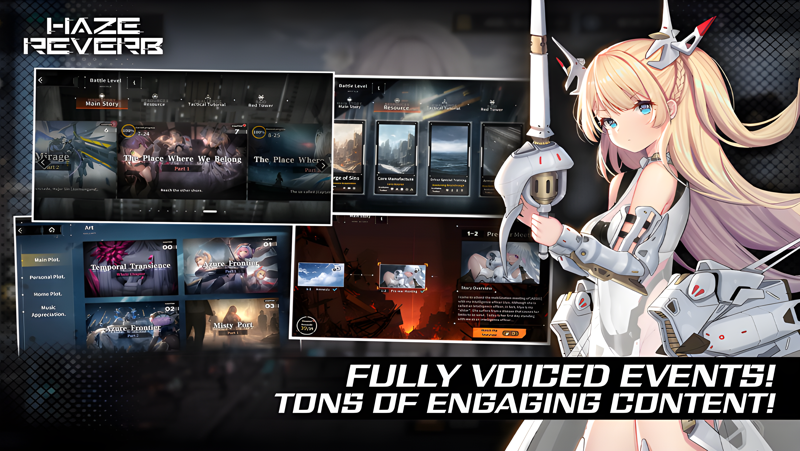
▼Full voice support
Not only the main story, but even limited-time events are fully voiced! An epic story told with a loving voice.

You, humanity's last hope... Will you join the final rescue operation?!

▼Community Information:
Naver Cafe: https://cafe.naver.com/hazereverb
X: https://x.com/hazereverbkr
Youtube: https://www.youtube.com/@hazereverbkr
Facebook: https://www.facebook.com/hazereverbkr

▼Official Website:
https://krcw.kibiplay.com/
Emulator Features
Highest Android 15 Support Best Compatibility on Mac

With a smart button scheme and image recognition function, provide a more concise UI, and support custom button mapping to meet different needs. With a smart button scheme and image recognition, enjoy a cleaner UI and custom button mapping to fit different gaming needs on Mac.

Run multiple games independently at the same time, easily manage multiple accounts, play games while hanging. Take your Mac gaming further with multiple independent instances, easy account management, and seamless AFK gaming on Apple Silicon Mac.

Break through FPS limit, and enjoy a seamless gaming experience without lag and delay! Break through FPS limits for a seamless, lag-free gaming experience on MacBook, Mac mini, iMac, and Mac Studio.

Get a 3-second startup with 52% less memory usage and 65% more stability. Enjoy 3-second startup, 52% less memory usage, and 65% greater stability on Apple Silicon Mac.
How to Download and Play 헤이즈 리버브 on PC and Mac
Installation Guide
Download MuMuPlayer
Download MuMuPlayer and install it on your PC or Mac
Sign-in Google Store
Complete Google sign-in to access the Play Store
Search and Install
Search 헤이즈 리버브 in the Play Store
Enjoy Gaming
Enjoy 120 FPS high-def gameplay with big screen
System Requirements
Windows PC
Vulkan / DirectX supported. 4 cores + 4GB RAM recommended. Up to 240 FPS. VT required.
macOS
Recommended: Apple Silicon Mac with 8GB RAM or above. Up to 240 FPS.