Play Neko Atsume 2: Kitty Collector on PC Play Neko Atsume 2: Kitty Collector on PC and Mac
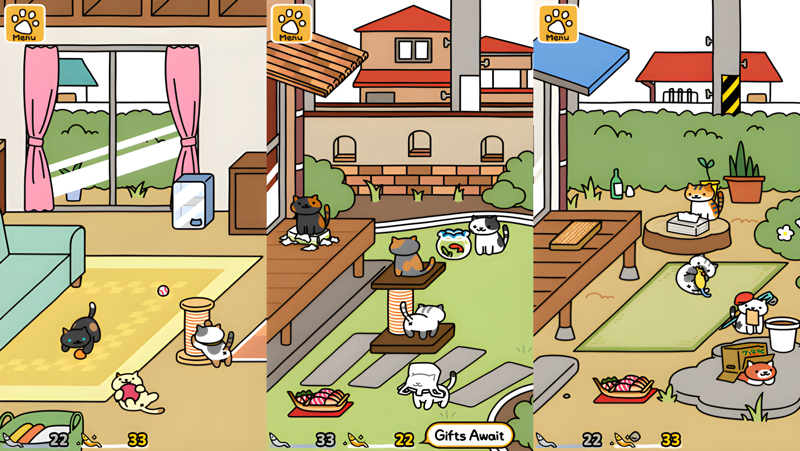
Neko Atsume 2: Kitty Collector is the charming follow-up to the beloved cat-collecting simulation that captured the hearts of players worldwide. Building on everything that made the original so endearing, this sequel invites you to set out snacks and toys in your yard, then sit back and watch an adorable parade of feline visitors arrive at their own pace. The relaxed, low-pressure gameplay makes it easy to pick up at any moment, and experiencing that cozy cat-watching atmosphere on a bigger screen through MuMuPlayer on PC takes the whole thing to a new level of comfort.
The sequel expands on its predecessor in meaningful ways. Beyond simply observing cats at play, you can now visit other players' yards or invite them to yours, opening up a social dimension that the original lacked. Venturing outside your yard may even lead to surprise encounters with cats you have never seen before. The game also introduces Helper cats, special felines that assist you in your daily Neko Atsume routine, along with the possibility of forming a deeper bond with a particular cat that becomes your very own Myneko. With over 40 cat varieties roaming the neighborhood, including rare cats that only appear when specific items are placed, filling out your Catbook becomes a genuinely satisfying long-term goal.
Playing Neko Atsume 2 through MuMuPlayer on PC gives you a noticeably more relaxed experience. The larger display lets you soak in every whisker-twitching detail of your visiting cats without squinting at a small phone screen. MuMuPlayer keeps the game running smoothly in the background so you never miss a rare cat visit, even while working on other tasks. Managing your yard layout, browsing your Catbook, and keeping an eye on multiple features at once all feel more natural with a mouse and keyboard, making your kitty-collecting life just a little bit easier every day.
Download Neko Atsume 2: Kitty Collector on PC or Mac with MuMuPlayer, get a PC like gameplay along with smart control and high graphics performance.
MuMuPlayer, the top Android emulator for PC and Apple silicon Mac, delivers an optimal gaming experience with minimal RAM usage and high FPS. It also allows you to create multiple instances of the emulator and run several games simultaneously, thanks to its Multi-instance feature. Its advanced emulator features ensure smooth gameplay, even on low-end PCs.
Download and play Neko Atsume 2: Kitty Collector on PC or Mac with MuMuPlayer and start enjoying your gaming experience now.
About the Game
If you have ever dreamed of turning your backyard into a favorite hangout spot for cats of every color and personality, Neko Atsume 2: Kitty Collector hands you exactly that opportunity. This simulation sequel takes the simple, deeply satisfying loop of its predecessor and layers on a set of new systems that give the experience considerably more depth. The core idea remains wonderfully straightforward: arrange food and playthings around your yard, step away, and return to find cats lounging, batting at toys, and generally doing whatever they please. There is no frantic tapping or time pressure involved. The rhythm of the game is gentle by design, rewarding patience over reflexes.
What sets the sequel apart from the original is how much more connected and lively the world feels. Players can now visit other users' yards to see how fellow collectors have arranged their spaces, or open their own yard to guests. These social visits add a layer of discovery that was absent before. On top of that, heading out into the wider neighborhood can lead to chance meetings with cats that would never find their way to your yard on their own, turning every excursion into a small adventure.
The introduction of Helper cats is another welcome addition. These are special cats that actively assist you as you manage your Neko Atsume life, handling small tasks and making your routines run more smoothly. There is also the concept of Myneko, a cat that forms a uniquely close bond with you over time. These two features give the game a sense of ongoing companionship that goes beyond simply cataloguing visitors.
Here is a quick look at what you will find in the game:
- Over 40 distinct cat varieties, covering a wide range of colors and markings including tabby, calico, white, black, and more
- Rare cats that only show up when you place specific items, giving collectors a genuine reason to experiment with their setups
- A Catbook that logs every cat you have encountered, serving as a personal record of your collecting progress
- Yard visits with other players for a social and exploratory twist on the usual gameplay
- Helper cats that support your daily activities within the game
- The Myneko system, which allows one cat to take on a special role in your experience
- A subscription-based Cat's Club Support service offering additional perks for dedicated players
Filling out the Catbook is the long-term goal that keeps most players coming back. Each new cat recorded feels like a genuine accomplishment, especially the rare ones that require careful planning to attract. Knowing which toys and foods to put out, and then waiting to see whether your setup pays off, creates a loop of anticipation and reward that is quietly addictive.
Playing through MuMuPlayer on PC makes this already comfortable game feel even more at home. The generous screen space lets you appreciate your yard setup and the cats visiting it without any of the visual clutter that comes with a smaller display. Because MuMuPlayer can keep the app running in the background, rare cat appearances are far less likely to slip by unnoticed while you are doing other things. Checking on your yard, reorganizing items, and browsing through your growing Catbook all feel natural and unhurried when handled with a mouse, making MuMuPlayer a genuinely practical choice for anyone who wants to get the most out of their Neko Atsume 2 experience.
Emulator Features
Highest Android 15 Support Best Compatibility on Mac

With a smart button scheme and image recognition function, provide a more concise UI, and support custom button mapping to meet different needs. With a smart button scheme and image recognition, enjoy a cleaner UI and custom button mapping to fit different gaming needs on Mac.

Run multiple games independently at the same time, easily manage multiple accounts, play games while hanging. Take your Mac gaming further with multiple independent instances, easy account management, and seamless AFK gaming on Apple Silicon Mac.

Break through FPS limit, and enjoy a seamless gaming experience without lag and delay! Break through FPS limits for a seamless, lag-free gaming experience on MacBook, Mac mini, iMac, and Mac Studio.

Get a 3-second startup with 52% less memory usage and 65% more stability. Enjoy 3-second startup, 52% less memory usage, and 65% greater stability on Apple Silicon Mac.
How to Download and Play Neko Atsume 2: Kitty Collector on PC and Mac
Installation Guide
Download MuMuPlayer
Download MuMuPlayer and install it on your PC or Mac
Sign-in Google Store
Complete Google sign-in to access the Play Store
Search and Install
Search Neko Atsume 2: Kitty Collector in the Play Store
Enjoy Gaming
Enjoy 120 FPS high-def gameplay with big screen
System Requirements
Windows PC
Vulkan / DirectX supported. 4 cores + 4GB RAM recommended. Up to 240 FPS. VT required.
macOS
Recommended: Apple Silicon Mac with 8GB RAM or above. Up to 240 FPS.