Play Tree of Savior: Neverland on PC and Mac
Tree of Savior: Neverland is a massively multiplayer online role-playing game developed by Qookka Games, serving as the official continuation of the beloved Tree of Savior universe. Built on the creative vision of Kim Hakkyu and accompanied by a sweeping soundtrack composed by Motoi Sakuraba, the game invites players into a richly illustrated fantasy world filled with exploration, combat, crafting, and genuine human connection. Whether you are looking to forge bonds with fellow adventurers or challenge fearsome dungeon bosses, Tree of Savior: Neverland offers a warm and expansive world to call your own, and MuMuPlayer brings the full experience to your PC screen with ease.
At the heart of Tree of Savior: Neverland lies a wide range of intertwining systems that go well beyond combat. The Tree Bond System allows players to hold a server-wide Tree Ceremony, a meaningful and celebratory event witnessed by the entire community, complete with a shared home space to develop together. The game also features a dynamic Weather System, where specific weather conditions across different zones unlock rare mounts, hidden treasure chests, and exclusive crafting materials, making exploration feel genuinely rewarding at every turn. Deep crafting mechanics let players prepare powerful dishes and alchemical concoctions that can shift the tide of battle, while massive servers supporting up to 50,000 players ensure the world stays lively with trade, conversation, group quests, and social discovery. New players receive generous starter rewards including 70 draws, a four-piece gold gear set, and a selectable exclusive mount.
Playing Tree of Savior: Neverland on PC through MuMuPlayer transforms the experience in meaningful ways. The larger display makes it far easier to navigate the game's sprawling zones, track weather events across regions, and keep an eye on server chat during busy moments. MuMuPlayer's stable performance ensures smooth operation during intense Demon God Dungeon boss encounters where timing and coordination matter most. Managing crafting queues, monitoring the in-game marketplace, and maintaining an active social presence across a 50,000-player server becomes noticeably more comfortable with a keyboard and mouse setup. For an MMO designed around community, adventure, and long play sessions, MuMuPlayer on PC is a natural and practical choice.
About the Game
Tree of Savior: Neverland carries forward a legacy that fans of the original Tree of Savior universe have long anticipated. Directed by Kim Hakkyu and scored by the acclaimed composer Motoi Sakuraba, this MMORPG combines stunning hand-crafted visuals with an emotionally resonant soundtrack to deliver a world that feels both epic and intimate. It is not simply a game about fighting monsters or climbing ranks. It is about the communities players build, the relationships they form, and the lives they choose to lead within a living, breathing world shared with tens of thousands of others across eleven Asian regions.
One of the most talked-about additions to the game is the Tree Bond System, which introduces a ceremonial event where two players can hold a formal Tree Ceremony witnessed and celebrated by everyone on the server. The ceremony is not a quiet private affair. It is a grand communal moment, complete with fireworks and the collective blessings of the entire server population. Beyond the ceremony itself, bonded players gain access to a shared home space where they can build and decorate their lives together, adding a layer of personal investment that goes far beyond typical MMO partnership systems.
For players who prefer combat and cooperative challenges, Tree of Savior: Neverland delivers through its Demon God Dungeon system. Powerful boss encounters appear in sequence, demanding real teamwork and strategy from coordinated groups. These are not easy fights designed to be cleared casually. They are high-stakes battles that reward preparation, communication, and persistence. Community channels like the Order Channel buzz with players organizing parties, strategizing approaches, and celebrating hard-earned victories together.
Exploration across the game world is made more engaging through the Weather System, a mechanic that ties rare discoveries to specific environmental conditions in each zone:
- Foggy conditions in the Tearwoods create opportunities to encounter ultra-rare mounts that cannot be found elsewhere.
- Blizzards sweeping through Winterhill hide treasure chests that reward players willing to brave the cold.
- A light rain falling over the Sage Forest brings out rare crafting materials scattered across the landscape.
This system gives players genuine reasons to revisit areas they have already explored, as each weather event opens a new window of opportunity.
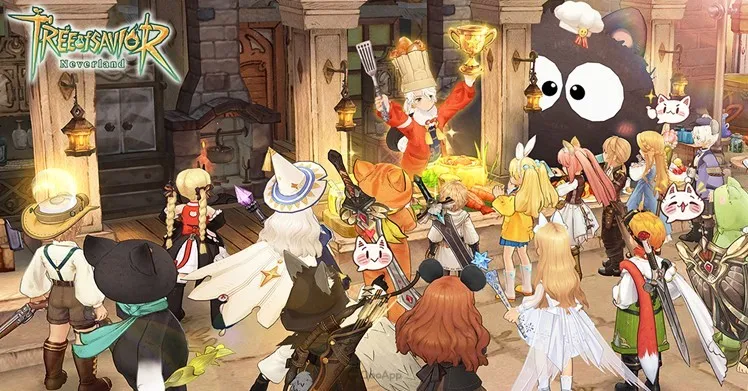
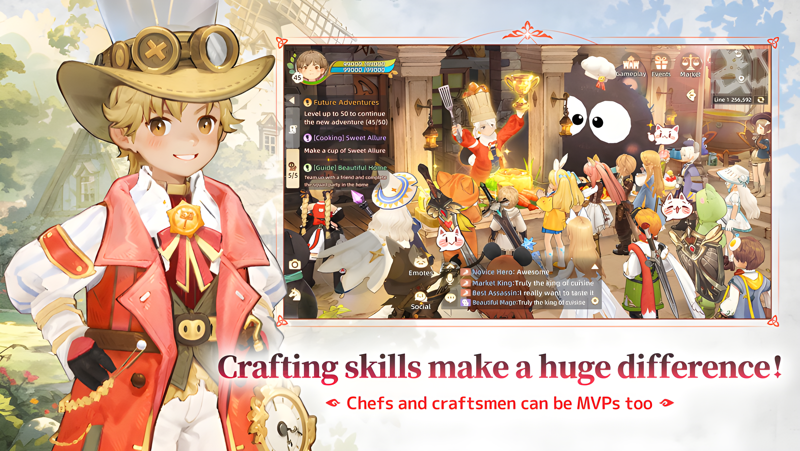
Crafting in Tree of Savior: Neverland is more than a background activity. Skilled cooks can prepare golden-tier dishes that provide powerful battlefield advantages, elevating their role far beyond that of a support contributor. Alchemists can brew specialized potions that fundamentally change how certain characters perform in combat, such as converting a healer's toolkit into something more offensively focused. The crafting economy also creates organic social connections, as players trade goods, barter rare items, and build reputations within their servers.
The social scale of the game is genuinely impressive. Each server supports up to 50,000 players simultaneously, which means the world never feels empty. Global chat, community boards, player story submissions, and shop review systems all contribute to a culture of connection that spans language barriers across the Asian player community. New players are welcomed with a generous package including 70 draws, a complete four-piece gold gear set, and an exclusive selectable mount to help them find their footing quickly.
For anyone ready to step into this world of ceremony, adventure, crafting, and community, Tree of Savior: Neverland offers an experience that grows richer the deeper you go.
Emulator Features
Highest Android 15 Support Best Compatibility on Mac

With a smart button scheme and image recognition function, provide a more concise UI, and support custom button mapping to meet different needs. With a smart button scheme and image recognition, enjoy a cleaner UI and custom button mapping to fit different gaming needs on Mac.

Run multiple games independently at the same time, easily manage multiple accounts, play games while hanging. Take your Mac gaming further with multiple independent instances, easy account management, and seamless AFK gaming on Apple Silicon Mac.

Break through FPS limit, and enjoy a seamless gaming experience without lag and delay! Break through FPS limits for a seamless, lag-free gaming experience on MacBook, Mac mini, iMac, and Mac Studio.

Get a 3-second startup with 52% less memory usage and 65% more stability. Enjoy 3-second startup, 52% less memory usage, and 65% greater stability on Apple Silicon Mac.
How to Download and Play Tree of Savior: Neverland on PC and Mac
Installation Guide
Download MuMuPlayer
Download MuMuPlayer and install it on your PC or Mac
Sign-in Google Store
Complete Google sign-in to access the Play Store
Search and Install
Search Tree of Savior: Neverland in the Play Store
Enjoy Gaming
Enjoy 120 FPS high-def gameplay with big screen
System Requirements
Windows PC
Vulkan / DirectX supported. 4 cores + 4GB RAM recommended. Up to 240 FPS. VT required.
macOS
Recommended: Apple Silicon Mac with 8GB RAM or above. Up to 240 FPS.