Play Cookingdom on PC Play Cookingdom on PC and Mac
Cookingdom is a cozy simulation game that invites players into a relaxing world of step-by-step virtual cooking. Designed for those who want to slow down and enjoy the process rather than race against the clock, the game walks you through preparing dishes from global cuisines, from fluffy pancakes to steaming miso ramen, all wrapped in soothing visuals, soft sound effects, and charming animations. You can bring the full Cookingdom experience to your PC screen right now by downloading it through MuMuPlayer, the Android emulator built for smooth and comfortable gameplay on a bigger display.
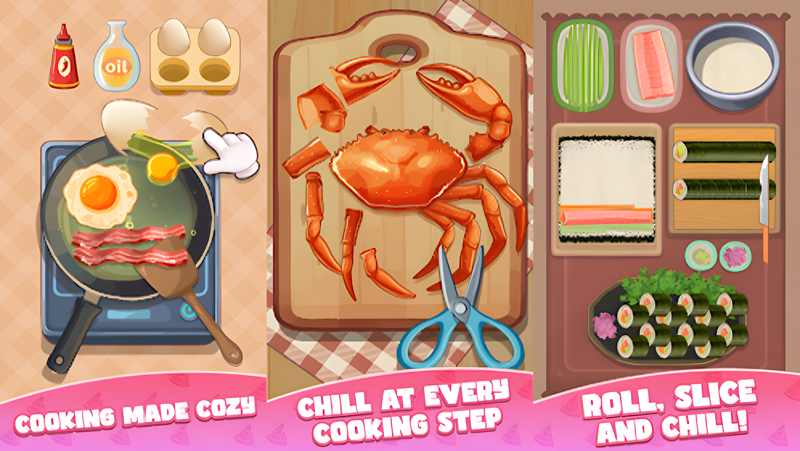
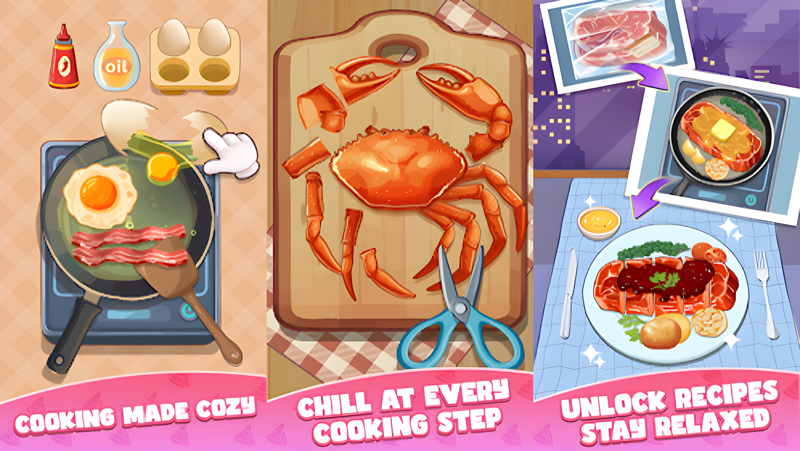
At the heart of Cookingdom is a collection of satisfying mini-games tied to each cooking step. You chop vegetables, mix batters, flip proteins at just the right moment, and carefully plate your finished creations with garnishes and sauces. Every action is accompanied by tactile sound design that gives the whole experience an almost ASMR-like quality. Beyond the kitchen work itself, the game also lets you personalize your cooking space with decorative items like fairy lights, potted plants, and rustic shelving, while your chef character can be dressed in themed outfits and accessories ranging from bunny aprons to fuzzy slippers. As you complete recipes, new ingredients, tools, and dishes steadily unlock, keeping the progression feeling fresh without ever becoming stressful.
Playing Cookingdom on PC through MuMuPlayer gives you a noticeably more comfortable experience compared to a small phone screen. The detailed plating sequences and kitchen decoration menus become far easier to navigate with a mouse, and the larger display lets you fully appreciate the game's warm, hand-crafted art style. MuMuPlayer runs the game smoothly without draining a phone battery, so you can sink into long, unhurried cooking sessions whenever you want to unwind. If you have been looking for the ideal way to enjoy this cozy culinary escape at its best, setting it up on MuMuPlayer is the way to go.
Download Cookingdom on PC or Mac with MuMuPlayer, get a PC like gameplay along with smart control and high graphics performance.
MuMuPlayer, the top Android emulator for PC and Apple silicon Mac, delivers an optimal gaming experience with minimal RAM usage and high FPS. It also allows you to create multiple instances of the emulator and run several games simultaneously, thanks to its Multi-instance feature. Its advanced emulator features ensure smooth gameplay, even on low-end PCs.
Download and play Cookingdom on PC or Mac with MuMuPlayer and start enjoying your gaming experience now.
About the Game
Cookingdom is a simulation game built entirely around the idea that cooking should feel like a treat, not a chore. Rather than rushing orders or managing chaotic dinner rushes, players are invited to slow down and work through each recipe one satisfying step at a time. The game draws inspiration from cuisines all around the world, offering a recipe book filled with dishes that span continents and cultures. Whether you are assembling a colorful charcuterie board, ladling toppings onto a bowl of miso ramen, or watching chocolate lava cake ooze as it comes out of the oven, the focus is always on the pleasure of the process itself.
The cooking system is structured around a series of mini-games, each representing a distinct stage of meal preparation. Here is what players engage with as they work through each recipe:
- Chopping and dicing: Slice vegetables, fresh herbs, and decorative garnishes with gentle, rhythmic cuts accompanied by soft cutting board sounds.
- Mixing and stirring: Combine ingredients in bowls or pots, watching colors swirl and blend as the dish takes shape before your eyes.
- Cooking to perfection: Time your flips, sautees, and grills to get the result just right. Misstiming is never punishing; the game simply encourages you to laugh and try again.
- Plating and finishing: Arrange components carefully on the plate, then add final touches like herb sprinkles or sauce drizzles to complete the presentation.
Beyond the cooking itself, Cookingdom gives players a meaningful layer of personalization. Your kitchen is a living space that you can furnish and decorate to reflect your own sense of coziness. Options include twinkling string lights, leafy potted plants, wooden shelving units, and a variety of quirky small details like a cat-shaped clock. Cooking tools such as cutting boards and whisks come in playful designs, and your chef avatar can wear everything from cozy sweaters to themed costume sets tied to specific recipes.
The audiovisual experience of Cookingdom is one of its strongest qualities. Soft lo-fi background music sets a calm tone throughout, while the layered sound effects, crunching vegetables, bubbling soups, and the gentle tap of seasoning, create an immersive sensory atmosphere. The art style is warm and illustrative, with animations that feel intentional and emotionally satisfying rather than mechanical.
Progression in Cookingdom is built to stay rewarding without applying pressure. Completing dishes unlocks new recipes, expands your available ingredients, and adds fresh tools to your collection. The game blends casual, puzzle, and simulation elements in a way that feels cohesive rather than scattered, making each session feel complete whether it lasts ten minutes or an hour. For anyone who wants a game that genuinely helps them decompress, Cookingdom offers a kitchen worth returning to every single day.
Emulator Features
Highest Android 15 Support Best Compatibility on Mac

With a smart button scheme and image recognition function, provide a more concise UI, and support custom button mapping to meet different needs. With a smart button scheme and image recognition, enjoy a cleaner UI and custom button mapping to fit different gaming needs on Mac.

Run multiple games independently at the same time, easily manage multiple accounts, play games while hanging. Take your Mac gaming further with multiple independent instances, easy account management, and seamless AFK gaming on Apple Silicon Mac.

Break through FPS limit, and enjoy a seamless gaming experience without lag and delay! Break through FPS limits for a seamless, lag-free gaming experience on MacBook, Mac mini, iMac, and Mac Studio.

Get a 3-second startup with 52% less memory usage and 65% more stability. Enjoy 3-second startup, 52% less memory usage, and 65% greater stability on Apple Silicon Mac.
How to Download and Play Cookingdom on PC and Mac
Installation Guide
Download MuMuPlayer
Download MuMuPlayer and install it on your PC or Mac
Sign-in Google Store
Complete Google sign-in to access the Play Store
Search and Install
Search Cookingdom in the Play Store
Enjoy Gaming
Enjoy 120 FPS high-def gameplay with big screen
System Requirements
Windows PC
Vulkan / DirectX supported. 4 cores + 4GB RAM recommended. Up to 240 FPS. VT required.
macOS
Recommended: Apple Silicon Mac with 8GB RAM or above. Up to 240 FPS.