Play Dungeon Clawler on PC Play Dungeon Clawler on PC and Mac
Download Dungeon Clawler on PC with MuMuPlayer, get a PC like gameplay along with smart control and high graphics performance.
MuMuPlayer, the top Android emulator for PC and Apple silicon Mac, delivers an optimal gaming experience with minimal RAM usage and high FPS. It also allows you to create multiple instances of the emulator and run several games simultaneously, thanks to its Multi-instance feature. Its advanced emulator features ensure smooth gameplay, even on low-end PCs.
Download and play Dungeon Clawler on PC with MuMuPlayer and start enjoying your gaming experience now.
Download Dungeon Clawler on PC or Mac with MuMuPlayer, get a PC like gameplay along with smart control and high graphics performance.
MuMuPlayer, the top Android emulator for PC and Apple silicon Mac, delivers an optimal gaming experience with minimal RAM usage and high FPS. It also allows you to create multiple instances of the emulator and run several games simultaneously, thanks to its Multi-instance feature. Its advanced emulator features ensure smooth gameplay, even on low-end PCs.
Download and play Dungeon Clawler on PC or Mac with MuMuPlayer and start enjoying your gaming experience now.
About the Game
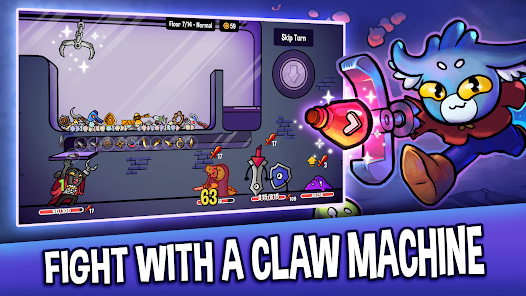
Use a claw machine to grab weapons, shields, and items as you navigate the dungeon packed with enemies and treasures. Get ready for a thrilling journey where your strategy and skill will be tested!

FEATURES:
- Unique Claw Machine Mechanic: Control a real-time claw machine to snatch weapons, shields, and items from the claw machine. Every grab counts, so plan your strategy and defeat enemies with precision.
- Roguelike Dungeon Exploration: Traverse procedurally generated dungeons that change with every run, offering new challenges, enemies, and treasures every time you play.
- Innovative Deckbuilding Strategy: Collect and upgrade your item pool with powerful weapons, items, and trinkets. With countless combinations, create your ultimate strategy to conquer the dungeons.
- Epic Boss Battles: Engage in intense boss battles and unlock special perks aka paws with every victory.
- Endless mode: Even after beating the dungeon boss, the run doesn’t end, but can go on forever. How deep into the dungeon can you venture?
- 4 Difficulty Modes: Beat the dungeon in normal, hard, harder and nightmare mode.
- Unique Characters: Choose from multiple heroes, each with their own unique abilities and playstyles. Discover the best combinations to suit your dungeon-crawling strategy.
- Engaging Storyline: The evil dungeon lord has stolen your rabbit paw and replaced it with a rusty claw. Fight your way through the dungeon to reclaim your lost limb and fortune!
- Stunning Art & Sound: Immerse yourself in the colorful, hand-drawn world of Dungeon Clawler with its dynamic soundtrack and beautifully crafted visuals.

WHY PLAY DUNGEON CLAWLER?
Dungeon Clawler brings together the strategic depth of deckbuilders with the thrilling unpredictability of roguelike dungeon crawlers and the fun of a claw machine mechanic. Each run offers something new, with endless strategies to discover and enemies to defeat. If you're seeking a fresh deck-builder gameplay with infinite replayability, this is the game for you.

EARLY ACCESS: HELP SHAPE THE FUTURE!
Dungeon Clawler is currently in Early Access, and we're committed to making it even better with your feedback! Expect frequent updates, new content, and improvements as we continue to enhance the game. By joining now, you can help shape the future of Dungeon Clawler and be part of our growing community.

JOIN THE ADVENTURE TODAY!
Download Dungeon Clawler now and begin your journey through ever-changing dungeons. Can you master the claw and reclaim your paw? The dungeon awaits!

ABOUT STRAY FAWN
We are an indie game development studio from Zurich, Switzerland. Dungeon Clawler is our fourth game and highly appreciate your support!
Emulator Features
Highest Android 15 Support Best Compatibility on Mac

With a smart button scheme and image recognition function, provide a more concise UI, and support custom button mapping to meet different needs. With a smart button scheme and image recognition, enjoy a cleaner UI and custom button mapping to fit different gaming needs on Mac.

Run multiple games independently at the same time, easily manage multiple accounts, play games while hanging. Take your Mac gaming further with multiple independent instances, easy account management, and seamless AFK gaming on Apple Silicon Mac.

Break through FPS limit, and enjoy a seamless gaming experience without lag and delay! Break through FPS limits for a seamless, lag-free gaming experience on MacBook, Mac mini, iMac, and Mac Studio.

Get a 3-second startup with 52% less memory usage and 65% more stability. Enjoy 3-second startup, 52% less memory usage, and 65% greater stability on Apple Silicon Mac.
How to Download and Play Dungeon Clawler on PC and Mac
Installation Guide
Download MuMuPlayer
Download MuMuPlayer and install it on your PC or Mac
Sign-in Google Store
Complete Google sign-in to access the Play Store
Search and Install
Search Dungeon Clawler in the Play Store
Enjoy Gaming
Enjoy 120 FPS high-def gameplay with big screen
System Requirements
Windows PC
Vulkan / DirectX supported. 4 cores + 4GB RAM recommended. Up to 240 FPS. VT required.
macOS
Recommended: Apple Silicon Mac with 8GB RAM or above. Up to 240 FPS.