Play HAIKYU!! TOUCH THE DREAM on PC and Mac
Download HAIKYU!! TOUCH THE DREAM on PC or Mac with MuMuPlayer, get a PC like gameplay along with smart control and high graphics performance.
MuMuPlayer, the top Android emulator for PC and Apple silicon Mac, delivers an optimal gaming experience with minimal RAM usage and high FPS. It also allows you to create multiple instances of the emulator and run several games simultaneously, thanks to its Multi-instance feature. Its advanced emulator features ensure smooth gameplay, even on low-end PCs.
Download and play HAIKYU!! TOUCH THE DREAM on PC or Mac with MuMuPlayer and start enjoying your gaming experience now.
About the Game
Haikyu!! TOUCH THE DREAM – Slope Update!

It may be the hot season now,
but winter has arrived early in TOUCH THE DREAM!

■Game Features

Create your own dream team.
『Haikyu!!』 has come to mobile with characters from the original work.
・Meet players from various schools such as Karasuno, Nekoma, Aoba Johsai, Date Kogyo, and more.
・Create your own dream team and challenge the top.

Enjoy the story mode with full voiceover.
Relive the moving and thrilling story that captivated fans worldwide, now in a game.
・Feel the emotions again with fully voiced story mode.

Enjoy a variety of content.
・Story mode for progressing the story, PvP matches against other players.
・Daily matches, tournaments, and more content to keep you entertained.

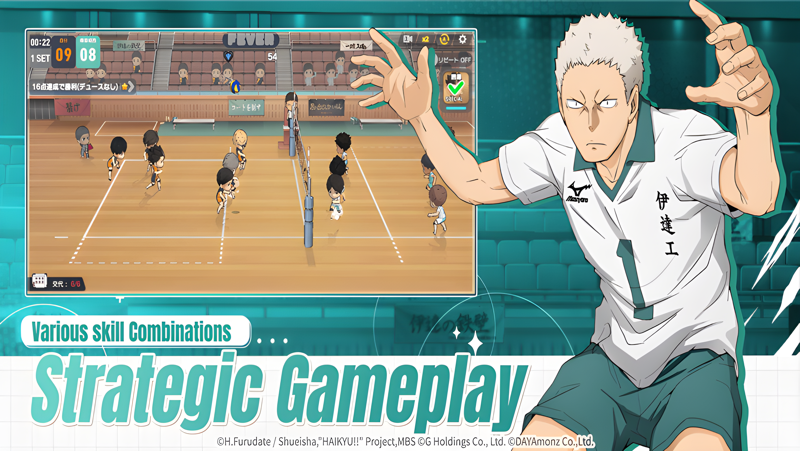
Strategic volleyball matches with 3D mini characters.
Original characters transformed into 3D mini characters.
・Meet the cool characters from the original work as cute mini characters in the game.
Strategic match management with various skill combinations.
・Choose advantageous skill cards by predicting the opponent's skill cards.

Rapid growth even during idle moments.
・Automatically gain experience points and gold through auto-match content.

[Smartphone App Access Permissions Guide]
To provide the following services when using the app, we are requesting access permissions.

[Optional Access Permissions]
Photos/Media/Files: Needed to save game execution files and videos, and to upload photos and videos.
Camera: Needed for taking photos and videos to upload.
Phone: Needed to collect phone numbers for sending promotional text messages.

Service can be used even if optional access permissions are not granted.
[How to withdraw access permissions]
▶ Android 6.0 and above: Settings > Apps > Select permission item > Permission list > Choose to grant or withdraw access permission
▶ Below Android 6.0: Upgrade the operating system to withdraw access permissions or delete the app
※ The app may not provide individual consent functions, and you can withdraw access permissions using the above method.
※ The images used are from the development stage and may differ from the actual game.
※ This game can be played for free, but some paid items are available.
※ Inquiry email: help_a@dayamonz.com
Emulator Features
Highest Android 15 Support Best Compatibility on Mac

With a smart button scheme and image recognition function, provide a more concise UI, and support custom button mapping to meet different needs. With a smart button scheme and image recognition, enjoy a cleaner UI and custom button mapping to fit different gaming needs on Mac.

Run multiple games independently at the same time, easily manage multiple accounts, play games while hanging. Take your Mac gaming further with multiple independent instances, easy account management, and seamless AFK gaming on Apple Silicon Mac.

Break through FPS limit, and enjoy a seamless gaming experience without lag and delay! Break through FPS limits for a seamless, lag-free gaming experience on MacBook, Mac mini, iMac, and Mac Studio.

Get a 3-second startup with 52% less memory usage and 65% more stability. Enjoy 3-second startup, 52% less memory usage, and 65% greater stability on Apple Silicon Mac.
How to Download and Play HAIKYU!! TOUCH THE DREAM on PC and Mac
Installation Guide
Download MuMuPlayer
Download MuMuPlayer and install it on your PC or Mac
Sign-in Google Store
Complete Google sign-in to access the Play Store
Search and Install
Search HAIKYU!! TOUCH THE DREAM in the Play Store
Enjoy Gaming
Enjoy 120 FPS high-def gameplay with big screen
System Requirements
Windows PC
Vulkan / DirectX supported. 4 cores + 4GB RAM recommended. Up to 240 FPS. VT required.
macOS
Recommended: Apple Silicon Mac with 8GB RAM or above. Up to 240 FPS.