Play Home Valley: Virtual World on PC Play Home Valley: Virtual World on PC and Mac
Home Valley: Virtual World is a social simulation game that invites players into a richly designed virtual environment where creativity, self-expression, and community come together. At its heart, the game lets you build a personalized home, craft a unique avatar, and connect with players from around the globe in a lively, ever-growing world. With MuMuPlayer, you can bring this entire experience to your PC and enjoy every detail on a larger screen with smoother, more comfortable controls.
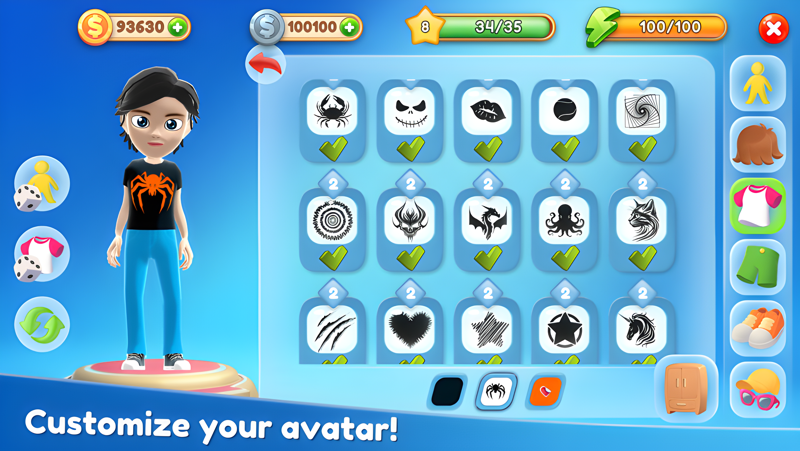
The game packs an impressive range of features that cater to designers, socializers, and casual players alike. You can build a fully customized 3D avatar using an extensive character creator that covers hairstyles, outfits, and accessories, letting your personality shine through. Home-building is equally deep, with players collecting resources from the forest to craft furniture and decorate themed rooms inspired by styles like Fantasy, Party, and Music. Daily missions, multiplayer events, and a progression system called Valley Track keep long-term engagement strong, rewarding you with new content as you level up. Social tools including animated emojis, chatrooms, and shared activities make it easy to meet new friends and play together in real time.
Playing Home Valley: Virtual World on PC through MuMuPlayer brings real advantages to a game built around creativity and social interaction. The larger display makes decorating your home and fine-tuning your avatar far more precise and enjoyable, while keyboard and mouse input gives you better control during multiplayer events and chatroom interactions. MuMuPlayer's stable performance also ensures you stay connected during live social events without interruption, so you never miss a moment in your growing virtual community.
Download Home Valley: Virtual World on PC or Mac with MuMuPlayer, get a PC like gameplay along with smart control and high graphics performance.
MuMuPlayer, the top Android emulator for PC and Apple silicon Mac, delivers an optimal gaming experience with minimal RAM usage and high FPS. It also allows you to create multiple instances of the emulator and run several games simultaneously, thanks to its Multi-instance feature. Its advanced emulator features ensure smooth gameplay, even on low-end PCs.
Download and play Home Valley: Virtual World on PC or Mac with MuMuPlayer and start enjoying your gaming experience now.
About the Game
Home Valley: Virtual World blends the appeal of life simulation with the energy of social gaming, creating a space where players can express themselves, build stunning virtual homes, and form genuine connections with others around the world. Rather than focusing on a single activity, the game weaves together several interconnected systems that reward both creativity and community engagement.
At the center of the experience is a robust avatar creation tool. Players can shape a 3D character from the ground up, selecting from a wide variety of hairstyles, clothing items, and accessories. The customization options are deep enough to make every avatar feel distinct, and the wardrobe continues to grow as you progress through the game. Dressing up and refining your look is not just a one-time setup but an ongoing part of how you present yourself to the world.
Home design is another major pillar of Home Valley. The crafting system encourages players to venture into lush forest environments and gather materials, which are then used to create furniture and decorative pieces for their living spaces. Every item can be personalized, giving you fine control over how your home looks and feels. Themed room sets, including options like Fantasy, Music, and Party, allow you to build spaces with a specific mood or aesthetic. Players who put serious effort into their designs can climb the in-game leaderboards and showcase their work to the entire community.
The social side of Home Valley is where the game truly comes alive. Key social features include:
- A chatroom system that connects players globally, supported by animated expressions and emoji reactions
- Multiplayer events and daily missions that bring friends together for shared challenges and rewards
- Lively public spaces such as forests, parks, and boulevards where spontaneous interactions happen naturally
- The ability to host your own parties or themed gatherings and invite other players to join
Progression in the game is handled through the Valley Track system, which rewards consistent play with experience points, unlockable content, and new crafting options. As you advance, your role in the world expands, with titles and skills reflecting your growing expertise as a designer, builder, or community figure.
What makes Home Valley stand out among virtual world games is how naturally all of these systems connect. Gathering resources feeds into crafting, which feeds into home design, which feeds into social sharing and competition. The loop feels rewarding at every stage, whether you are a new player decorating your first room or a veteran competing for the top spot on the design leaderboard.
For players who want the most out of this experience, running Home Valley: Virtual World on PC through MuMuPlayer opens up the full visual and social experience on a bigger canvas, with the precision of mouse and keyboard making every design decision easier and every chat interaction faster.
Emulator Features
Highest Android 15 Support Best Compatibility on Mac

With a smart button scheme and image recognition function, provide a more concise UI, and support custom button mapping to meet different needs. With a smart button scheme and image recognition, enjoy a cleaner UI and custom button mapping to fit different gaming needs on Mac.

Run multiple games independently at the same time, easily manage multiple accounts, play games while hanging. Take your Mac gaming further with multiple independent instances, easy account management, and seamless AFK gaming on Apple Silicon Mac.

Break through FPS limit, and enjoy a seamless gaming experience without lag and delay! Break through FPS limits for a seamless, lag-free gaming experience on MacBook, Mac mini, iMac, and Mac Studio.

Get a 3-second startup with 52% less memory usage and 65% more stability. Enjoy 3-second startup, 52% less memory usage, and 65% greater stability on Apple Silicon Mac.
How to Download and Play Home Valley: Virtual World on PC and Mac
Installation Guide
Download MuMuPlayer
Download MuMuPlayer and install it on your PC or Mac
Sign-in Google Store
Complete Google sign-in to access the Play Store
Search and Install
Search Home Valley: Virtual World in the Play Store
Enjoy Gaming
Enjoy 120 FPS high-def gameplay with big screen
System Requirements
Windows PC
Vulkan / DirectX supported. 4 cores + 4GB RAM recommended. Up to 240 FPS. VT required.
macOS
Recommended: Apple Silicon Mac with 8GB RAM or above. Up to 240 FPS.