Play Puzzle SEVENTEEN on PC Play Puzzle SEVENTEEN on PC and Mac
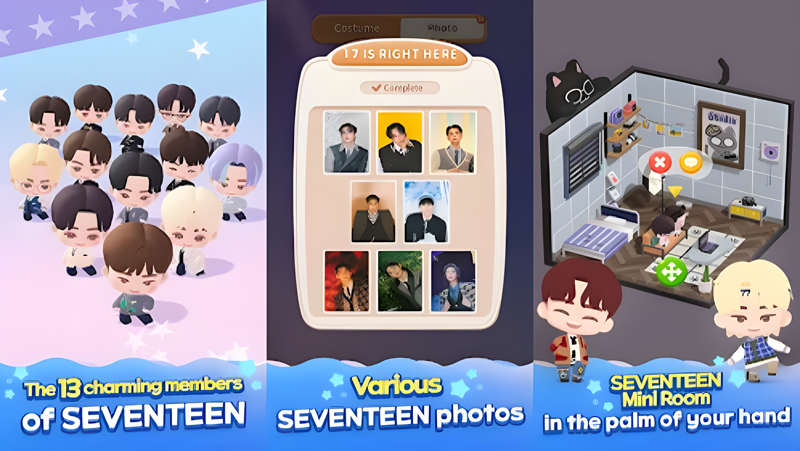
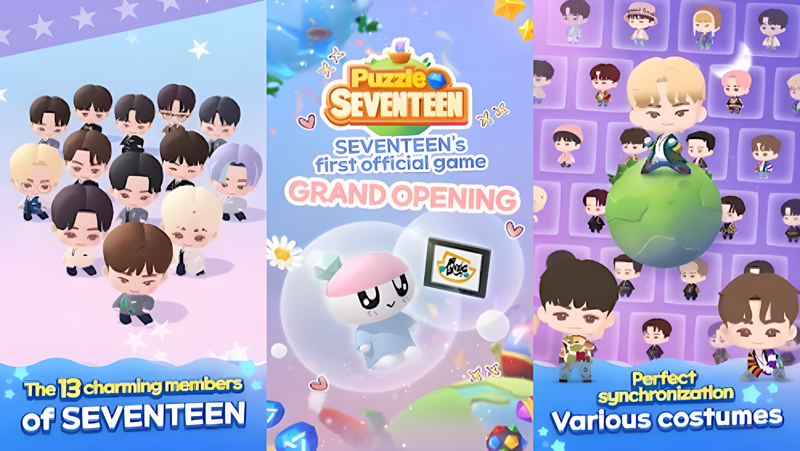
Puzzle SEVENTEEN is a match-3 puzzle game built around the popular K-pop group SEVENTEEN, and it invites fans into a colorful world of chibi characters, music, and collection. As a Puzzleteen crew member, you solve tile-matching stages while interacting with adorable SD versions of all 13 members. The game blends casual puzzle mechanics with idol-themed decoration and card collecting. While it is designed for mobile, you can enjoy Puzzle SEVENTEEN on PC through MuMuPlayer, which brings the experience to a larger screen with smooth performance and convenient controls.
Puzzle SEVENTEEN packs several features that cater directly to CARATs. The core match-3 gameplay is accompanied by SEVENTEEN's hit songs such as Very Nice, CLAP, Oh My, HOT, Super, God of Music, and MAESTRO, making each stage feel like a mini concert. You can collect exclusive photocards, dress up members in various costumes and hairstyles, and decorate their mini rooms with interactive reactions. The game also includes a card collection system tied to seasonal events, leagues, friends, and boxes, plus island adventures on Starting Isle, Ice Island, Super Island, and City Island. All of this is wrapped in charming dialogue and stories that reflect the unique personalities of each member.
Playing Puzzle SEVENTEEN on PC with MuMuPlayer enhances the experience in several practical ways. The larger screen makes it easier to spot match-3 opportunities and appreciate the detailed chibi art and room decorations. MuMuPlayer is a lightweight Android emulator that runs smoothly on Windows and Mac computers, including MacBook, Mac mini, and Apple Silicon models like M1, M2, M3, M4, M5, M5 Pro, and M6. You can play on Mac with MuMuPlayer using either a keyboard and mouse or a gamepad, which can make long puzzle sessions more comfortable. The emulator also supports multiple instances, so you can manage different accounts or simply keep the game running while you do other tasks. Whether you are on a Windows PC or a Mac, MuMuPlayer offers a reliable way to dive into the world of Puzzle SEVENTEEN without being tied to a small phone screen.
Download Puzzle SEVENTEEN on PC or Mac with MuMuPlayer, get a PC like gameplay along with smart control and high graphics performance.
MuMuPlayer, the top Android emulator for PC and Apple silicon Mac, delivers an optimal gaming experience with minimal RAM usage and high FPS. It also allows you to create multiple instances of the emulator and run several games simultaneously, thanks to its Multi-instance feature. Its advanced emulator features ensure smooth gameplay, even on low-end PCs.
Download and play Puzzle SEVENTEEN on PC or Mac with MuMuPlayer and start enjoying your gaming experience now.
About the Game
Puzzle SEVENTEEN is a delightful match-3 puzzle game that brings the 13 members of SEVENTEEN into a charming, chibi-filled world. Developed with the group's participation, this game is a love letter to CARATs, offering a mix of casual puzzle solving, collection, and decoration. You can play Puzzle SEVENTEEN on PC with MuMuPlayer, an Android emulator that lets you enjoy the game on a bigger screen with enhanced controls and performance. Whether you are a longtime fan or new to the fandom, the game provides a relaxing yet engaging way to connect with SEVENTEEN's music and personality.
The heart of Puzzle SEVENTEEN is its match-3 gameplay. Each stage presents a grid of colorful tiles, and your goal is to match three or more of the same type to clear them and achieve objectives. The puzzles are easy to learn but gradually become more challenging, requiring strategic thinking and the use of boosters. As you progress, you unlock new stages and encounter various obstacles. The game features a wide selection of SEVENTEEN's songs, including Very Nice, CLAP, Oh My, HOT, Super, God of Music, and MAESTRO, which play in the background and add energy to each match. The chibi versions of the members appear throughout the game, offering support and reactions that make the experience feel personal and lively.
Beyond the puzzles, Puzzle SEVENTEEN offers a rich collection system. You can gather exclusive photocards that showcase the members in different outfits and concepts, some of which are inspired by album photos and concert stages. These cards can be collected through events, leagues, friends, team members, and boxes, allowing you to complete sets and earn rewards. The card collection system is updated with seasonal events, giving you new goals to strive for. Additionally, you can customize your favorite idol with various costumes and hairstyles, creating a unique look that reflects your style. This customization extends to the mini rooms, where you can decorate the personal spaces of SEVENTEEN members. You can arrange furniture and decor freely, and the members will react to your choices through interactive events, adding a layer of charm and personality.
Adventure is another key element in Puzzle SEVENTEEN. The game features several islands, such as Starting Isle, Ice Island, Super Island, and City Island, each with its own theme and secrets to discover. As a member of the Puzzleteen crew, you board the ship CARAT and embark on journeys to these islands, uncovering stories and enjoying special events. The islands serve as a backdrop for the game's narrative, where you can interact with SEVENTEEN members and learn more about their personalities through detailed dialogue. The game's story is crafted to highlight the unique charms of each member, with scenarios that feel authentic to their real-life dynamics. This narrative aspect adds depth to the puzzle-solving, making each stage feel like part of a larger adventure.
Puzzle SEVENTEEN also includes social features that let you connect with friends and other players. You can join leagues, exchange gifts, and participate in team activities, fostering a sense of community among CARATs. The game regularly hosts events, such as the live broadcast event with JEONGHAN, which offer special rewards and limited-time content. These events keep the game fresh and provide opportunities to earn exclusive items. The combination of puzzles, collection, decoration, and social interaction creates a well-rounded experience that appeals to both casual players and dedicated fans.
For the best experience, playing Puzzle SEVENTEEN on PC with MuMuPlayer is highly recommended. MuMuPlayer is a free Android emulator that runs on Windows and Mac computers, including MacBook, Mac mini, and Apple Silicon models like M1, M2, M3, M4, M5, M5 Pro, and M6. It allows you to play mobile games on a larger screen with improved graphics and smoother performance. With MuMuPlayer, you can use your keyboard and mouse or a gamepad to control the game, which can be more precise and comfortable than touch controls, especially during longer sessions. The emulator also supports multiple instances, so you can run Puzzle SEVENTEEN alongside other apps or manage multiple accounts simultaneously. Additionally, MuMuPlayer offers customizable settings for resolution and performance, ensuring that the game runs smoothly on your hardware. Whether you are using a Windows PC or a Mac, MuMuPlayer provides a seamless way to enjoy Puzzle SEVENTEEN without being limited by a phone's battery or screen size.
In summary, Puzzle SEVENTEEN is a comprehensive match-3 game that combines addictive puzzle gameplay with the charm of SEVENTEEN. From collecting photocards and decorating rooms to exploring islands and participating in events, there is always something to do. The game's focus on the members' personalities and music makes it a must-play for CARATs. By playing on PC with MuMuPlayer, you can enhance your experience with better controls, a larger display, and the convenience of running the game on your computer. Whether you are at home or on the go, MuMuPlayer ensures that Puzzle SEVENTEEN is always accessible and enjoyable.
Emulator Features
Highest Android 15 Support Best Compatibility on Mac

With a smart button scheme and image recognition function, provide a more concise UI, and support custom button mapping to meet different needs. With a smart button scheme and image recognition, enjoy a cleaner UI and custom button mapping to fit different gaming needs on Mac.

Run multiple games independently at the same time, easily manage multiple accounts, play games while hanging. Take your Mac gaming further with multiple independent instances, easy account management, and seamless AFK gaming on Apple Silicon Mac.

Break through FPS limit, and enjoy a seamless gaming experience without lag and delay! Break through FPS limits for a seamless, lag-free gaming experience on MacBook, Mac mini, iMac, and Mac Studio.

Get a 3-second startup with 52% less memory usage and 65% more stability. Enjoy 3-second startup, 52% less memory usage, and 65% greater stability on Apple Silicon Mac.
How to Download and Play Puzzle SEVENTEEN on PC and Mac
Installation Guide
Download MuMuPlayer
Download MuMuPlayer and install it on your PC or Mac
Sign-in Google Store
Complete Google sign-in to access the Play Store
Search and Install
Search Puzzle SEVENTEEN in the Play Store
Enjoy Gaming
Enjoy 120 FPS high-def gameplay with big screen
System Requirements
Windows PC
Vulkan / DirectX supported. 4 cores + 4GB RAM recommended. Up to 240 FPS. VT required.
macOS
Recommended: Apple Silicon Mac with 8GB RAM or above. Up to 240 FPS.