Play Welcome to My Home on PC Play Welcome to My Home on PC and Mac
Download Welcome to My Home on PC with MuMuPlayer, get a PC like gameplay along with smart control and high graphics performance.
MuMuPlayer, the top Android emulator for PC and Apple silicon Mac, delivers an optimal gaming experience with minimal RAM usage and high FPS. It also allows you to create multiple instances of the emulator and run several games simultaneously, thanks to its Multi-instance feature. Its advanced emulator features ensure smooth gameplay, even on low-end PCs.
Download and play Welcome to My Home on PC with MuMuPlayer and start enjoying your gaming experience now.
Download Welcome to My Home on PC or Mac with MuMuPlayer, get a PC like gameplay along with smart control and high graphics performance.
MuMuPlayer, the top Android emulator for PC and Apple silicon Mac, delivers an optimal gaming experience with minimal RAM usage and high FPS. It also allows you to create multiple instances of the emulator and run several games simultaneously, thanks to its Multi-instance feature. Its advanced emulator features ensure smooth gameplay, even on low-end PCs.
Download and play Welcome to My Home on PC or Mac with MuMuPlayer and start enjoying your gaming experience now.
About the Game
** This game is available only in English. Other languages are not yet supported**

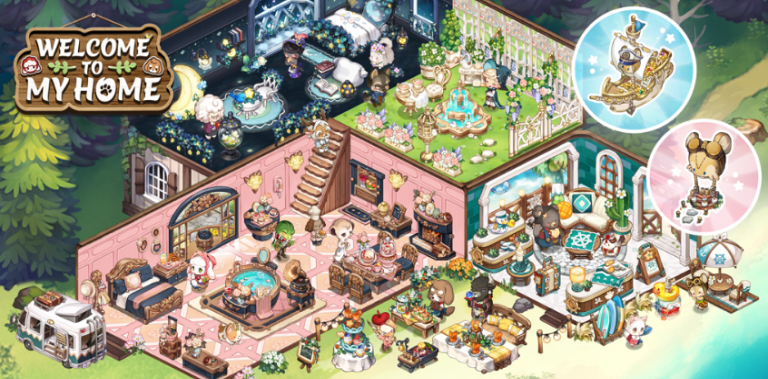
Welcome to My Home! Take a break from your everyday life by crafting and farming at your workshop.

Welcome to My Home is a heartwarming and charming game where players are immersed into a delightful world filled with endless opportunities for creativity. Dive into a tranquil and cozy world where you can craft, decorate, and socialize with other players while surrounded by your real-life friends and cute NPCs

Key Features

Relaxing Gameplay: Welcome to My Home offers a cozy and relaxed gaming experience. It's perfect for unwinding after a long day, providing a tranquil escape to a world of charm and coziness.

Crafting and Decorating: Unleash your inner designer and create your dream haven. Collect resources, craft various themed furniture and decorations, and customize not only your cozy corner of the world. Whether it's a cozy cottage, a magical forest retreat, or a beachside paradise, the possibilities are endless. Decorate your home and your avatar too! There are over 200 types of outfits and accessories to dress up in your personal style!

Socialize with Friends: Connect and collaborate with other players in a friendly and inclusive environment. Visit each other's workshops and join societies and participate in events to foster a sense of community within the game. Meet new friends and society members at the square and timeline, and trade items through the market!

Adorable Animal NPCs: Welcome to My Home has a wide array of cute and endearing animal NPCs. These charming animals will become your virtual companions, showing affection and forming heartwarming bonds with you as you progress in the game.

Quests and Achievements: Embark on heartwarming quests, challenges, and achievements that help you grow within the game. Earn rewards and unlock special items by completing tasks and achieving milestones.

Seasonal Themes: Welcome to My Home regularly introduces seasonal themes and events, keeping the gameplay fresh and exciting. From winter wonderlands to tropical escapes, each season brings new crafting recipes, decorations, and challenges.

Welcome to My Home is not just a game; it's a heartwarming and creative social experience. Join the community of like-minded players, craft your perfect haven, and bask in the affectionate company of charming animal NPCs. Immerse yourself in the world of Welcome to My Home and create memories that warm your heart.
Emulator Features
Highest Android 15 Support Best Compatibility on Mac

With a smart button scheme and image recognition function, provide a more concise UI, and support custom button mapping to meet different needs. With a smart button scheme and image recognition, enjoy a cleaner UI and custom button mapping to fit different gaming needs on Mac.

Run multiple games independently at the same time, easily manage multiple accounts, play games while hanging. Take your Mac gaming further with multiple independent instances, easy account management, and seamless AFK gaming on Apple Silicon Mac.

Break through FPS limit, and enjoy a seamless gaming experience without lag and delay! Break through FPS limits for a seamless, lag-free gaming experience on MacBook, Mac mini, iMac, and Mac Studio.

Get a 3-second startup with 52% less memory usage and 65% more stability. Enjoy 3-second startup, 52% less memory usage, and 65% greater stability on Apple Silicon Mac.
How to Download and Play Welcome to My Home on PC and Mac
Installation Guide
Download MuMuPlayer
Download MuMuPlayer and install it on your PC or Mac
Sign-in Google Store
Complete Google sign-in to access the Play Store
Search and Install
Search Welcome to My Home in the Play Store
Enjoy Gaming
Enjoy 120 FPS high-def gameplay with big screen
System Requirements
Windows PC
Vulkan / DirectX supported. 4 cores + 4GB RAM recommended. Up to 240 FPS. VT required.
macOS
Recommended: Apple Silicon Mac with 8GB RAM or above. Up to 240 FPS.