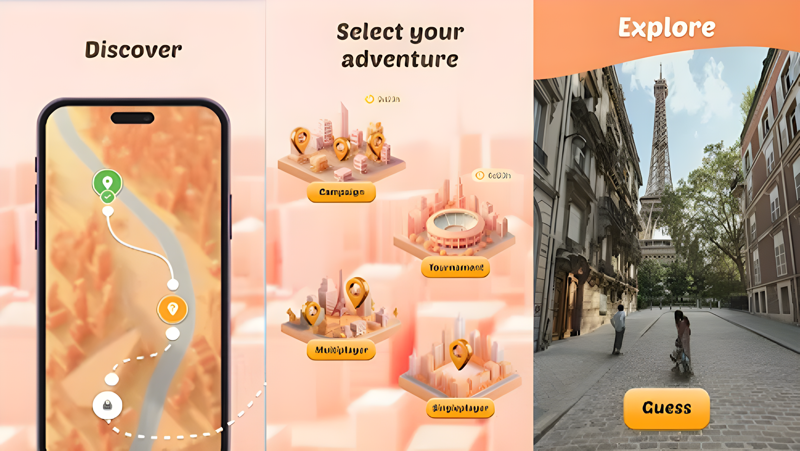
Play Where Am I? - GeoGuess Game on PC and Mac
Where Am I? is a geography-based trivia game that challenges players to identify real-world locations by watching street walk videos from destinations across the globe. The game blends exploration, knowledge, and competition into a single experience, letting you virtually travel the world while testing how well you know its cities, landscapes, and landmarks. You can now take this adventure even further by playing Where Am I? on PC through MuMuPlayer, enjoying every detail of the world map on a larger screen.
The game offers a rich set of features built around discovery and challenge. Players watch immersive street-level footage and place their guesses on a world map, earning points based on accuracy. Beyond solo play, the game includes multiplayer duels and weekly tournaments where you can compete against friends or global players. A collectible monument system lets you build a personalized map of visited locations, while daily campaigns themed around world landmarks keep the content fresh. Leaderboards, experience-based leveling, badges, and free daily rewards round out a feature set designed for both casual explorers and dedicated geography enthusiasts.
Playing Where Am I? on PC with MuMuPlayer gives you a meaningful advantage when precision matters most. Placing location pins on a world map becomes far more accurate with a mouse compared to a touchscreen, helping you score higher on every round. The larger display makes it easier to study street walk video details, read environmental clues, and absorb the visual context needed to make confident guesses. MuMuPlayer also provides a stable, uninterrupted session for longer tournament runs or daily campaign completions, so you never miss a reward or a competitive opportunity.
About the Game
Where Am I? takes the concept of virtual travel and turns it into a competitive geography challenge you can play from anywhere. Instead of flashcards or static images, the game drops you into real street walk videos filmed at locations around the world, from crowded urban centers to quiet rural roads, and asks a simple but surprisingly difficult question: where exactly are you? Your answer comes in the form of a pin placed on a world map, and the closer your guess, the more points you collect.
What makes the game compelling beyond its core mechanic is how much variety surrounds it. Here is a breakdown of what players can expect:
- Street Walk Exploration: Watch real-location footage and analyze visual clues like architecture, signage, vegetation, and terrain to identify where in the world you are.
- Multiplayer Competition: Take on friends or strangers in head-to-head duels, or enter weekly tournaments to compete for prizes and recognition on global leaderboards.
- Daily Campaigns: Rotating themed challenges, such as campaigns focused on famous monuments, give players fresh content and specific knowledge tests every day.
- Collectible Monument System: Each correctly identified location can add a monument to your personal world map, turning your progress into a visual collection.
- Leaderboards and Titles: Consistent performance earns you badges and moves you up ranked leaderboards, with the King of the World title available to the most dedicated players.
- Daily Rewards and Treasure Chests: Free gifts and unlockable chests provide ongoing incentives to log in regularly without requiring purchases.
- Experience and Leveling: As you play and guess, you earn experience points that unlock harder challenges and exclusive content tiers.
The game is designed to appeal to a wide audience. Geography enthusiasts will find the location-guessing mechanics genuinely educational, introducing them to visual details of regions they may never have visited. Trivia fans will appreciate the knowledge-testing format that goes beyond standard question-and-answer structure. Competitive players have ranked modes and tournaments to sink into, while casual users can simply explore at their own pace and collect monuments over time.
One of the game's strongest qualities is its accessibility. There is no requirement to memorize textbook facts; instead, the challenge is about observation, pattern recognition, and building familiarity with how different parts of the world look. Over time, players naturally develop a stronger sense of global geography through repeated exposure rather than rote study.
For players who want to take their performance seriously, running Where Am I? on PC through MuMuPlayer offers practical benefits. Mouse-based pin placement on the world map is noticeably more precise than tapping on a mobile screen, which can directly improve scoring in competitive rounds. The expanded display area makes street walk footage easier to analyze, allowing you to catch subtle visual details that might be missed on a smaller screen. Stable performance during tournaments and daily sessions also means you can focus entirely on the game without worrying about interruptions. Whether you are aiming for the top of the leaderboard or simply exploring the world one video at a time, MuMuPlayer provides a comfortable and capable environment for the full experience.
Emulator Features
Highest Android 15 Support Best Compatibility on Mac

With a smart button scheme and image recognition function, provide a more concise UI, and support custom button mapping to meet different needs. With a smart button scheme and image recognition, enjoy a cleaner UI and custom button mapping to fit different gaming needs on Mac.

Run multiple games independently at the same time, easily manage multiple accounts, play games while hanging. Take your Mac gaming further with multiple independent instances, easy account management, and seamless AFK gaming on Apple Silicon Mac.

Break through FPS limit, and enjoy a seamless gaming experience without lag and delay! Break through FPS limits for a seamless, lag-free gaming experience on MacBook, Mac mini, iMac, and Mac Studio.

Get a 3-second startup with 52% less memory usage and 65% more stability. Enjoy 3-second startup, 52% less memory usage, and 65% greater stability on Apple Silicon Mac.
How to Download and Play Where Am I? - GeoGuess Game on PC and Mac
Installation Guide
Download MuMuPlayer
Download MuMuPlayer and install it on your PC or Mac
Sign-in Google Store
Complete Google sign-in to access the Play Store
Search and Install
Search Where Am I? - GeoGuess Game in the Play Store
Enjoy Gaming
Enjoy 120 FPS high-def gameplay with big screen
System Requirements
Windows PC
Vulkan / DirectX supported. 4 cores + 4GB RAM recommended. Up to 240 FPS. VT required.
macOS
Recommended: Apple Silicon Mac with 8GB RAM or above. Up to 240 FPS.