Play Climb Knight on PC and Mac
Download Climb Knight on PC or Mac with MuMuPlayer, get a PC like gameplay along with smart control and high graphics performance.
MuMuPlayer, the top Android emulator for PC and Apple silicon Mac, delivers an optimal gaming experience with minimal RAM usage and high FPS. It also allows you to create multiple instances of the emulator and run several games simultaneously, thanks to its Multi-instance feature. Its advanced emulator features ensure smooth gameplay, even on low-end PCs.
Download and play Climb Knight on PC or Mac with MuMuPlayer and start enjoying your gaming experience now.
About the Game
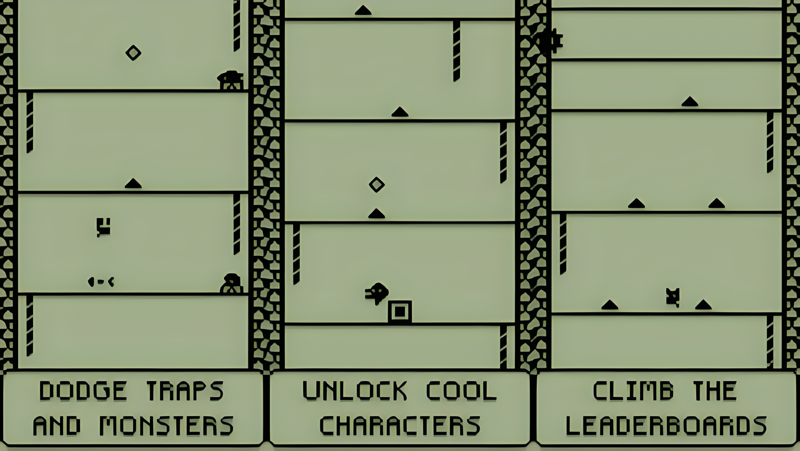
Step into a retro arcade adventure with Climb Knight! Every floor you conquer brings you closer to the top of the global leaderboards. Can you out-climb the competition and reach the "top"?

With LCD-style graphics and super simple 1-button controls, Climb Knight is easy to pick up but fun to master. Just avoid traps, scale ropes, and see how many floors you can clear. Perfect for quick gaming sessions or those moments when you just need one more try after a close call!

Featuring a 1-bit minimalist aesthetic inspired by classic handheld LCD games, vintage brick game consoles, calculator games, old keypad nokia phones, and the timeless charm of palm computers and early portable gaming devices, Climb Knight blends that nostalgic pixel art charm with the fun challenge of a true high-score chaser.

Why you’ll love it:

Global leaderboards: The higher you climb, and the more levels you conquer, the better your high score. How high can you go?
Unlockable characters: Collect and play with multiple pixel art characters as you progress.
Retro feel: Inspired by the 80s arcade era, with LCD game pixel graphics and chiptune music to match.
Challenge friends: Share your high score and challenge your friends to beat it.
Changing environments: The layout, traps, and reality itself shift slightly after each game, making every run feel familiar, yet strangely different.
Test your reflexes: Improve your skills and reaction time with every playthrough.
Fun is infinite: The fun never stops as you climb higher and higher in an 80s-style arcade game with a modern twist.
Mr. Advisor: A mysterious entity now answers your questions. But beware—knowledge always comes at a price.
Three Unlockable Mini-Games: Earn your right to play them; they do not reveal themselves easily:
1. Run Knight – Run and jump over obstacles in this endless test of reflexes.
2. Floppy Bat – Guide a fragile bat through a gauntlet of deadly spikes. Precision is survival.
3. Squirmy Worm – A slithering creature moves forward, unable to turn back. Just like you. Can you survive the traps ahead?

If you're a retro gaming fan or looking for a quick one-more-try challenge, Climb Knight is packed with endless fun, designed to keep you coming back for more. Ready to test your reflexes and reach new heights? Play Climb Knight today!
Emulator Features

With a smart button scheme and image recognition function, provide a more concise UI, and support custom button mapping to meet different needs.

Run multiple games independently at the same time, easily manage multiple accounts, play games while hanging.

Break through FPS limit, and enjoy a seamless gaming experience without lag and delay!

Get a 3-second startup with 52% less memory usage and 65% more stability.
How to Download and Play Climb Knight on PC and Mac
Installation Guide
Download MuMuPlayer
Download and install MuMuPlayer on your PC or Mac
Sign-in Google Store
Complete Google sign-in to access the Play Store
Search and Install
Search Climb Knight in the Play Store
Enjoy Gaming
Enjoy 120 FPS high-def gameplay with big screen
System Requirements
Windows PC
Vulkan / DirectX supported. 4 cores + 4GB RAM recommended. Up to 240 FPS. VT required.
macOS
Recommended: Apple Silicon Mac with 8GB RAM or above. Up to 240 FPS.