Play Cricket League on PC and Mac
Cricket League is a fast-paced 3D multiplayer cricket game developed by Miniclip.com that brings the excitement of real cricket matches to your fingertips. Falling squarely in the sports genre, the game lets you bat, bowl, and field your way through quick two-over matches against players from all over the world, with iconic venues like Mumbai, London, Melbourne, and Johannesburg serving as your battlegrounds. You can download Cricket League on PC through MuMuPlayer and enjoy every match on a bigger screen with smoother controls.
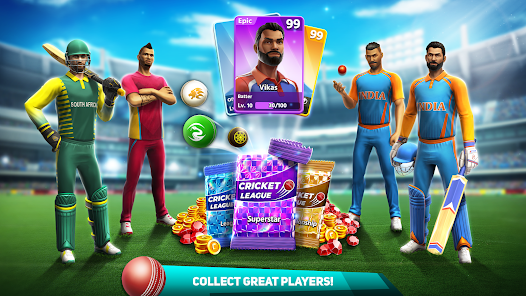
The game is built around short, snappy sessions that last only three to five minutes, making it easy to squeeze in a match whenever you have a spare moment. You can collect over 25 unique characters, level them up to unlock new abilities, and equip specialized balls to gain a competitive edge on the pitch. Bowling techniques like Doosra, Sling, and In/Out Swings add a layer of strategy to each delivery, while the straightforward controls mean anyone can pick up the basics in under a minute. Leagues, friend challenges, and coin rewards keep you motivated to build and refine your dream team over time.
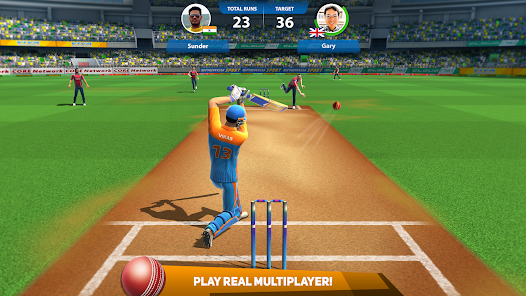
Playing Cricket League on PC through MuMuPlayer brings real advantages to a game that rewards precision and timing. The larger display makes it easier to read ball trajectories, time your shots accurately, and react to opponent strategies in real time. MuMuPlayer also provides stable network performance, which matters in a real-time multiplayer title that can run even on a 2G or 3G connection. Whether you are grinding through league matches or competing against friends, the PC environment gives you a comfortable and responsive setup that keeps you focused on winning.
About the Game
Cricket League puts you in the middle of a fully realized 3D cricket experience where every match demands quick thinking, good timing, and smart team management. Developed by Miniclip.com, the game is designed around a multiplayer-first philosophy, pairing you with opponents from across the globe in real time. Whether you are a cricket enthusiast or a complete newcomer to the sport, the game eases you into its mechanics fast while still offering enough depth to keep you engaged for the long haul.
At the heart of Cricket League is a match format built for modern mobile play. Each game spans just two overs, meaning a full contest wraps up in roughly three to five minutes. This compact structure does not sacrifice intensity. With only a handful of deliveries on each side, every run scored and every wicket taken carries serious weight. The pressure is real from the first ball, and that tension is a big part of what makes the format so compelling.
The game takes you to some of the most celebrated cricket venues on the planet. Locations span multiple continents, with pitches modeled after famous grounds in cities such as:
- Mumbai and Dhaka, representing South Asia
- Karachi and Dubai, covering the Middle East region
- Johannesburg, bringing South African flair to your schedule
- Adelaide and Melbourne, offering the Australian atmosphere
- London, rounding out the global tour with a classic English setting
New locations can be unlocked as you progress, and each venue adds fresh visual variety to your match experience.
Building a strong squad is central to long-term progress in Cricket League. The roster contains more than 25 collectible characters, each of which can be leveled up over time. Advancing a player's level does more than improve their stats; it opens up new gameplay options and strategies. On the bowling side, you can invest in specialized ball types that influence how your deliveries behave, giving you tools like Doosra, Sling deliveries, and both inward and outward swing variations. These options reward players who pay attention to their opponent's weaknesses and adapt accordingly.
Progression is fueled by coins earned through match victories. Winning consistently lets you reinvest those coins into your roster, purchase better equipment, and work toward assembling the team you have been building toward from the start. The league system gives this progression a clear competitive context, placing you against players at a similar skill level and pushing you to keep improving.
Social play is woven into the experience as well. You can invite friends and family to matches directly, making Cricket League a natural choice for anyone who enjoys friendly competition. The real-time multiplayer runs smoothly even under limited network conditions, with the developers optimizing performance to hold up on 2G and 3G connections.
For players who want to enjoy Cricket League on a larger screen with greater comfort, MuMuPlayer offers a straightforward way to run the game on PC. The keyboard and mouse setup can make batting and bowling inputs feel more deliberate, and the full display size gives you a better view of the pitch during fast-paced exchanges. MuMuPlayer handles the game's real-time demands reliably, so your matches stay smooth from the opening delivery to the final ball.
Emulator Features
Highest Android 15 Support Best Compatibility on Mac

With a smart button scheme and image recognition function, provide a more concise UI, and support custom button mapping to meet different needs. With a smart button scheme and image recognition, enjoy a cleaner UI and custom button mapping to fit different gaming needs on Mac.

Run multiple games independently at the same time, easily manage multiple accounts, play games while hanging. Take your Mac gaming further with multiple independent instances, easy account management, and seamless AFK gaming on Apple Silicon Mac.

Break through FPS limit, and enjoy a seamless gaming experience without lag and delay! Break through FPS limits for a seamless, lag-free gaming experience on MacBook, Mac mini, iMac, and Mac Studio.

Get a 3-second startup with 52% less memory usage and 65% more stability. Enjoy 3-second startup, 52% less memory usage, and 65% greater stability on Apple Silicon Mac.
How to Download and Play Cricket League on PC and Mac
Installation Guide
Download MuMuPlayer
Download MuMuPlayer and install it on your PC or Mac
Sign-in Google Store
Complete Google sign-in to access the Play Store
Search and Install
Search Cricket League in the Play Store
Enjoy Gaming
Enjoy 120 FPS high-def gameplay with big screen
System Requirements
Windows PC
Vulkan / DirectX supported. 4 cores + 4GB RAM recommended. Up to 240 FPS. VT required.
macOS
Recommended: Apple Silicon Mac with 8GB RAM or above. Up to 240 FPS.